Turn on suggestions
Auto-suggest helps you quickly narrow down your search results by suggesting possible matches as you type.
- Canon Community
- Discussions & Help
- Printer
- Printer Software & Networking
- Re: Print Studio Pro Not working after upgrade to ...
Options
- Subscribe to RSS Feed
- Mark Topic as New
- Mark Topic as Read
- Float this Topic for Current User
- Bookmark
- Subscribe
- Mute
- Printer Friendly Page

Options
- Mark as New
- Bookmark
- Subscribe
- Mute
- Subscribe to RSS Feed
- Permalink
- Report Inappropriate Content
01-27-2024 04:55 PM
I have an iMac M1 and MacBook Air M2 both recently upgraded to MacOS Ventura 14.2.1. I am using LrC 13.1 and Photoshop 2024 25.4.0
I can print to my Canon Pixma Pro-100 using the latest printer driver.
However Print Studio Pro does not work after installing the most recent released version from the Canon USA.
After installing Print Studio Pro I get the following error message.
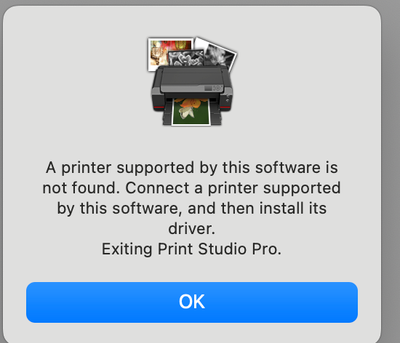
I have had similar problem with the Pro-100 PSP after MacOS upgrades in the past and Was able to find a version of PSP on the Canon UK website that worked under MacOS. I called Canon CPS and was informed that in general it may take some time until an upgraded version of PSP will be available.
I would appreciate any information about this problem and a solution that work. I can still print with my printer driver of the Pro-100 but it would be convenient to have the features built into PDP.
Thanks.
Solved! Go to Solution.
1 ACCEPTED SOLUTION
Accepted Solutions


Options
- Mark as New
- Bookmark
- Subscribe
- Mute
- Subscribe to RSS Feed
- Permalink
- Report Inappropriate Content
04-26-2024 06:45 AM - edited 04-26-2024 06:49 AM
PSP works for me with macOS 14.4.1. (With both LrC and Ps). Try re-installing the plugin. Also, I have found that it is always a good idea to reinstall the printer driver after a macOS update.
John Hoffman
Conway, NH
R6 Mark III, M200 (converted to infrared), RF lenses, Pixma PRO-100, Pixma TR8620a, Lr Classic
Conway, NH
R6 Mark III, M200 (converted to infrared), RF lenses, Pixma PRO-100, Pixma TR8620a, Lr Classic
3 REPLIES 3

Options
- Mark as New
- Bookmark
- Subscribe
- Mute
- Subscribe to RSS Feed
- Permalink
- Report Inappropriate Content
02-05-2024 06:05 PM
I am on OS Sonoma and having the same problem..
Options
- Mark as New
- Bookmark
- Subscribe
- Mute
- Subscribe to RSS Feed
- Permalink
- Report Inappropriate Content
04-26-2024 02:54 AM
since updating my mac OS to 14.4.1, I also cant access print studio pro. i have tried uninstalling, re installing and doing the same for lightroom classic. i keep getting an error that says "an error has occurred, exiting print studio pro" its driving me crazy. any thing to help please!!
Options
- Mark as New
- Bookmark
- Subscribe
- Mute
- Subscribe to RSS Feed
- Permalink
- Report Inappropriate Content
04-26-2024 06:45 AM - edited 04-26-2024 06:49 AM
PSP works for me with macOS 14.4.1. (With both LrC and Ps). Try re-installing the plugin. Also, I have found that it is always a good idea to reinstall the printer driver after a macOS update.
John Hoffman
Conway, NH
R6 Mark III, M200 (converted to infrared), RF lenses, Pixma PRO-100, Pixma TR8620a, Lr Classic
Conway, NH
R6 Mark III, M200 (converted to infrared), RF lenses, Pixma PRO-100, Pixma TR8620a, Lr Classic

Announcements
07/22/2026: New firmware updates are available.
EOS R6 Mark III - Version 1.1.0
05/13/2026: New firmware updates are available.
EOS R5 Mark II - Version 1.3.0
EOS R6 Mark II - Version 1.7.0
04/28/2026: Service Notice: Caution Concerning use of Lithium Batteries
03/17/2026: New firmware updates are available.
SELPHY CP1500 - Version 1.0.7.0
02/23/2026: New firmware update is available for EOS C50- Version 1.0.3.1
01/23/2026: New firmware update is available for RF 24-105mm F4 IS USM- Version 2.0.7
01/20/2026: New firmware updates are available.
10/21/2025: Service Notice: To Users of the Compact Digital Camera PowerShot V1
10/15/2025: New firmware updates are available.
Speedlite EL-5 - Version 1.2.0
Speedlite EL-1 - Version 1.1.0
Speedlite Transmitter ST-E10 - Version 1.2.0
07/28/2025: Notice of Free Repair Service for the Mirrorless Camera EOS R50 (Black)
05/21/2025: New firmware update available for EOS C500 Mark II - Version 1.1.5.1
Related Content
- CanoScan LiDE 300 "You do not have the required privileges to access the specified folder" in Scanners
- imageCLASS MF733Cdw Airprint issue - Windows 11 in Office Printers
- Canon Plotwave 3000 unable to receive print on Port 9100 in Production Printing
- CanoScan LiDE 400 stuck on "Scanning" (VueScan says Transport Lock is on, but it's not) in Scanners
- imageCLASS MF751Cdw II, unable to scan, communication error in Office Printers

Ⓒ 2026
Canon U.S.A Inc. All Rights Reserved. Reproduction in whole or part without permission is prohibited.
