Turn on suggestions
Auto-suggest helps you quickly narrow down your search results by suggesting possible matches as you type.
- Canon Community
- Discussions & Help
- Printer
- Printer Software & Networking
- Re: Error 3446
Options
- Subscribe to RSS Feed
- Mark Topic as New
- Mark Topic as Read
- Float this Topic for Current User
- Bookmark
- Subscribe
- Mute
- Printer Friendly Page

Options
- Mark as New
- Bookmark
- Subscribe
- Mute
- Subscribe to RSS Feed
- Permalink
- Report Inappropriate Content
12-15-2018 04:35 AM
Hello.
I am trying to connect my printer ts6020 to my wifi and I get error 3446 which stops wireless LAN operation. The router is ea6900 of Linksys and operating system is windows 10.
Is there something wrong with my new printer? Or router configuration?
Message recommends that I disable Wireless Direct or change wireless Lan network configuration, I don't know how.
Thanks for your help.
I am trying to connect my printer ts6020 to my wifi and I get error 3446 which stops wireless LAN operation. The router is ea6900 of Linksys and operating system is windows 10.
Is there something wrong with my new printer? Or router configuration?
Message recommends that I disable Wireless Direct or change wireless Lan network configuration, I don't know how.
Thanks for your help.
Solved! Go to Solution.
2 ACCEPTED SOLUTIONS
Accepted Solutions


Options
- Mark as New
- Bookmark
- Subscribe
- Mute
- Subscribe to RSS Feed
- Permalink
- Report Inappropriate Content
12-17-2018 08:49 AM
Hi Rislo,
Please follow the steps below to disable the wireless direct setting:
- Make sure printer is turned on.
Select
.jpg) Setup on the HOME screen.
Setup on the HOME screen.Select
 Settings.
Select
 Device settings.
Select LAN settings.
Select Wireless Direct.
Select Wireless Direct active/inactive.
Select OFF
Did this answer your question? Please click the Accept as Solution button so that others may find the answer as well.
Options
- Mark as New
- Bookmark
- Subscribe
- Mute
- Subscribe to RSS Feed
- Permalink
- Report Inappropriate Content
12-17-2018 08:51 AM
4 REPLIES 4


Options
- Mark as New
- Bookmark
- Subscribe
- Mute
- Subscribe to RSS Feed
- Permalink
- Report Inappropriate Content
12-15-2018 10:05 AM
3446
Cause
IP address and subnet mask are conflicting.
What to Do
Select OK on the printer's touch screen.
Disable the wireless direct or change the wireless LAN network configuration. When changing the network configuration, specify a unique subnet range for each of the wireless direct and the wireless LAN to prevent a conflict.
For details on changing the network configuration, refer to the documentation for your wireless LAN router.
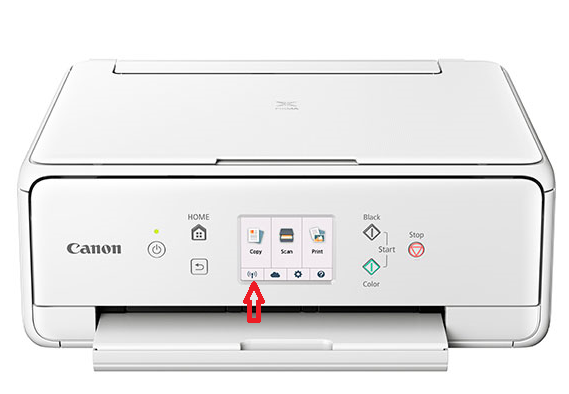
Press this button. What does it say? Are you connected to your wireless network? If not are you able to select the SSID name and enter your password? Keep in mind the printer only supports 2.4Ghz broadcast so thats the network you'll need to connect to.
There is nothing magic about Wireless Direct Printing, so I'd disable it. You can print from any device, mobile, laptop or desktop connected to the same wireless network anyway.
Please post your progress.
~Rick
Bay Area - CA
~R5 C (1.1.3.1), ~RF Trinity, ~RF 100 Macro, ~RF 100~400, ~RF 100~500, ~RF 200-800, ~RF 1.4x TC, BG-R10, 430EX III-RT ~DxO PhotoLab Elite ~DaVinci Resolve Studio ~ImageClass MF644Cdw MF656Cdw ~Pixel 10 ~CarePaks Are Worth It
Options
- Mark as New
- Bookmark
- Subscribe
- Mute
- Subscribe to RSS Feed
- Permalink
- Report Inappropriate Content
12-15-2018 12:52 PM
Thank you. What is the procedure to disable wireless direct printing?
Options
- Mark as New
- Bookmark
- Subscribe
- Mute
- Subscribe to RSS Feed
- Permalink
- Report Inappropriate Content
12-17-2018 08:49 AM
Hi Rislo,
Please follow the steps below to disable the wireless direct setting:
- Make sure printer is turned on.
Select
Setup on the HOME screen.Select
Settings.Select
Device settings.Select LAN settings.
Select Wireless Direct.
Select Wireless Direct active/inactive.
Select OFF
Did this answer your question? Please click the Accept as Solution button so that others may find the answer as well.
Options
- Mark as New
- Bookmark
- Subscribe
- Mute
- Subscribe to RSS Feed
- Permalink
- Report Inappropriate Content
12-17-2018 08:51 AM
Thank you! It worked.


Announcements
07/22/2026: New firmware updates are available.
EOS R6 Mark III - Version 1.1.0
05/13/2026: New firmware updates are available.
EOS R5 Mark II - Version 1.3.0
EOS R6 Mark II - Version 1.7.0
04/28/2026: Service Notice: Caution Concerning use of Lithium Batteries
03/17/2026: New firmware updates are available.
SELPHY CP1500 - Version 1.0.7.0
02/23/2026: New firmware update is available for EOS C50- Version 1.0.3.1
01/23/2026: New firmware update is available for RF 24-105mm F4 IS USM- Version 2.0.7
01/20/2026: New firmware updates are available.
10/21/2025: Service Notice: To Users of the Compact Digital Camera PowerShot V1
10/15/2025: New firmware updates are available.
Speedlite EL-5 - Version 1.2.0
Speedlite EL-1 - Version 1.1.0
Speedlite Transmitter ST-E10 - Version 1.2.0
07/28/2025: Notice of Free Repair Service for the Mirrorless Camera EOS R50 (Black)
05/21/2025: New firmware update available for EOS C500 Mark II - Version 1.1.5.1
Related Content
- PIXMA G7020 5200 errror in Desktop Inkjet Printers
- imageCLASS MFC743Cdw - No scan, no print, not working and can't reach Canon support after months. in Office Printers
- PIXMA TR8620a, printer offline error in Printer Software & Networking
- G7020 not filling ink in Desktop Inkjet Printers
- PIXMA TS3122 Connection Failed, error E36 in Printer Software & Networking

Ⓒ 2026
Canon U.S.A Inc. All Rights Reserved. Reproduction in whole or part without permission is prohibited.
