- Meet Our Illuminaries
- Discussions & Help
- Printer
- Desktop Inkjet Printers
- Printer Software & Networking
- Office Printers
- Professional Photo Printers
- Mobile & Compact Printers
- Scanners
- Production Printing
- Desktop Inkjet Printers
- Printer Software & Networking
- Office Printers
- Professional Photo Printers
- Mobile & Compact Printers
- Scanners
- Production Printing
- Camera
- EOS Webcam Utility Pro
- Video
- General Discussion
- Gear Guide
- Printer
- Desktop Inkjet Printers
- Printer Software & Networking
- Office Printers
- Professional Photo Printers
- Mobile & Compact Printers
- Scanners
- Production Printing
- Desktop Inkjet Printers
- Printer Software & Networking
- Office Printers
- Professional Photo Printers
- Mobile & Compact Printers
- Scanners
- Production Printing
- Camera
- EOS Webcam Utility Pro
- Video
- General Discussion
- Gear Guide
- Printer
- Gallery
- Learn With Canon
- About Our Community
- Meet Our Illuminaries
- Discussions & Help
- Printer
- Desktop Inkjet Printers
- Printer Software & Networking
- Office Printers
- Professional Photo Printers
- Mobile & Compact Printers
- Scanners
- Production Printing
- Desktop Inkjet Printers
- Printer Software & Networking
- Office Printers
- Professional Photo Printers
- Mobile & Compact Printers
- Scanners
- Production Printing
- Camera
- EOS Webcam Utility Pro
- Video
- General Discussion
- Gear Guide
- Printer
- Desktop Inkjet Printers
- Printer Software & Networking
- Office Printers
- Professional Photo Printers
- Mobile & Compact Printers
- Scanners
- Production Printing
- Desktop Inkjet Printers
- Printer Software & Networking
- Office Printers
- Professional Photo Printers
- Mobile & Compact Printers
- Scanners
- Production Printing
- Camera
- EOS Webcam Utility Pro
- Video
- General Discussion
- Gear Guide
- Printer
- Gallery
- Learn With Canon
- About Our Community
Turn on suggestions
Auto-suggest helps you quickly narrow down your search results by suggesting possible matches as you type.
- Canon Community
- Discussions & Help
- Printer
- Desktop Inkjet Printers
- OS not supported...
Options
- Subscribe to RSS Feed
- Mark Topic as New
- Mark Topic as Read
- Float this Topic for Current User
- Bookmark
- Subscribe
- Mute
- Printer Friendly Page

Options
- Mark as New
- Bookmark
- Subscribe
- Mute
- Subscribe to RSS Feed
- Permalink
- Report Inappropriate Content
07-06-2019 11:43 AM
I have a Pixma MG 5420 printer. It is 5 years old. I have used it on my Mac desktop(2009) since I purchased it. Printer and computer have been compatible until yesterday. Now suddenly my printer is offline. I tried several things but ended up reseting my printer, which of course deleted the printer from my computer. When I tried to reinstall the printer drivers I get a message that my OS is not supported and the drivers will not install. What the world is going on?
Solved! Go to Solution.
1 ACCEPTED SOLUTION
Accepted Solutions

Options
- Mark as New
- Bookmark
- Subscribe
- Mute
- Subscribe to RSS Feed
- Permalink
- Report Inappropriate Content
07-08-2019 10:06 AM
@Grama_Sue6 wrote:Rick,
Just want to say THANK YOU for the help. I had gone online to the Canon website and tried to download the drivers, but obviously I was not in the right spot. I did just what you said and now my printer is back up and running!!!
Again, Thank you kindly!
Grama_Sue6
Glad it worked out. 
~Rick
Bay Area - CA
~R5 C (1.1.2.1), ~R50v (1.1.1) ~RF Trinity, ~RF 100 Macro, ~RF 100~400, ~RF 100~500, ~RF 200-800 +RF 1.4x TC, BG-R10, 430EX III-RT ~DxO PhotoLab Elite ~DaVinci Resolve Studio ~ImageClass MF644Cdw/MF656Cdw ~Pixel 8 ~CarePaks Are Worth It
5 REPLIES 5

Options
- Mark as New
- Bookmark
- Subscribe
- Mute
- Subscribe to RSS Feed
- Permalink
- Report Inappropriate Content
07-07-2019 11:17 AM
@Grama_Sue6 wrote:I have a Pixma MG 5420 printer. It is 5 years old. .... What the world is going on?
Visit this page
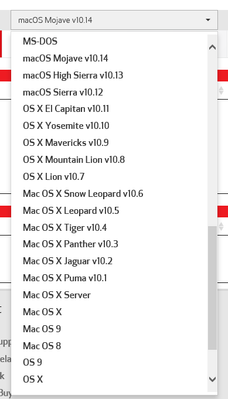
Select your version of OSX from the download's dropdown. Download the compatible drivers for your MAC OS.
A word of advice. I suggest you remove the printer from System Preferences > Printer and Scanners and uninstall any previous Canon Drivers before installing new drivers for your printer.
~Rick
Bay Area - CA
~R5 C (1.1.2.1), ~R50v (1.1.1) ~RF Trinity, ~RF 100 Macro, ~RF 100~400, ~RF 100~500, ~RF 200-800 +RF 1.4x TC, BG-R10, 430EX III-RT ~DxO PhotoLab Elite ~DaVinci Resolve Studio ~ImageClass MF644Cdw/MF656Cdw ~Pixel 8 ~CarePaks Are Worth It
Options
- Mark as New
- Bookmark
- Subscribe
- Mute
- Subscribe to RSS Feed
- Permalink
- Report Inappropriate Content
07-07-2019 11:05 PM
Rick,
Just want to say THANK YOU for the help. I had gone online to the Canon website and tried to download the drivers, but obviously I was not in the right spot. I did just what you said and now my printer is back up and running!!!
Again, Thank you kindly!
Grama_Sue6
Options
- Mark as New
- Bookmark
- Subscribe
- Mute
- Subscribe to RSS Feed
- Permalink
- Report Inappropriate Content
07-07-2019 11:07 PM
Rick,
Just want to say THANK YOU for the help. I had gone online to the Canon website and tried to download the drivers, but obviously I was not in the right spot. I did just what you said and now my printer is back up and running!!!
Again, Thank you kindly!
Grama_Sue6
Options
- Mark as New
- Bookmark
- Subscribe
- Mute
- Subscribe to RSS Feed
- Permalink
- Report Inappropriate Content
07-08-2019 10:06 AM
@Grama_Sue6 wrote:Rick,
Just want to say THANK YOU for the help. I had gone online to the Canon website and tried to download the drivers, but obviously I was not in the right spot. I did just what you said and now my printer is back up and running!!!
Again, Thank you kindly!
Grama_Sue6
Glad it worked out.
~Rick
Bay Area - CA
~R5 C (1.1.2.1), ~R50v (1.1.1) ~RF Trinity, ~RF 100 Macro, ~RF 100~400, ~RF 100~500, ~RF 200-800 +RF 1.4x TC, BG-R10, 430EX III-RT ~DxO PhotoLab Elite ~DaVinci Resolve Studio ~ImageClass MF644Cdw/MF656Cdw ~Pixel 8 ~CarePaks Are Worth It

Options
- Mark as New
- Bookmark
- Subscribe
- Mute
- Subscribe to RSS Feed
- Permalink
- Report Inappropriate Content
10-05-2020 08:56 PM
I know it's a long time since your post, but I'm having the same problem. I just bought a pixma TS6320 on craigslist. I have a macbook pro 2014 with OSX Yosemite 10.10 and when I try to download the driver I get the error message that my operating system is not supported. I was able to connect the printer to my computer wirelessly and on system preferences. Do I need to download the printer driver for it to work? And if so how do I make that happen?
Thanks so much in advance for any help you can give me.

Announcements
12/22/2025: New firmware update is available for EOS R6 Mark III- Version 1.0.2
12/15/2025: New firmware update available for EOS C50 - Version 1.0.1.1
10/21/2025: Service Notice: To Users of the Compact Digital Camera PowerShot V1
07/28/2025: Notice of Free Repair Service for the Mirrorless Camera EOS R50 (Black)
05/21/2025: New firmware update available for EOS C500 Mark II - Version 1.1.5.1
12/18/2025: New firmware updates are available.
12/15/2025: New firmware update available for EOS C50 - Version 1.0.1.1
11/20/2025: New firmware updates are available.
EOS R5 Mark II - Version 1.2.0
PowerShot G7 X Mark III - Version 1.4.0
PowerShot SX740 HS - Version 1.0.2
10/21/2025: Service Notice: To Users of the Compact Digital Camera PowerShot V1
10/15/2025: New firmware updates are available.
Speedlite EL-5 - Version 1.2.0
Speedlite EL-1 - Version 1.1.0
Speedlite Transmitter ST-E10 - Version 1.2.0
07/28/2025: Notice of Free Repair Service for the Mirrorless Camera EOS R50 (Black)
7/17/2025: New firmware updates are available.
05/21/2025: New firmware update available for EOS C500 Mark II - Version 1.1.5.1
02/20/2025: New firmware updates are available.
RF70-200mm F2.8 L IS USM Z - Version 1.0.6
RF24-105mm F2.8 L IS USM Z - Version 1.0.9
RF100-300mm F2.8 L IS USM - Version 1.0.8
Related Content
- imageCLASS MF663Cdw Driver is "not supported by the computer" in Printer Software & Networking
- MF269dw II stuck in Download Mode, Canon support has so far proven useless. Please help. in Office Printers
- PIXMA TS9521Ca Supported paper weights? in Desktop Inkjet Printers
- Windows 11 doesn't see imageFORMULA DR-7550C in Scanners
- Customer support issue. TS3522 printer cartridges. in Desktop Inkjet Printers

Ⓒ 2026
Canon U.S.A Inc. All Rights Reserved. Reproduction in whole or part without permission is prohibited.
