Turn on suggestions
Auto-suggest helps you quickly narrow down your search results by suggesting possible matches as you type.
- Canon Community
- Discussions & Help
- Camera
- Point & Shoot Digital Cameras
- Update Firmware on Powershot V1 with a blank scree...
Options
- Subscribe to RSS Feed
- Mark Topic as New
- Mark Topic as Read
- Float this Topic for Current User
- Bookmark
- Subscribe
- Mute
- Printer Friendly Page
Update Firmware on Powershot V1 with a blank screen?

Options
- Mark as New
- Bookmark
- Subscribe
- Mute
- Subscribe to RSS Feed
- Permalink
- Report Inappropriate Content
05-18-2026 04:15 PM
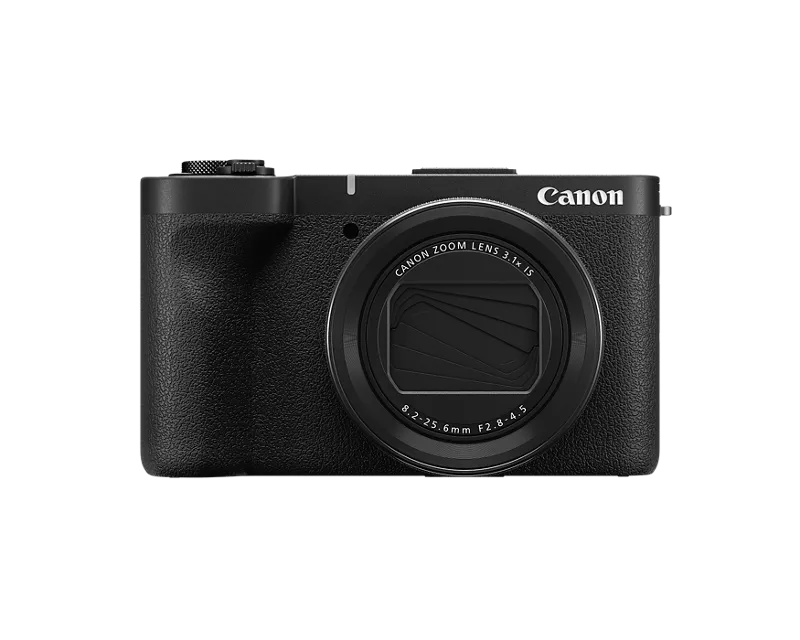
I have a Canon Powershot V1 that I've only used a few times. Today I got it out to record some video and turned it on while I was setting up a few things. I noticed the screen started to dim but assumed it was a time out issue.
I googled the problem and saw someone on reddit talking about a firmware update to address the issue.
I downloaded the update, transferred it to my SD card and put the SD card back into my camera. The problem is, the screen is still blank, therefore I cannot use the Menu to install the firmware.
Is there any way to fix my screen problem?
Thanks in advance.
7 REPLIES 7


Options
- Mark as New
- Bookmark
- Subscribe
- Mute
- Subscribe to RSS Feed
- Permalink
- Report Inappropriate Content
05-18-2026 05:31 PM - edited 05-18-2026 05:32 PM
Are you sure the battery is fully charged and functional?
If so, then you could try pulling the battery pack and let the camera sit several hours. Then reinstall battery and power up and if the screen comes on then immediately start the update process.
But this is likely going to be a Canon service issue because I would be surprised to see a "glitch" due to firmware suddenly become a permanent issue long after the camera was sold.
Rodger
EOS 1DX M3, 1DX M2, 1DX, 5DS R, M6 Mark II, 1D M2, EOS 650 (film), many lenses, XF400 video

Options
- Mark as New
- Bookmark
- Subscribe
- Mute
- Subscribe to RSS Feed
- Permalink
- Report Inappropriate Content
05-18-2026 07:43 PM
Greetings,
I would attempt to confirm and / or resolve the screen issue before attempting to upgrade your firmware.
It is never wise to upgrade or attempt to upgrade your firmware when your camera is malfunctioning or exhibiting unexpected or abnormal behavior.
~Rick
Bay Area - CA
~R5 C (1.1.3.1), ~RF Trinity, ~RF 100 Macro, ~RF 100~400, ~RF 100~500, ~RF 200-800, ~RF 1.4x TC, BG-R10, 430EX III-RT ~DxO PhotoLab Elite ~DaVinci Resolve Studio ~ImageClass MF644Cdw MF656Cdw ~Pixel 10 ~CarePaks Are Worth It
Options
- Mark as New
- Bookmark
- Subscribe
- Mute
- Subscribe to RSS Feed
- Permalink
- Report Inappropriate Content
05-18-2026 11:15 PM
Ok, then how do I fix the screen issue. Please refer to the info I provided in my original post.

Options
- Mark as New
- Bookmark
- Subscribe
- Mute
- Subscribe to RSS Feed
- Permalink
- Report Inappropriate Content
05-19-2026 08:21 AM
You can try to attach a monitor/TV with the HDMI terminal.
Options
- Mark as New
- Bookmark
- Subscribe
- Mute
- Subscribe to RSS Feed
- Permalink
- Report Inappropriate Content
06-05-2026 08:28 PM
Just wanted to give an update.
My V1 does turn back on with the screen working after a few days. However, if I let the screen fade out again, the problem returns. With the screen off, I can still take photos, I just can't see what I'm taking photos of.
So I decided to send it to the Canon Factory Service center.
They have quoted me an estimate of $434 without even looking at it. They say they must receive payment before even looking at it. They are going to just automatically replace the screen because I said it's not working. But of course, I have no idea if the screen needs to be replaced, if there is a software issue, or if I have it on some setting that I can't figure out how to reverse.
I picked this V1 up 2 days after it launched. Life got in the way of me using it too much. And then one month after the warranty was up, this problem arises. Pretty disappointed in Canon at the moment.
Options
- Mark as New
- Bookmark
- Subscribe
- Mute
- Subscribe to RSS Feed
- Permalink
- Report Inappropriate Content
06-05-2026 08:54 PM - edited 06-05-2026 08:56 PM
Greetings,
As far as timing goes, I'm sorry your camera appears to have failed a month out of warranty.
It's reasonable to assume that Canon has performed a cursory diagnostics on your camera. This would include them plugging it into a reader that performs a diagnostics on the hardware. It might be worth while to contact customer service if you are literally weeks out of warranty, and see if they can help. You can also ask for slight reduction in the repair cost. Answer might be a no, but won't hurt to ask.
Also, I'm quite sure your issue is not related to firmware. As I said previously, it's never a good idea to attempt or upgrade firmware on a camera that's malfunctioning or exhibiting unexpected behavior.
~Rick
Bay Area - CA
~R5 C (1.1.3.1), ~RF Trinity, ~RF 100 Macro, ~RF 100~400, ~RF 100~500, ~RF 200-800, ~RF 1.4x TC, BG-R10, 430EX III-RT ~DxO PhotoLab Elite ~DaVinci Resolve Studio ~ImageClass MF644Cdw MF656Cdw ~Pixel 10 ~CarePaks Are Worth It
Options
- Mark as New
- Bookmark
- Subscribe
- Mute
- Subscribe to RSS Feed
- Permalink
- Report Inappropriate Content
06-13-2026 04:39 PM
Final update: Canon Factory Service did tell me they did an initial assessment but wouldn't tell me what the assessment was. Additionally, if I were to agree to pay for the repair, I would be agreeing to: a repair on the camera I sent *or* a refurbished model. But they wouldn't tell me in advance which option it would be in my case.
I opted to refuse the service since they could not simply tell me what was going on. If I take my car to the mechanic, I'm not paying for repairs if they can't be specific.
I received my camera back today. There were new scuff marks on it that weren't there before. The camera now has a new problem: I gently set it down while waiting for the screen to fade to replicate the original problem. It froze upon being put down. I had to take the battery out to get it to even turn off and then back on.
I used a Canon film camera in college for my photography classes and photojournalism internship. I have a Canon printer that does amazing prints. So I'm very disappointed in this outcome. The only way I could imagine buying a Canon product again is if they issue a software update in the future to fix this problem, if that's even an option. But if it truly was a physical issue, I'll never know - because Canon won't tell me.

Announcements
07/22/2026: New firmware updates are available.
EOS R6 Mark III - Version 1.1.0
05/13/2026: New firmware updates are available.
EOS R5 Mark II - Version 1.3.0
EOS R6 Mark II - Version 1.7.0
04/28/2026: Service Notice: Caution Concerning use of Lithium Batteries
03/17/2026: New firmware updates are available.
SELPHY CP1500 - Version 1.0.7.0
02/23/2026: New firmware update is available for EOS C50- Version 1.0.3.1
01/23/2026: New firmware update is available for RF 24-105mm F4 IS USM- Version 2.0.7
01/20/2026: New firmware updates are available.
10/21/2025: Service Notice: To Users of the Compact Digital Camera PowerShot V1
10/15/2025: New firmware updates are available.
Speedlite EL-5 - Version 1.2.0
Speedlite EL-1 - Version 1.1.0
Speedlite Transmitter ST-E10 - Version 1.2.0
07/28/2025: Notice of Free Repair Service for the Mirrorless Camera EOS R50 (Black)
05/21/2025: New firmware update available for EOS C500 Mark II - Version 1.1.5.1
Related Content
- EOS Canon R6 mkIII Image write failure in EOS DSLR & Mirrorless Cameras
- PLEASE HELP!!! PowerShot ELPH 300 HS turns itself on and glitching in Point & Shoot Digital Cameras
- EOS R5 Mark II firmware won't update in EOS DSLR & Mirrorless Cameras
- Color vertical linea in visor R8 in EOS DSLR & Mirrorless Cameras
- PowerShot A590 LCD screen not working right in Point & Shoot Digital Cameras

Ⓒ 2026
Canon U.S.A Inc. All Rights Reserved. Reproduction in whole or part without permission is prohibited.
