- Meet Our Illuminaries
- Discussions & Help
- Gallery
- Learn With Canon
- About Our Community
- Meet Our Illuminaries
- Discussions & Help
- Gallery
- Learn With Canon
- About Our Community
Turn on suggestions
Auto-suggest helps you quickly narrow down your search results by suggesting possible matches as you type.
- Canon Community
- Discussions & Help
- Camera
- Point & Shoot Digital Cameras
- PowerShot SX200 IS Memory card error
Options
- Subscribe to RSS Feed
- Mark Topic as New
- Mark Topic as Read
- Float this Topic for Current User
- Bookmark
- Subscribe
- Mute
- Printer Friendly Page
PowerShot SX200 IS Memory card error

Options
- Mark as New
- Bookmark
- Subscribe
- Mute
- Subscribe to RSS Feed
- Permalink
- Report Inappropriate Content
05-12-2013
08:07 PM
- last edited on
12-02-2022
08:48 AM
by
 Danny
Danny
Out of nowhere, I came up with a memory card error on my canon power shot sx 200 is. Any suggestions on how to correct the problem?
36 REPLIES 36

Options
- Mark as New
- Bookmark
- Subscribe
- Mute
- Subscribe to RSS Feed
- Permalink
- Report Inappropriate Content
05-01-2017 04:53 PM
Hi Cvgibson,
Thanks for posting.
Please double-check the camera model you're using and let us know which one it is.
- Which memory cards are you attempting to use in your camera?
- Have you been able to use these memory cards, with this camera, in the past?
Did this answer your question? Please click the Accept as Solution button so that others may find the answer as well.
Options
- Mark as New
- Bookmark
- Subscribe
- Mute
- Subscribe to RSS Feed
- Permalink
- Report Inappropriate Content
05-01-2017 04:58 PM
Hi Xtremeleafan,
Thank you for posting.
If you've used this card for a while and if it's been a while since you formatted the card, some of your images may have become corrupt. To resolve this, I recommend saving all images and movies to your computer, then formatting the memory card, in the camera and using the low-level option. Here's how:
1. Press the <Power> button on the camera.
2. Press the <MENU> ( ) button.
) button.
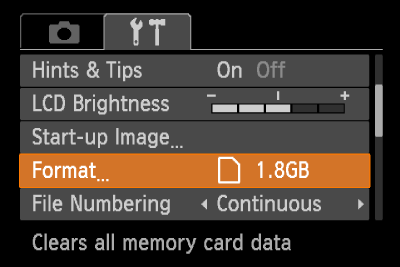
3. The following screen appears on the LCD monitor.
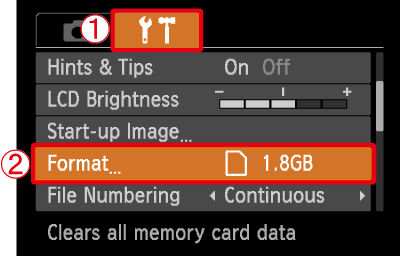
Operate the <directional buttons> left or right to select  the [Set up] (
 ) tab.
the [Set up] () tab.Operate the <directional buttons> up or down to select  [Format].
[Format].After making a selection, press the <FUNC./SET> ( ) button.
) button.
4. The following screen appears.
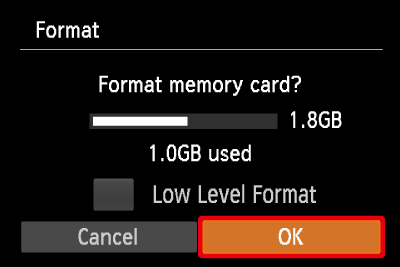
Operate the <directional buttons> left or right to select [OK].
After making a selection, press the <FUNC./SET> () button.
) button.NOTE
- We recommend that you perform low level formatting when you think that the recording/reading speed of a memory card has dropped, and when you want to erase data completely.
- When performing low level formatting, select [Low Level Format], and then operate the <directional buttons> left or right to display the (
) mark.
- Low level formatting may take longer than standard formatting, since all recorded data are erased.
5. The following screen appears.
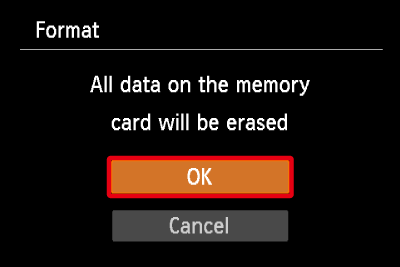
Operate the <directional buttons> up or down to select [OK].
After making a selection, press the <FUNC./SET> () button.
) button.
6. The following screen appears, and then the memory card is formatted (initialized).
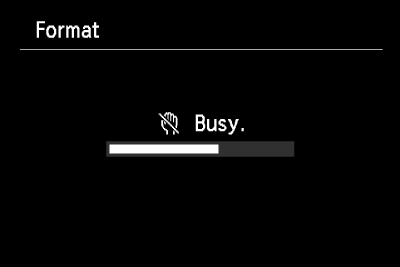
7. The following screen appears.
Press the <FUNC./SET> () button.
) button.
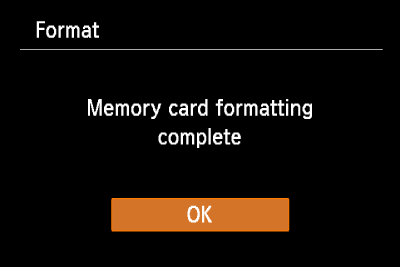
8. When formatting is completed, the following screen appears on the LCD monitor.
Did this answer your question? Please click the Accept as Solution button so that others may find the answer as well.

Options
- Mark as New
- Bookmark
- Subscribe
- Mute
- Subscribe to RSS Feed
- Permalink
- Report Inappropriate Content
05-01-2017 10:58 PM
Thank you for your advice. I have formatted before,but never a low level one. I will try that....
Options
- Mark as New
- Bookmark
- Subscribe
- Mute
- Subscribe to RSS Feed
- Permalink
- Report Inappropriate Content
06-13-2017 12:41 AM
I have experienced the same Memory Card error on the Canon Powershot A520 when I put in the SanDisk 8 GB Memory Card in the camera today. What should I do to correct this? Thanks.
Options
- Mark as New
- Bookmark
- Subscribe
- Mute
- Subscribe to RSS Feed
- Permalink
- Report Inappropriate Content
10-28-2018 01:26 AM
My error comes up w/power on. The menu has the format option grayed out(so unavailable) but these cards can be formatted on other devices. I see that this is a very common problem. So if we are able to eliminate the card as the prob, then what is the 2nd most likely issue within the camera? Thanks.


Options
- Mark as New
- Bookmark
- Subscribe
- Mute
- Subscribe to RSS Feed
- Permalink
- Report Inappropriate Content
10-30-2018 05:17 PM
@Tee-time1 wrote:My error comes up w/power on. The menu has the format option grayed out(so unavailable) but these cards can be formatted on other devices....Thanks.
If you format the card in a laptop or desktop, make sure you also format it again in the camera in which it will be used. Provided that the camera will allow you to do so. Also set the clock and calendar while you're in the set-up menus.
Options
- Mark as New
- Bookmark
- Subscribe
- Mute
- Subscribe to RSS Feed
- Permalink
- Report Inappropriate Content
03-25-2019 11:31 PM - edited 04-04-2019 03:11 AM
This is really annoying. Have you locked your SD adapter? Or running CDM on a PC can help you fix SD problems. The ultimate solution for SD card repair is to format it. If you have to do it, be sure to back up your SD card.

- « Previous
- Next »
- « Previous
- Next »
Announcements
07/22/2026: New firmware updates are available.
EOS R6 Mark III - Version 1.1.0
05/13/2026: New firmware updates are available.
EOS R5 Mark II - Version 1.3.0
EOS R6 Mark II - Version 1.7.0
04/28/2026: Service Notice: Caution Concerning use of Lithium Batteries
03/17/2026: New firmware updates are available.
SELPHY CP1500 - Version 1.0.7.0
02/23/2026: New firmware update is available for EOS C50- Version 1.0.3.1
01/23/2026: New firmware update is available for RF 24-105mm F4 IS USM- Version 2.0.7
01/20/2026: New firmware updates are available.
10/21/2025: Service Notice: To Users of the Compact Digital Camera PowerShot V1
10/15/2025: New firmware updates are available.
Speedlite EL-5 - Version 1.2.0
Speedlite EL-1 - Version 1.1.0
Speedlite Transmitter ST-E10 - Version 1.2.0
07/28/2025: Notice of Free Repair Service for the Mirrorless Camera EOS R50 (Black)
05/21/2025: New firmware update available for EOS C500 Mark II - Version 1.1.5.1
Related Content
- Dropped my canon powershot elph360 A in Point & Shoot Digital Cameras
- Canon 24-70mm F2.8 II stopped focusing in EF & RF Lenses
- EOS M10 "Memory Card Error" & Corrupted Files – Found a Bent Pin in the SD Slot. in EOS DSLR & Mirrorless Cameras
- Error 60 Powershot SX70HS in Point & Shoot Digital Cameras
- Canon EDSDK decoding Evf Memory Stream data C++ (not working) vs Python (working) in Camera Software

Ⓒ 2026
Canon U.S.A Inc. All Rights Reserved. Reproduction in whole or part without permission is prohibited.
