Turn on suggestions
Auto-suggest helps you quickly narrow down your search results by suggesting possible matches as you type.
- Canon Community
- Discussions & Help
- Camera
- Point & Shoot Digital Cameras
- IXUS Overexposed images
Options
- Subscribe to RSS Feed
- Mark Topic as New
- Mark Topic as Read
- Float this Topic for Current User
- Bookmark
- Subscribe
- Mute
- Printer Friendly Page
IXUS Overexposed images

Options
- Mark as New
- Bookmark
- Subscribe
- Mute
- Subscribe to RSS Feed
- Permalink
- Report Inappropriate Content
12-17-2022
03:28 AM
- last edited on
12-17-2022
08:23 AM
by
 Danny
Danny
I recently was cleaning my cabinet when I found my old Cannon IXUS camera. I decided to take a photo with it at first when I was shooting the photo nothing was wrong but when I check the image it was overexposed. The image was very bright, whatever picture I took was all white I tried to rest the settings to default I even tried to decrease the brightness to the lowest but nothing working still the same result. Cannon community can I please get some help?
5 REPLIES 5


Options
- Mark as New
- Bookmark
- Subscribe
- Mute
- Subscribe to RSS Feed
- Permalink
- Report Inappropriate Content
12-17-2022 07:02 AM
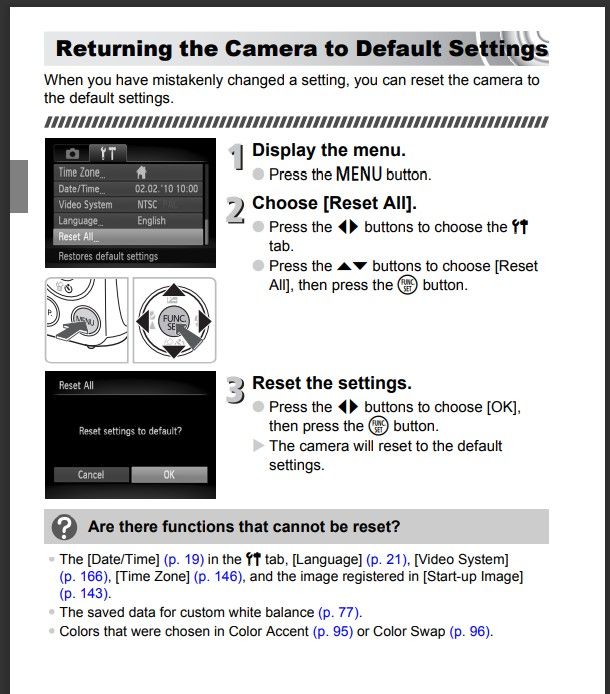
There are many versions of the IXUS model line, but here is a screenshot of a typical model.
Look for a menu page on the camera similar to this and reset camera settings to factory values to see if that helps.
John Hoffman
Conway, NH
R6 Mark III, M200 (converted to infrared), RF lenses, Pixma PRO-100, Pixma TR8620a, Lr Classic
Conway, NH
R6 Mark III, M200 (converted to infrared), RF lenses, Pixma PRO-100, Pixma TR8620a, Lr Classic
Options
- Mark as New
- Bookmark
- Subscribe
- Mute
- Subscribe to RSS Feed
- Permalink
- Report Inappropriate Content
07-09-2026 03:18 AM
i have the same problem as of just now and sadly this didn’t work, for me it’s all images that are more zoomed in

Options
- Mark as New
- Bookmark
- Subscribe
- Mute
- Subscribe to RSS Feed
- Permalink
- Report Inappropriate Content
07-09-2026 07:52 AM
Sounds like a lens problem. It is probably time to retire it.
Options
- Mark as New
- Bookmark
- Subscribe
- Mute
- Subscribe to RSS Feed
- Permalink
- Report Inappropriate Content
07-09-2026 10:44 AM
probably 😞 but i love that camera
Options
- Mark as New
- Bookmark
- Subscribe
- Mute
- Subscribe to RSS Feed
- Permalink
- Report Inappropriate Content
07-09-2026 04:07 PM
This is an almost 4 year old thread.
You should start your own thread detailing exactly what your problem is.
John Hoffman
Conway, NH
R6 Mark III, M200 (converted to infrared), RF lenses, Pixma PRO-100, Pixma TR8620a, Lr Classic
Conway, NH
R6 Mark III, M200 (converted to infrared), RF lenses, Pixma PRO-100, Pixma TR8620a, Lr Classic

Announcements
07/22/2026: New firmware updates are available.
EOS R6 Mark III - Version 1.1.0
05/13/2026: New firmware updates are available.
EOS R5 Mark II - Version 1.3.0
EOS R6 Mark II - Version 1.7.0
04/28/2026: Service Notice: Caution Concerning use of Lithium Batteries
03/17/2026: New firmware updates are available.
SELPHY CP1500 - Version 1.0.7.0
02/23/2026: New firmware update is available for EOS C50- Version 1.0.3.1
01/23/2026: New firmware update is available for RF 24-105mm F4 IS USM- Version 2.0.7
01/20/2026: New firmware updates are available.
10/21/2025: Service Notice: To Users of the Compact Digital Camera PowerShot V1
10/15/2025: New firmware updates are available.
Speedlite EL-5 - Version 1.2.0
Speedlite EL-1 - Version 1.1.0
Speedlite Transmitter ST-E10 - Version 1.2.0
07/28/2025: Notice of Free Repair Service for the Mirrorless Camera EOS R50 (Black)
05/21/2025: New firmware update available for EOS C500 Mark II - Version 1.1.5.1
Related Content
- Artifacts from RF15-35mm F2.8 L IS USM in EF & RF Lenses
- flash photos with EOS 90D overexposed in EOS DSLR & Mirrorless Cameras
- EOS R5 Mark II tracking feature not working well on wildlife in EOS DSLR & Mirrorless Cameras
- Ixus 110 "Unidentified Image" in Point & Shoot Digital Cameras
- How to continue using image.canon on PowerShot ELPH 190 IS & EOS Rebel T7 in Camera Software

Ⓒ 2026
Canon U.S.A Inc. All Rights Reserved. Reproduction in whole or part without permission is prohibited.
