Turn on suggestions
Auto-suggest helps you quickly narrow down your search results by suggesting possible matches as you type.
- Canon Community
- Discussions & Help
- Camera
- Point & Shoot Digital Cameras
- Re: Error when uploading videos from Powershot to ...
Options
- Subscribe to RSS Feed
- Mark Topic as New
- Mark Topic as Read
- Float this Topic for Current User
- Bookmark
- Subscribe
- Mute
- Printer Friendly Page
Error when uploading videos from Powershot to Macbook

Options
- Mark as New
- Bookmark
- Subscribe
- Mute
- Subscribe to RSS Feed
- Permalink
- Report Inappropriate Content
04-20-2020 02:07 AM
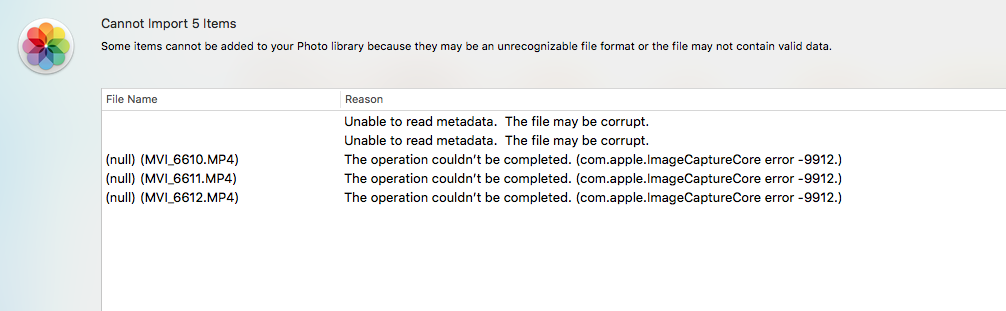
I am trying to upload videos from my Canon Powershot to Photos (SD Slot is damaged so I have to use USB cables from my camera) but when I do, some videos say "Unable to read medadata. The file may be corrupt" while some other videos say "(null)(File name) The operation couldn't be completed." yet all the videos have been filmed in the same format and I have done this task for years and this has never happened before. Screenshot added for error message.
The memory card is also the same as used before
If it helps, my MacbookPro is running macOS High Sierra 10.13.6
I attached a screenshot of the error message
16 REPLIES 16
Options
- Mark as New
- Bookmark
- Subscribe
- Mute
- Subscribe to RSS Feed
- Permalink
- Report Inappropriate Content
04-20-2020 11:17 AM
No luck using image capture either


Options
- Mark as New
- Bookmark
- Subscribe
- Mute
- Subscribe to RSS Feed
- Permalink
- Report Inappropriate Content
04-20-2020 12:51 PM - edited 04-20-2020 12:52 PM
@aj2475 wrote:
@kvbarkley wrote:When was the last time you re-formatted the card *in the camera*?
That I never have
This should be mandatory. Despite all appearances to the contrary, memory cards do not come preformatted. The formatting on new memory cards is actually residue from production testing, which MUST be completely wiped with a low level format, preferably performed on a PC, and then again in the camera.
--------------------------------------------------------
"Enjoying photography since 1972."
"Enjoying photography since 1972."

Options
- Mark as New
- Bookmark
- Subscribe
- Mute
- Subscribe to RSS Feed
- Permalink
- Report Inappropriate Content
04-20-2020 01:14 PM
@aj2475 wrote:No no, Wadizzle is correct, my USB slot on my macbook was damaged years ago but my camera is fine and I didn't make any indication about the memory card not being removed from the camera.
But yes, the videos can be played back on the camera and the memory card I have been using is Sandisk 64gb Ultra Plus 10
Then Waddizzle is also correct that you should try using a card reader. Any other solution merely adds unnecessary complexity.
Bob
Philadelphia, Pennsylvania USA
Philadelphia, Pennsylvania USA
Options
- Mark as New
- Bookmark
- Subscribe
- Mute
- Subscribe to RSS Feed
- Permalink
- Report Inappropriate Content
04-20-2020 04:50 PM
At this time I don't have a card reader.
I went ahead and formatted my card through my camera (SX740 btw)
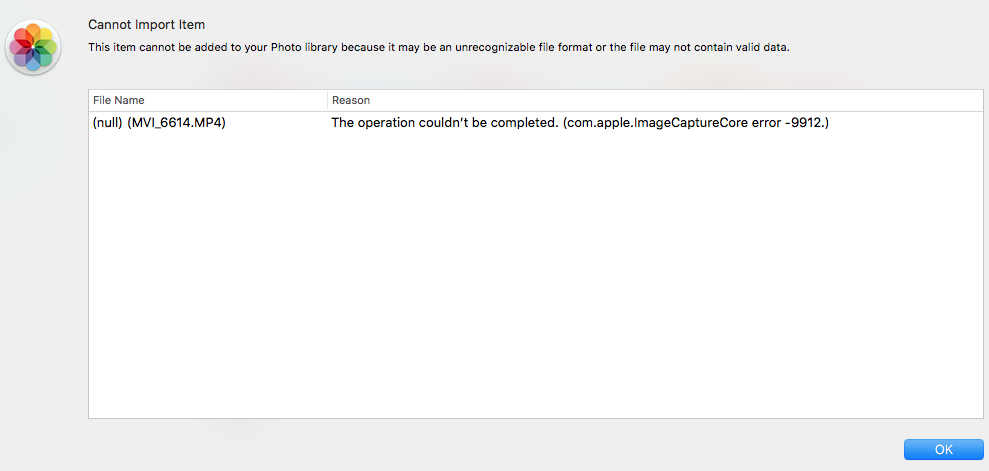
I filmed two shots, one is under 2 minutes and the other is over 10 minutes. The shorter clip uploaded immediately and the longer clip has this message

Options
- Mark as New
- Bookmark
- Subscribe
- Mute
- Subscribe to RSS Feed
- Permalink
- Report Inappropriate Content
04-20-2020 04:57 PM
Sorry, I guess you will need to get a card reader. It looks like the camera responds slower than the Mac expects it to.
Options
- Mark as New
- Bookmark
- Subscribe
- Mute
- Subscribe to RSS Feed
- Permalink
- Report Inappropriate Content
04-20-2020 06:02 PM
But that still doesn't answer the question why this is all of a sudden even after re-formatting the card?
Options
- Mark as New
- Bookmark
- Subscribe
- Mute
- Subscribe to RSS Feed
- Permalink
- Report Inappropriate Content
04-23-2020 11:49 AM
Can't answer. Many Macs have a card reader built in, except the low end macbooks with USB-C only.

- « Previous
-
- 1
- 2
- Next »
- « Previous
-
- 1
- 2
- Next »

Announcements
05/13/2026: New firmware updates are available.
EOS R5 Mark II - Version 1.3.0
EOS R6 Mark II - Version 1.7.0
04/28/2026: Service Notice: Caution Concerning use of Lithium Batteries
03/17/2026: New firmware updates are available.
SELPHY CP1500 - Version 1.0.7.0
02/23/2026: New firmware update is available for EOS C50- Version 1.0.3.1
01/23/2026: New firmware update is available for RF 24-105mm F4 IS USM- Version 2.0.7
01/20/2026: New firmware updates are available.
12/22/2025: New firmware update is available for EOS R6 Mark III- Version 1.0.2
10/21/2025: Service Notice: To Users of the Compact Digital Camera PowerShot V1
10/15/2025: New firmware updates are available.
Speedlite EL-5 - Version 1.2.0
Speedlite EL-1 - Version 1.1.0
Speedlite Transmitter ST-E10 - Version 1.2.0
07/28/2025: Notice of Free Repair Service for the Mirrorless Camera EOS R50 (Black)
05/21/2025: New firmware update available for EOS C500 Mark II - Version 1.1.5.1
Related Content
- Difficulty connecting EOS Rebel T7 to MacBook to upload photos in EOS DSLR & Mirrorless Cameras
- PowerShot ELPH 360 HS says memory card locked in Point & Shoot Digital Cameras
- PowerShot G9 X, push button option for uploads and WiFi connection info missing in Point & Shoot Digital Cameras
- How to continue using image.canon on PowerShot ELPH 190 IS & EOS Rebel T7 in Camera Software
- Trouble uploading PowerShot ELPH 150 images to PC in Camera Software

Ⓒ 2026
Canon U.S.A Inc. All Rights Reserved. Reproduction in whole or part without permission is prohibited.
