Greetings,
Please help us so we can help you.
You have a MF741Cdw
What is it connected to / How is it connected?
You are running windows. Which version and build?
Which LED is flashing? 4 or 5? Is an error message displayed?
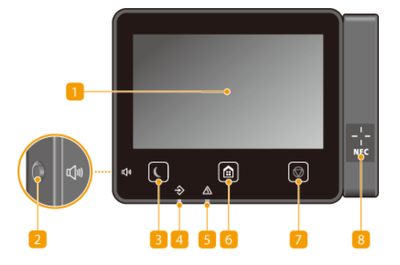 shadowsports_0-1712807135653.png
When the error condition occurs, press the home (house) button
Then press item #4 (Status Monitor)
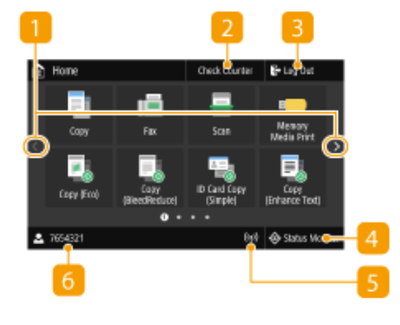 shadowsports_1-1712807859319.png
Then tap item #1 (Error Information / Notification)
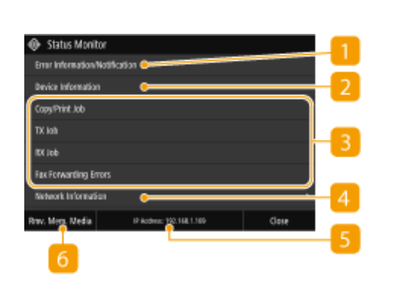 shadowsports_2-1712807935467.png
What is the error message?
~Rick
Bay Area - CA
~R5 C (1.1.3.1), ~RF Trinity, ~RF 100 Macro, ~RF 100~400, ~RF 100~500, ~RF 200-800, ~RF 1.4x TC, BG-R10, 430EX III-RT ~DxO PhotoLab Elite ~DaVinci Resolve Studio ~ImageClass MF644Cdw MF656Cdw ~Pixel 10 ~CarePaks Are Worth It






