Turn on suggestions
Auto-suggest helps you quickly narrow down your search results by suggesting possible matches as you type.
- Canon Community
- Discussions & Help
- Printer
- Office Printers
- Re: Image Class MF 731 CDW Print problem
Options
- Subscribe to RSS Feed
- Mark Topic as New
- Mark Topic as Read
- Float this Topic for Current User
- Bookmark
- Subscribe
- Mute
- Printer Friendly Page

Options
- Mark as New
- Bookmark
- Subscribe
- Mute
- Subscribe to RSS Feed
- Permalink
- Report Inappropriate Content
10-07-2022
05:39 PM
- last edited on
10-08-2022
08:07 AM
by
 Danny
Danny
prints too light, image class mf 731 CDW. I have read the instruction thoroughly to no avail.
Solved! Go to Solution.
1 ACCEPTED SOLUTION
Accepted Solutions

Options
- Mark as New
- Bookmark
- Subscribe
- Mute
- Subscribe to RSS Feed
- Permalink
- Report Inappropriate Content
10-08-2022 08:45 AM - edited 10-08-2022 08:52 AM
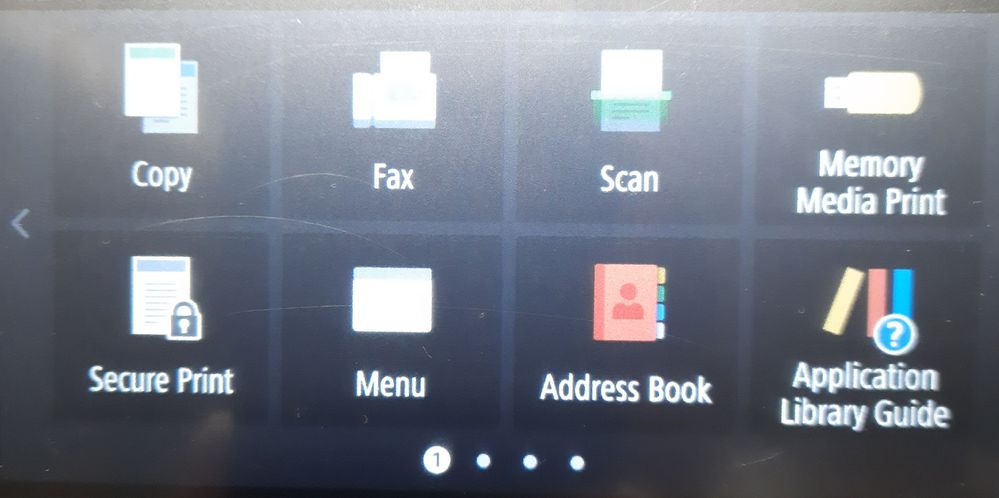
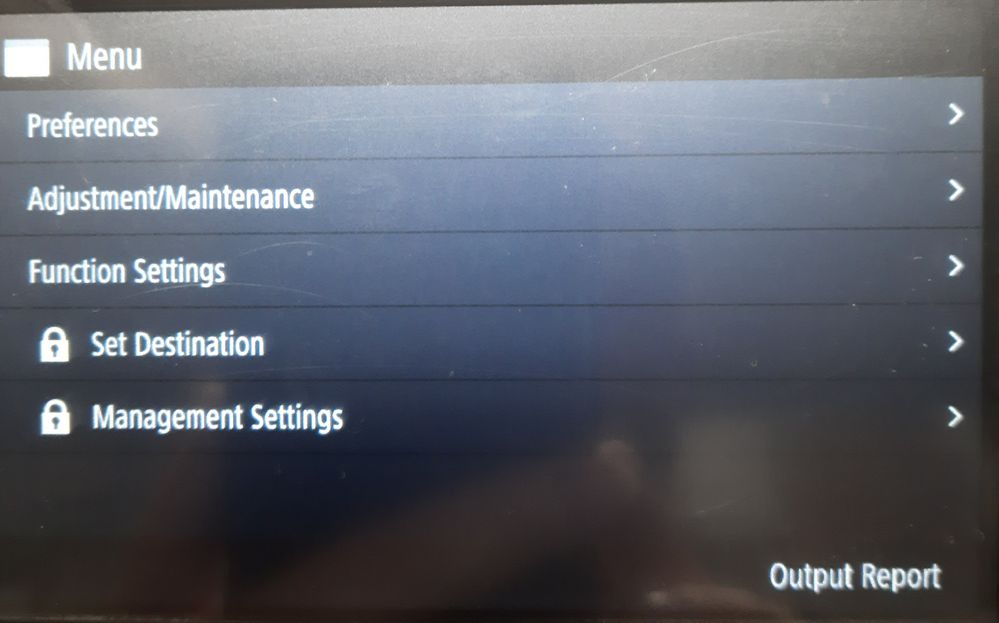
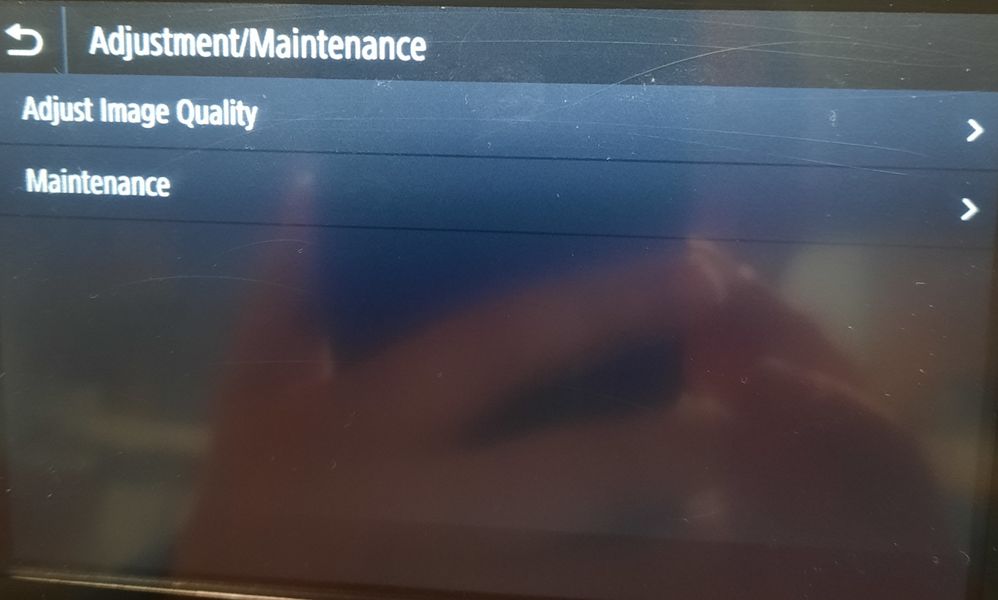
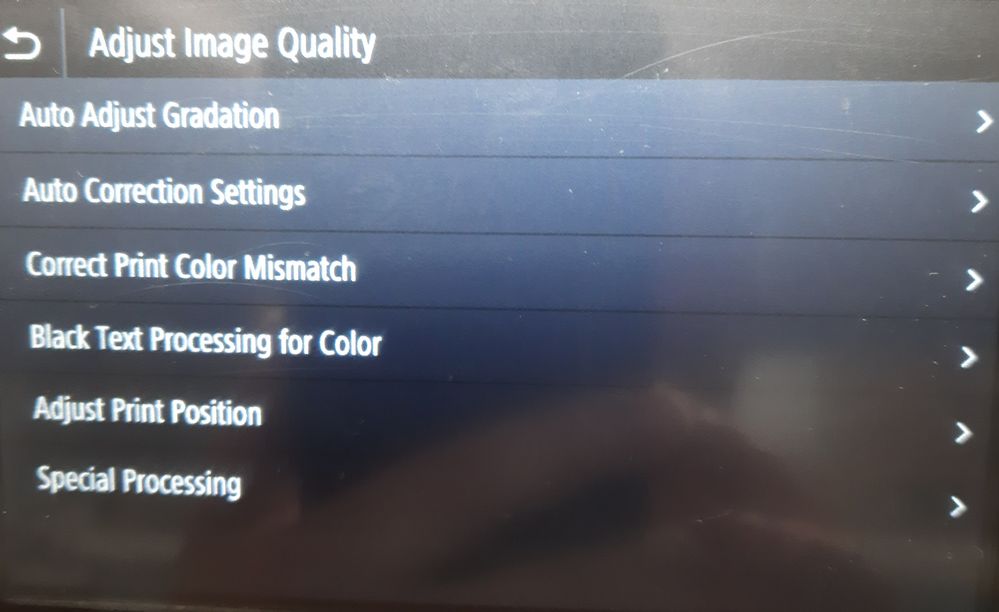
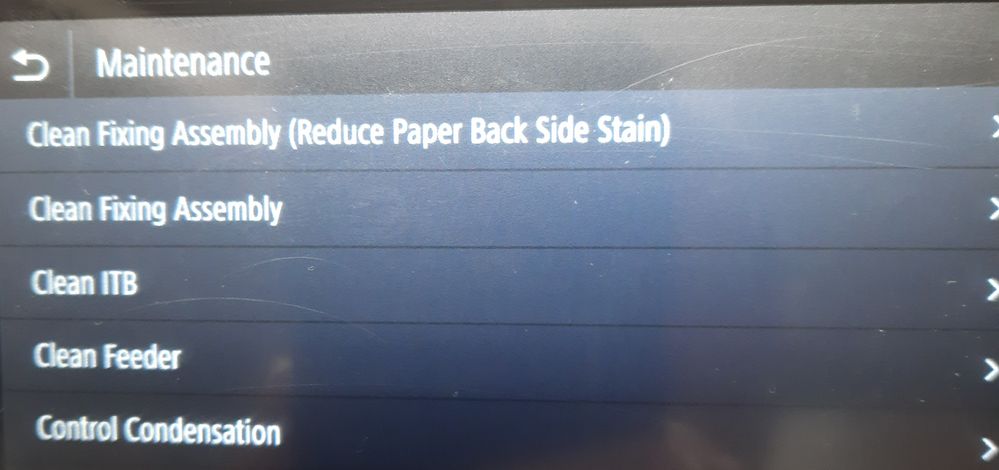
I took pictures of the "path" using my 743 (which is the same physical printer as the 731/733/735/741/745). Menu->Adjustment/Maintenance->Adjust Image Quality (and Maintenance).
From the "Adjustment" menu, try running the first three selections. From the "Maintenance" menu, try running the first three selections. See if any of that makes a difference.
When selecting "Adjust Gradation", the printer will create two test pages containing color patterns using all four colors. Does the first one look OK? or is it, also faded? 🤔
6 REPLIES 6

Options
- Mark as New
- Bookmark
- Subscribe
- Mute
- Subscribe to RSS Feed
- Permalink
- Report Inappropriate Content
10-07-2022 08:10 PM
The imageCLASS MF731,733,741,743 and others have some onboard maintenance & adjustment capabilities under the "Settings" menu. If they haven't been run, try them and see if they make any difference.
Also, are the toner cartridges genuine Canon, or a third party? 🤔
Options
- Mark as New
- Bookmark
- Subscribe
- Mute
- Subscribe to RSS Feed
- Permalink
- Report Inappropriate Content
10-08-2022 07:59 AM
Under menu I find no place to adjust print settings. My color cartridges are down to 20% but no warnings.
Cannot find a "settings" under menu. Can you send path? Sorry to be so dense but the problem has never appeared before and product has not needed this kind of manipulations before.
Under menu I find no place to adjust print settings. My color cartridges are down to 20% but no warnings.
Cannot find a "settings" under menu. Can you send path? Sorry to be so dense but the problem has never appeared before and product has not needed this kind of manipulations before.
Only Canon ink ever.
Options
- Mark as New
- Bookmark
- Subscribe
- Mute
- Subscribe to RSS Feed
- Permalink
- Report Inappropriate Content
10-08-2022 08:45 AM - edited 10-08-2022 08:52 AM
I took pictures of the "path" using my 743 (which is the same physical printer as the 731/733/735/741/745). Menu->Adjustment/Maintenance->Adjust Image Quality (and Maintenance).
From the "Adjustment" menu, try running the first three selections. From the "Maintenance" menu, try running the first three selections. See if any of that makes a difference.
When selecting "Adjust Gradation", the printer will create two test pages containing color patterns using all four colors. Does the first one look OK? or is it, also faded? 🤔
Options
- Mark as New
- Bookmark
- Subscribe
- Mute
- Subscribe to RSS Feed
- Permalink
- Report Inappropriate Content
10-08-2022 10:29 AM
I had done all that already. But replacing the cartridges before 20% is the answer. Seemed like I should have gotten more than 80% use from the but live and learn. Thanks so much for your assistance and patience. Us Old Folks need all the patience and assistance we can get.
Options
- Mark as New
- Bookmark
- Subscribe
- Mute
- Subscribe to RSS Feed
- Permalink
- Report Inappropriate Content
10-08-2022 07:40 PM - edited 10-08-2022 07:41 PM
I've set the change toner cartridge notification/alarm on the 733 & 743 to activate at 10%.
20% seems a bit early to require a cartridge replacement. I think the factory default level is 30%.
Replacement toner cartridge costs....being what they are....I'd make purchasing the final step in troubleshooting.
Started out purchasing the standard 046 & 055 versions, but soon switched to the high capacity offerings.
Options
- Mark as New
- Bookmark
- Subscribe
- Mute
- Subscribe to RSS Feed
- Permalink
- Report Inappropriate Content
04-18-2025 05:45 PM
When I try to make the print adjustments I get the message "Could not perform correction"
What do I need to do to get this done?
Thanks, HarryZeg

Announcements
07/22/2026: New firmware updates are available.
EOS R6 Mark III - Version 1.1.0
05/13/2026: New firmware updates are available.
EOS R5 Mark II - Version 1.3.0
EOS R6 Mark II - Version 1.7.0
04/28/2026: Service Notice: Caution Concerning use of Lithium Batteries
03/17/2026: New firmware updates are available.
SELPHY CP1500 - Version 1.0.7.0
02/23/2026: New firmware update is available for EOS C50- Version 1.0.3.1
01/23/2026: New firmware update is available for RF 24-105mm F4 IS USM- Version 2.0.7
01/20/2026: New firmware updates are available.
10/21/2025: Service Notice: To Users of the Compact Digital Camera PowerShot V1
10/15/2025: New firmware updates are available.
Speedlite EL-5 - Version 1.2.0
Speedlite EL-1 - Version 1.1.0
Speedlite Transmitter ST-E10 - Version 1.2.0
07/28/2025: Notice of Free Repair Service for the Mirrorless Camera EOS R50 (Black)
05/21/2025: New firmware update available for EOS C500 Mark II - Version 1.1.5.1
Related Content
- imageCLASS MF665Cdw driver won't install, Winzip can't create output file in Printer Software & Networking
- Professional Print and Layout (ver1.6.1) stopped printing. Pixma Pro 200, Windows11 in Printer Software & Networking
- PRO-1100 is suddenly printing very slowly and color is off in Professional Photo Printers
- PIXMA TR8520 Wireless will not connect to my Netgear Orbi 770 Tri-Band WiFi7 Mesh router in Printer Software & Networking
- PIXMA TR4722 - Says out of paper when it's not - Answer is here as well in Desktop Inkjet Printers

Ⓒ 2026
Canon U.S.A Inc. All Rights Reserved. Reproduction in whole or part without permission is prohibited.
