Turn on suggestions
Auto-suggest helps you quickly narrow down your search results by suggesting possible matches as you type.
- Canon Community
- Discussions & Help
- Printer
- Office Printers
- Re: Maxify MB2720 can not register
Options
- Subscribe to RSS Feed
- Mark Topic as New
- Mark Topic as Read
- Float this Topic for Current User
- Bookmark
- Subscribe
- Mute
- Printer Friendly Page
Maxify MB2720 can not register

Options
- Mark as New
- Bookmark
- Subscribe
- Mute
- Subscribe to RSS Feed
- Permalink
- Report Inappropriate Content
03-18-2023 01:36 AM
I have purchased a new Canon Maxify MB2720 and when I attempt to register, I receive a message that the serial number is not valid. I receive the following:
The serial number you have entered is invalid for one or more of the following reasons:
1) The serial number does not match the product you have selected (FCC ID which starts with “AZD” is often mistaken for serial number.)
2) The serial number entered indicates this product was not intended for sale in the United States and is ineligible for registration and support in the U.S.
Please verify your product model and serial number to ensure they were entered correctly.
I am sure the unit was purchased here in the USA and I am even more confident that I entered the s/n correctly. What am I missing???
How do I find my serial number?
6 REPLIES 6

Options
- Mark as New
- Bookmark
- Subscribe
- Mute
- Subscribe to RSS Feed
- Permalink
- Report Inappropriate Content
03-18-2023 08:43 AM
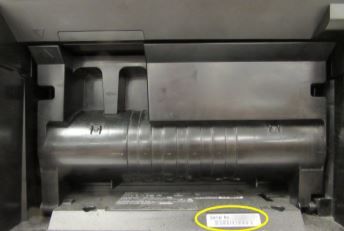
Hi, sjarriett! You'll find the serial number for your MAXIFY MB2720 on the back of the unit and it's an alphanumerical code beginning with four letters. Those letters indicate which market your printer was intended for with US-market printers starting with either AEWP, AELE, AFKB, or AGBY. If the serial number starts with any other combination, such as AELF or AEWR, then the printer was intended for sale and use in Canada and is ineligible for registration with Canon USA. We recommend contacting your dealer if they say they're based in the United States and sold you a printer meant for use another country.
Hope this helps!
Options
- Mark as New
- Bookmark
- Subscribe
- Mute
- Subscribe to RSS Feed
- Permalink
- Report Inappropriate Content
03-18-2023 10:47 PM
Mines start with AGSG and I purchased from Wal-Mart here in Mississippi…. I’m at a lost.. Would it be covered under warranty
Options
- Mark as New
- Bookmark
- Subscribe
- Mute
- Subscribe to RSS Feed
- Permalink
- Report Inappropriate Content
03-18-2023 10:49 PM
That may be an issue as I saw another at the same store that started the same way
Options
- Mark as New
- Bookmark
- Subscribe
- Mute
- Subscribe to RSS Feed
- Permalink
- Report Inappropriate Content
03-19-2023 11:45 AM
I purchased the same printer at a Walmart in Indiana yesterday and I am getting the same error. The UPC label says MN: MB2720 US... My SN number also starts AGSG. Seems Canon needs to fix this issue... as the model number shows the model is a US model...

Options
- Mark as New
- Bookmark
- Subscribe
- Mute
- Subscribe to RSS Feed
- Permalink
- Report Inappropriate Content
03-20-2023 04:47 PM
Can you please PRIVATE MESSAGE me with your registration information so I can file a ticket with corporate and get this taken care of?
PRIVATELY I need your first and last name, email address, phone number, printer model, serial number, approximate date of purchase, and place of purchase.
If you already have a My Canon Account established, please make sure the email address is the same one on your My Canon Account.
Options
- Mark as New
- Bookmark
- Subscribe
- Mute
- Subscribe to RSS Feed
- Permalink
- Report Inappropriate Content
10-30-2024
09:56 AM
- last edited on
10-30-2024
12:18 PM
by
 Danny
Danny
I have the same issue. I purchased mine from Walmart in Washington, NC.
Please help me register my printer.
William Autrey
Maxify MB2720
S#AEWR[xxxxx]
[Personal contact info and serial number hidden to protect privacy.]

Announcements
07/22/2026: New firmware updates are available.
EOS R6 Mark III - Version 1.1.0
05/13/2026: New firmware updates are available.
EOS R5 Mark II - Version 1.3.0
EOS R6 Mark II - Version 1.7.0
04/28/2026: Service Notice: Caution Concerning use of Lithium Batteries
03/17/2026: New firmware updates are available.
SELPHY CP1500 - Version 1.0.7.0
02/23/2026: New firmware update is available for EOS C50- Version 1.0.3.1
01/23/2026: New firmware update is available for RF 24-105mm F4 IS USM- Version 2.0.7
01/20/2026: New firmware updates are available.
10/21/2025: Service Notice: To Users of the Compact Digital Camera PowerShot V1
10/15/2025: New firmware updates are available.
Speedlite EL-5 - Version 1.2.0
Speedlite EL-1 - Version 1.1.0
Speedlite Transmitter ST-E10 - Version 1.2.0
07/28/2025: Notice of Free Repair Service for the Mirrorless Camera EOS R50 (Black)
05/21/2025: New firmware update available for EOS C500 Mark II - Version 1.1.5.1
Related Content
- I bought a MAXIFY MB2720 it will not print with my Android. Its a new printer. in Printer Software & Networking
- MAXIFY MB2720, change OLD ink cartridge that still shows ink, but its probably dried up. in Office Printers
- Won't let me Register my MAXIFY GX2020 in Desktop Inkjet Printers
- MAXIFY MB2720 error code 5205 in Office Printers
- MAXIFY MB2720 Printer Error 5040 in Office Printers

Ⓒ 2026
Canon U.S.A Inc. All Rights Reserved. Reproduction in whole or part without permission is prohibited.
