01-03-2016 08:45 PM
I've owned a D530 printer/scanner since March 19, 2015 and haven't had any problems with it. This past week I haven't been able to scan anything and it's causing a serious problem in my work schedule. My Operating System is Windows 8.1.
My problem:
When I first try to scan, the actual device makes the sounds as if it scanning. But on the screen it is stuck at 0%, similar to the problems at the beginning of this YouTube video.
The device itself gives an error message after a few minutes while the software on the screen remains stuck at 0% until I eventually have to force quit with CTRL+ALT+DEL.
Any attempts to scan after that brings up this lovely error message
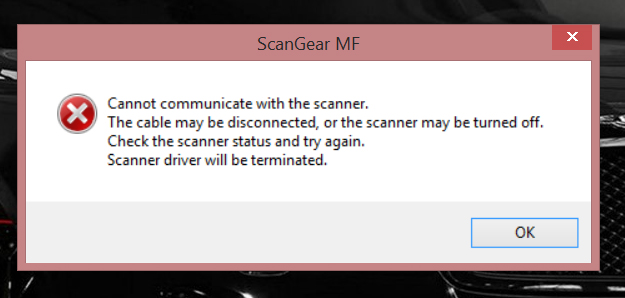
I figured maybe it was a driver problem, so I downloaded an update from here. I'm still having the exact same problem, so I'm completely at a loss.
Some help would be greatly appreciated.
Thanks.

01-03-2016 08:49 PM
P.S. I forgot to add that it is not a USB cord problem. If I disconnect the cord...
1- Trying to scan from the scanner gives the "Connect Computer" error message.
2- Trying to initiate a scan from the software gives the same error message as posted in my main post.
12/18/2025: New firmware updates are available.
11/20/2025: New firmware updates are available.
EOS R5 Mark II - Version 1.2.0
PowerShot G7 X Mark III - Version 1.4.0
PowerShot SX740 HS - Version 1.0.2
10/15/2025: New firmware updates are available.
Speedlite EL-5 - Version 1.2.0
Speedlite EL-1 - Version 1.1.0
Speedlite Transmitter ST-E10 - Version 1.2.0
7/17/2025: New firmware updates are available.
02/20/2025: New firmware updates are available.
RF70-200mm F2.8 L IS USM Z - Version 1.0.6
RF24-105mm F2.8 L IS USM Z - Version 1.0.9
RF100-300mm F2.8 L IS USM - Version 1.0.8
Canon U.S.A Inc. All Rights Reserved. Reproduction in whole or part without permission is prohibited.
