01-26-2018 11:47 PM - edited 01-26-2018 11:59 PM
I've used an MX882 for years. I scan from within Acrobat, typically, and have always used the MP Navigator software.
The new MAXIFY MB2720 installed, I no longer get MP Navigator when I scan from Acrobat, Instead, I get this:
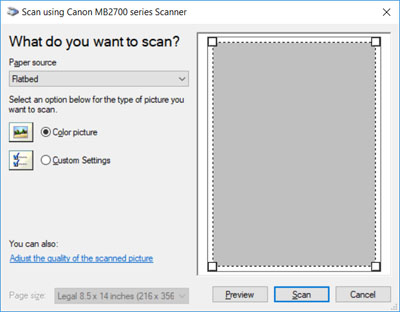
The only way I've found to MP Navigator software is Start > Canon Utilities > IJ Scan Utility > ScanGear. But that
What do I need to do to get MP Navigator to open when I perform a scan from Acrobat XI? Running Windows 10.

Solved! Go to Solution.
01-28-2018 11:55 AM
Case closed. Everything is fine now. For some reason, 'Show Native Interface' was greyed out/unavailabe when I was having the problem. Today, it was available so I selected it and voila. ScanGear's advanced interface opened. Whew. I didn't want to imagine life without it.
01-28-2018 11:55 AM
Case closed. Everything is fine now. For some reason, 'Show Native Interface' was greyed out/unavailabe when I was having the problem. Today, it was available so I selected it and voila. ScanGear's advanced interface opened. Whew. I didn't want to imagine life without it.
12/18/2025: New firmware updates are available.
11/20/2025: New firmware updates are available.
EOS R5 Mark II - Version 1.2.0
PowerShot G7 X Mark III - Version 1.4.0
PowerShot SX740 HS - Version 1.0.2
10/15/2025: New firmware updates are available.
Speedlite EL-5 - Version 1.2.0
Speedlite EL-1 - Version 1.1.0
Speedlite Transmitter ST-E10 - Version 1.2.0
7/17/2025: New firmware updates are available.
02/20/2025: New firmware updates are available.
RF70-200mm F2.8 L IS USM Z - Version 1.0.6
RF24-105mm F2.8 L IS USM Z - Version 1.0.9
RF100-300mm F2.8 L IS USM - Version 1.0.8
Canon U.S.A Inc. All Rights Reserved. Reproduction in whole or part without permission is prohibited.
