Turn on suggestions
Auto-suggest helps you quickly narrow down your search results by suggesting possible matches as you type.
- Canon Community
- Discussions & Help
- Printer
- Office Printers
- Re: Canon TM-200 SMTP settings
Options
- Subscribe to RSS Feed
- Mark Topic as New
- Mark Topic as Read
- Float this Topic for Current User
- Bookmark
- Subscribe
- Mute
- Printer Friendly Page
Canon TM-200 SMTP settings

Options
- Mark as New
- Bookmark
- Subscribe
- Mute
- Subscribe to RSS Feed
- Permalink
- Report Inappropriate Content
01-22-2021 10:55 AM
Good Morning,
I need some help setting up SMTP on our Canon TM-200 so that it can accept print documents by email.
The online help indicates this should be possible:
https://ij.manual.canon/ij/webmanual/Manual/All/TM-200/EN/UG/ug_setting02_0500.html
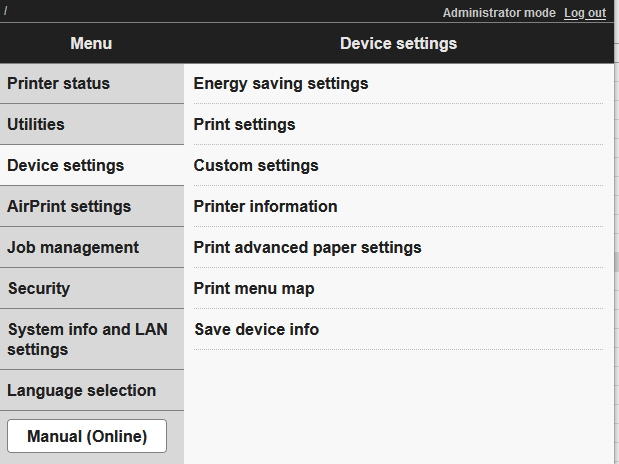
However, the Remote UI does not present the option to set the mail server (see below). The setting does not seem to appear elsewhere in the Menu.
Suggestions?
2 REPLIES 2


Options
- Mark as New
- Bookmark
- Subscribe
- Mute
- Subscribe to RSS Feed
- Permalink
- Report Inappropriate Content
01-22-2021 11:07 AM
The manual states: "This function may not be available depending on the country or region of purchase." Are you within the US? And did you purchase the printer from a US supplier?
--
Ricky
Camera: EOS R5 II, RF 50mm f/1.2L, RF 135mm f/1.8L
Lighting: Profoto Lights & Modifiers
Ricky
Camera: EOS R5 II, RF 50mm f/1.2L, RF 135mm f/1.8L
Lighting: Profoto Lights & Modifiers
Options
- Mark as New
- Bookmark
- Subscribe
- Mute
- Subscribe to RSS Feed
- Permalink
- Report Inappropriate Content
01-22-2021 11:54 AM
We purchased from a supplier in the US (Novatech). Is the function not available on US models?
Are there other options we might consider to set up automatic printing on a schedule? The main goal right now is to configure a sample test sheet to automatically print out once per week so that we can keep the print heads/nozzles flowing freely, just in case we don't use the printer for an extended period. I'd figured if we could configure auto-printing by email, we could schedule to send a regular print job from an account.

Announcements
07/22/2026: New firmware updates are available.
EOS R6 Mark III - Version 1.1.0
05/13/2026: New firmware updates are available.
EOS R5 Mark II - Version 1.3.0
EOS R6 Mark II - Version 1.7.0
04/28/2026: Service Notice: Caution Concerning use of Lithium Batteries
03/17/2026: New firmware updates are available.
SELPHY CP1500 - Version 1.0.7.0
02/23/2026: New firmware update is available for EOS C50- Version 1.0.3.1
01/23/2026: New firmware update is available for RF 24-105mm F4 IS USM- Version 2.0.7
01/20/2026: New firmware updates are available.
10/21/2025: Service Notice: To Users of the Compact Digital Camera PowerShot V1
10/15/2025: New firmware updates are available.
Speedlite EL-5 - Version 1.2.0
Speedlite EL-1 - Version 1.1.0
Speedlite Transmitter ST-E10 - Version 1.2.0
07/28/2025: Notice of Free Repair Service for the Mirrorless Camera EOS R50 (Black)
05/21/2025: New firmware update available for EOS C500 Mark II - Version 1.1.5.1
Related Content
- Can't connect Canon PRINT app to Android, Failed to configure the printer's Wi-Fi settings error in Printer Software & Networking
- imageCLASS LBP247dw II drops network connection and goes to sleep in Printer Software & Networking
- Bug Report: macOS Driver Conflict – Booklet Printing on Legal Paper (iR ADV DX C5840i / Finisher-AB1 in Production Printing
- PRO-1100 is suddenly printing very slowly and color is off in Professional Photo Printers
- PIXMA TS3400 Can’t print on photo paper in Desktop Inkjet Printers

Ⓒ 2026
Canon U.S.A Inc. All Rights Reserved. Reproduction in whole or part without permission is prohibited.
