Turn on suggestions
Auto-suggest helps you quickly narrow down your search results by suggesting possible matches as you type.
- Canon Community
- Discussions & Help
- Printer
- Office Printers
- Re: Canon Maxify iB4120 can't print borderless???
Options
- Subscribe to RSS Feed
- Mark Topic as New
- Mark Topic as Read
- Float this Topic for Current User
- Bookmark
- Subscribe
- Mute
- Printer Friendly Page
Canon Maxify iB4120 can't print borderless???

Options
- Mark as New
- Bookmark
- Subscribe
- Mute
- Subscribe to RSS Feed
- Permalink
- Report Inappropriate Content
08-17-2017 03:32 PM
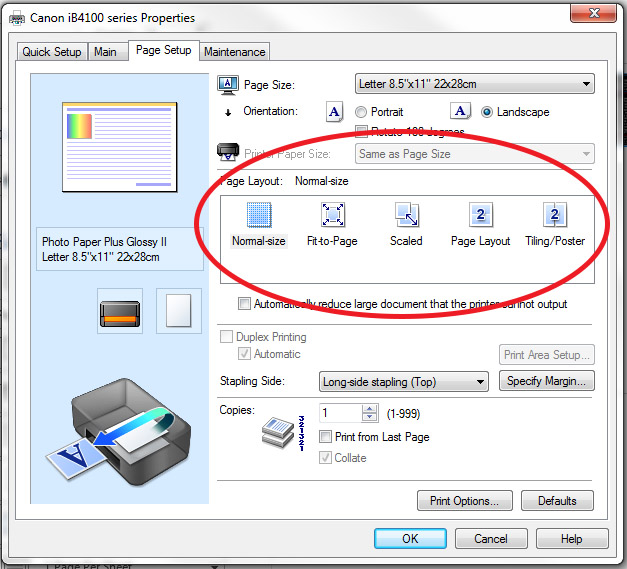
I finally decided to upgrade the printer I use for printing product labels. I ordered the Canon Maxify iB4120. I set the margins in Microsoft Word to 0, 0, 0, 0 but it still printed with about a 0.5" border around the entire document. I thought "no worries, I just have to change a setting quick". However, when I went to change the setting there was no option for borderless.
Anyone have a solution or work-around?
Thank you in advance.
3 REPLIES 3
Options
- Mark as New
- Bookmark
- Subscribe
- Mute
- Subscribe to RSS Feed
- Permalink
- Report Inappropriate Content
08-21-2017 09:43 AM
Anyone?


Options
- Mark as New
- Bookmark
- Subscribe
- Mute
- Subscribe to RSS Feed
- Permalink
- Report Inappropriate Content
08-21-2017 09:56 AM
Hi SB1!
Welcome to the Canon Community Forums! The Forums aren't intended for immediate assistance. If your question is of an urgent nature, please feel free to CONTACT US either by phone at 1-844-4-MAXIFY (1-844-462-9439) Monday-Friday 8:00 am to 10:00 pm ET, or Saturday 10:00 am to 7:00 pm ET, or email 24 hours a day!

Options
- Mark as New
- Bookmark
- Subscribe
- Mute
- Subscribe to RSS Feed
- Permalink
- Report Inappropriate Content
12-04-2017 05:07 PM
Hi SB1,
Borderless printing is not an option for plain paper. If you use glossy or matte photo paper as a paper type, borderless printing should become available.
This didn't answer your question or issue? Please call or email us at one of the methods on the Contact Us page for further assistance.
Did this answer your question? Please click the Accept as Solution button so that others may find the answer as well.


Announcements
05/13/2026: New firmware updates are available.
EOS R5 Mark II - Version 1.3.0
EOS R6 Mark II - Version 1.7.0
04/28/2026: Service Notice: Caution Concerning use of Lithium Batteries
03/17/2026: New firmware updates are available.
SELPHY CP1500 - Version 1.0.7.0
02/23/2026: New firmware update is available for EOS C50- Version 1.0.3.1
01/23/2026: New firmware update is available for RF 24-105mm F4 IS USM- Version 2.0.7
01/20/2026: New firmware updates are available.
12/22/2025: New firmware update is available for EOS R6 Mark III- Version 1.0.2
10/21/2025: Service Notice: To Users of the Compact Digital Camera PowerShot V1
10/15/2025: New firmware updates are available.
Speedlite EL-5 - Version 1.2.0
Speedlite EL-1 - Version 1.1.0
Speedlite Transmitter ST-E10 - Version 1.2.0
07/28/2025: Notice of Free Repair Service for the Mirrorless Camera EOS R50 (Black)
05/21/2025: New firmware update available for EOS C500 Mark II - Version 1.1.5.1
Related Content
- MAXIFY GX1020 4" x 6" borderless printing option unavailable in Office Printers
- Borderless pictures with MAXIFY MB 2700 series in Office Printers
- Canon Maxify GX5020 Borderless Printing Help Needed in Office Printers
- MAXIFY GX2020 Can't find borderless printing option in Office Printers
- MAXIFY GX3020 & GX4020 borderless printing in Office Printers

Ⓒ 2026
Canon U.S.A Inc. All Rights Reserved. Reproduction in whole or part without permission is prohibited.
