01-19-2019 10:36 PM
I was able to print and scan wirelessly a few months ago. Today, when I went to scan from my computer, I received the following error:
Error in scanner.
Follow instructions in the online manual.
Scanner driver will be terminated.
Code: 255,0,0
When I click Scan (on the printer LCD) > Computer, I get "connect to computer." I've tired uninstalling and reinstalling the MF Scan Utility and the print driver but it did not resolve the problem. I am not sure why I can no longer scan to my computer wirelessly
Using Windows 10
01-29-2019 10:50 AM
Hi Need_IT_Help.
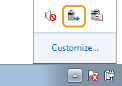
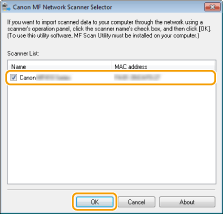
Please check the MF Network Scanner Selector and verify if the printer is selected there. To check the utility, please follow the steps below:
in the system tray.

12/18/2025: New firmware updates are available.
11/20/2025: New firmware updates are available.
EOS R5 Mark II - Version 1.2.0
PowerShot G7 X Mark III - Version 1.4.0
PowerShot SX740 HS - Version 1.0.2
10/15/2025: New firmware updates are available.
Speedlite EL-5 - Version 1.2.0
Speedlite EL-1 - Version 1.1.0
Speedlite Transmitter ST-E10 - Version 1.2.0
7/17/2025: New firmware updates are available.
02/20/2025: New firmware updates are available.
RF70-200mm F2.8 L IS USM Z - Version 1.0.6
RF24-105mm F2.8 L IS USM Z - Version 1.0.9
RF100-300mm F2.8 L IS USM - Version 1.0.8
Canon U.S.A Inc. All Rights Reserved. Reproduction in whole or part without permission is prohibited.