Turn on suggestions
Auto-suggest helps you quickly narrow down your search results by suggesting possible matches as you type.
- Canon Community
- Discussions & Help
- General Discussion
- General Discussion
- Re: Why would video have different DOF than stills...
Options
- Subscribe to RSS Feed
- Mark Topic as New
- Mark Topic as Read
- Float this Topic for Current User
- Bookmark
- Subscribe
- Mute
- Printer Friendly Page
Why would video have different DOF than stills, ceteris parabus?

Options
- Mark as New
- Bookmark
- Subscribe
- Mute
- Subscribe to RSS Feed
- Permalink
- Report Inappropriate Content
03-02-2021 05:06 AM
So this was odd. I shot some portraiture with my M50, 50mm at f/2.2, both in still and video. My subject was standing near some flowers. In the stills, only her face and the flower branch near it were in focus. But in the video, a much wider range was sharp- her entire body and ... wait I think I just got it. The FOV was somewhat similar in both, but I know the cropping is different in video mode (I don’t mean 4K, I know the difference in that cropping is enormous.) I wonder if I was actually further away when taking the video and it was cropped more narrowly, thus the range of sharpness would be higher.
4 REPLIES 4


Options
- Mark as New
- Bookmark
- Subscribe
- Mute
- Subscribe to RSS Feed
- Permalink
- Report Inappropriate Content
03-02-2021 08:13 AM
DOF is driven by many factors: focal length, distance of the focal plane to your subject, aperture and the circle of confusion. Where the circle of confusion is related to the size of the sensor.
And as you've found, since video uses a cropped portion of the sensor, to get the same field of view to that of a still that uses the entire sensor, your distance to the subject would have changed and thus affect DOF.
--
Ricky
Camera: EOS R5 II, RF 50mm f/1.2L, RF 135mm f/1.8L
Lighting: Profoto Lights & Modifiers
Ricky
Camera: EOS R5 II, RF 50mm f/1.2L, RF 135mm f/1.8L
Lighting: Profoto Lights & Modifiers

Options
- Mark as New
- Bookmark
- Subscribe
- Mute
- Subscribe to RSS Feed
- Permalink
- Report Inappropriate Content
03-02-2021 08:27 AM - edited 03-02-2021 10:13 AM
@rs-eos wrote:DOF is driven by many factors: focal length, distance of the focal plane to your subject, aperture and the circle of confusion. Where the circle of confusion is related to the size of the sensor.
And as you've found, since video uses a cropped portion of the sensor, to get the same field of view to that of a still that uses the entire sensor, your distance to the subject would have changed and thus affect DOF.
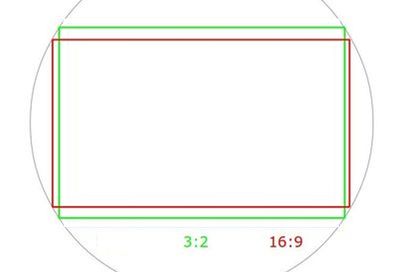
Are you talking about the cropping for 16x9 video vs 3x2 stills? I can't see that being much of a factor in Depth of Field.
Mike Sowsun
Options
- Mark as New
- Bookmark
- Subscribe
- Mute
- Subscribe to RSS Feed
- Permalink
- Report Inappropriate Content
03-02-2021 08:33 AM - edited 03-02-2021 08:34 AM
No, not the aspect ratio. The actual area of the sensor being used. DSLRs often will not use the full sensor area for video. And thus apply yet-another crop factor to the equation.
e.g. with the 5D IV, you get a 1.7 crop factor applied when capturing 4K video.
--
Ricky
Camera: EOS R5 II, RF 50mm f/1.2L, RF 135mm f/1.8L
Lighting: Profoto Lights & Modifiers
Ricky
Camera: EOS R5 II, RF 50mm f/1.2L, RF 135mm f/1.8L
Lighting: Profoto Lights & Modifiers
Options
- Mark as New
- Bookmark
- Subscribe
- Mute
- Subscribe to RSS Feed
- Permalink
- Report Inappropriate Content
03-02-2021 08:46 AM - edited 03-02-2021 01:00 PM
The OP has said they are not using 4K video. There should be minimal crop factor with 1080p video.
For the OP to notice a difference in DOF between video and stills there must have been some other factor involved. Maybe they were shooting 4K and did not know it.
Mike Sowsun


Announcements
05/13/2026: New firmware updates are available.
EOS R5 Mark II - Version 1.3.0
EOS R6 Mark II - Version 1.7.0
04/28/2026: Service Notice: Caution Concerning use of Lithium Batteries
03/17/2026: New firmware updates are available.
SELPHY CP1500 - Version 1.0.7.0
02/23/2026: New firmware update is available for EOS C50- Version 1.0.3.1
01/23/2026: New firmware update is available for RF 24-105mm F4 IS USM- Version 2.0.7
01/20/2026: New firmware updates are available.
12/22/2025: New firmware update is available for EOS R6 Mark III- Version 1.0.2
10/21/2025: Service Notice: To Users of the Compact Digital Camera PowerShot V1
10/15/2025: New firmware updates are available.
Speedlite EL-5 - Version 1.2.0
Speedlite EL-1 - Version 1.1.0
Speedlite Transmitter ST-E10 - Version 1.2.0
07/28/2025: Notice of Free Repair Service for the Mirrorless Camera EOS R50 (Black)
05/21/2025: New firmware update available for EOS C500 Mark II - Version 1.1.5.1

Ⓒ 2026
Canon U.S.A Inc. All Rights Reserved. Reproduction in whole or part without permission is prohibited.
