Turn on suggestions
Auto-suggest helps you quickly narrow down your search results by suggesting possible matches as you type.
- Canon Community
- Discussions & Help
- General Discussion
- General Discussion
- Re: Face overexposed in concert photography
Options
- Subscribe to RSS Feed
- Mark Topic as New
- Mark Topic as Read
- Float this Topic for Current User
- Bookmark
- Subscribe
- Mute
- Printer Friendly Page
Face overexposed in concert photography

Options
- Mark as New
- Bookmark
- Subscribe
- Mute
- Subscribe to RSS Feed
- Permalink
- Report Inappropriate Content
11-02-2016 06:23 PM
Hello:
Quick question.
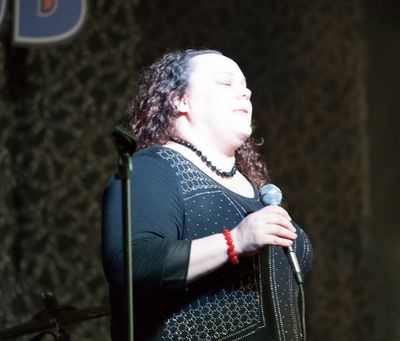
I'm looking for some suggestions on how to compensate for over exposed faces during concert photography.
I can adjust most of this in post processing, but it's better if I start with a not so over exposed face.
I was in manual mode, spot metering with a canon.
The spot is obviosuly in the middle of the frame and caught her black dress which over exposed the skin tones. I used BBF and the AF point was near the top of the frame.
Just looking for some suggestions.
This is a RAW file just to show what I'm talking about.
J.
20 REPLIES 20

Options
- Mark as New
- Bookmark
- Subscribe
- Mute
- Subscribe to RSS Feed
- Permalink
- Report Inappropriate Content
11-02-2016 06:30 PM - edited 11-02-2016 06:33 PM
@ilzho wrote:Hello:
Quick question.
I'm looking for some suggestions on how to compensate for over exposed faces during concert photography.
I can adjust most of this in post processing, but it's better if I start with a not so over exposed face.
I was in manual mode, spot metering with a canon.
First do NOT use spot metering. Spot metering metered for the black dress at the center of the frame. Use evaluative metering, turn 'blinkies' on, and dial in negative exposure compensation to eliminate the 'blinkies' on all but specular highlights. This requires an automatic exposure mode, like Av/Tv/or M with Auto ISO. With the rapidly changing lighting of a concert it is next to impossible to use full Manual mode.

Options
- Mark as New
- Bookmark
- Subscribe
- Mute
- Subscribe to RSS Feed
- Permalink
- Report Inappropriate Content
11-02-2016 07:50 PM
@TTMartin wrote:
First do NOT use spot metering. Spot metering metered for the black dress at the center of the frame. Use evaluative metering, turn 'blinkies' on, and dial in negative exposure compensation to eliminate the 'blinkies' on all but specular highlights. This requires an automatic exposure mode, like Av/Tv/or M with Auto ISO. With the rapidly changing lighting of a concert it is next to impossible to use full Manual mode.
Actually, I'd be inclined to use Center-Weighted Averaging. Evaluative might give too much weight to the very dark background. And you should be able to turn the highlights down in post, as long as you don't let them get fully blown.
Bob
Philadelphia, Pennsylvania USA
Philadelphia, Pennsylvania USA
Options
- Mark as New
- Bookmark
- Subscribe
- Mute
- Subscribe to RSS Feed
- Permalink
- Report Inappropriate Content
11-02-2016 07:54 PM
Thanks guys.
Yes I can correct in post, but I only have lightroom, so I'm a little limited in that regard, but it still works.
Don't get me wrong, I have plenty of keepers, but just a little frustrating seeing this on the back of my camera and trying to fix.
I guess with experience, I will get more comfortable.
Options
- Mark as New
- Bookmark
- Subscribe
- Mute
- Subscribe to RSS Feed
- Permalink
- Report Inappropriate Content
11-02-2016 08:02 PM
@ilzho wrote:Thanks guys.
Yes I can correct in post, but I only have lightroom, so I'm a little limited in that regard, but it still works.
Don't get me wrong, I have plenty of keepers, but just a little frustrating seeing this on the back of my camera and trying to fix.
I guess with experience, I will get more comfortable.
You don't think LR is up to the job of toning down the highlights? Jeez, don't tell Ernie Biggs that; he'll have a fit!
Bob
Philadelphia, Pennsylvania USA
Philadelphia, Pennsylvania USA
Options
- Mark as New
- Bookmark
- Subscribe
- Mute
- Subscribe to RSS Feed
- Permalink
- Report Inappropriate Content
11-02-2016 08:03 PM
No it can. I just know PS is more powerful.
Options
- Mark as New
- Bookmark
- Subscribe
- Mute
- Subscribe to RSS Feed
- Permalink
- Report Inappropriate Content
11-02-2016 08:07 PM
@ilzho wrote:No it can. I just know PS is more powerful.
Not for that really, LR is all you need.
Options
- Mark as New
- Bookmark
- Subscribe
- Mute
- Subscribe to RSS Feed
- Permalink
- Report Inappropriate Content
11-03-2016 05:26 AM
If you are spotmetering the black dress the exposure reading shows for zone v to make black dress 18% gray. You need make two stop underexose in order to m ake black dress black and rest of all will follow.

Options
- Mark as New
- Bookmark
- Subscribe
- Mute
- Subscribe to RSS Feed
- Permalink
- Report Inappropriate Content
11-03-2016 08:25 AM
@TTMartin wrote:
@ilzho wrote:No it can. I just know PS is more powerful.
Not for that really, LR is all you need.
I agree. I only use PS for some special effect, for manufacturing a photograph. A radial filter can fix it up, or even the brush.
--------------------------------------------------------
"Enjoying photography since 1972."
"Enjoying photography since 1972."

Options
- Mark as New
- Bookmark
- Subscribe
- Mute
- Subscribe to RSS Feed
- Permalink
- Report Inappropriate Content
11-04-2016 10:55 AM
How you meter is not the problem.
However you meter, you always want to underexpose a shot like this. Overexposed loses details while under can be retrieved, usually.
As to the use of LR vs PS, LR is the starer program. PS is the finisher. If there is some detail left in the face, PS can easily recover it with a simple mask and layers.
In you sample shot even the dress looks overexposed to me. If it is a black dress, that is.
EB
EOS 1DX and many lenses.
EOS 1DX and many lenses.

Announcements
07/22/2026: New firmware updates are available.
EOS R6 Mark III - Version 1.1.0
05/13/2026: New firmware updates are available.
EOS R5 Mark II - Version 1.3.0
EOS R6 Mark II - Version 1.7.0
04/28/2026: Service Notice: Caution Concerning use of Lithium Batteries
03/17/2026: New firmware updates are available.
SELPHY CP1500 - Version 1.0.7.0
02/23/2026: New firmware update is available for EOS C50- Version 1.0.3.1
01/23/2026: New firmware update is available for RF 24-105mm F4 IS USM- Version 2.0.7
01/20/2026: New firmware updates are available.
10/21/2025: Service Notice: To Users of the Compact Digital Camera PowerShot V1
10/15/2025: New firmware updates are available.
Speedlite EL-5 - Version 1.2.0
Speedlite EL-1 - Version 1.1.0
Speedlite Transmitter ST-E10 - Version 1.2.0
07/28/2025: Notice of Free Repair Service for the Mirrorless Camera EOS R50 (Black)
05/21/2025: New firmware update available for EOS C500 Mark II - Version 1.1.5.1

Ⓒ 2026
Canon U.S.A Inc. All Rights Reserved. Reproduction in whole or part without permission is prohibited.
