Turn on suggestions
Auto-suggest helps you quickly narrow down your search results by suggesting possible matches as you type.
- Canon Community
- Discussions & Help
- General Discussion
- General Discussion
- Re: Cannot Schedule/Pay for Maintenance via Canon ...
Options
- Subscribe to RSS Feed
- Mark Topic as New
- Mark Topic as Read
- Float this Topic for Current User
- Bookmark
- Subscribe
- Mute
- Printer Friendly Page
Cannot Schedule/Pay for Maintenance via Canon Support Website

Options
- Mark as New
- Bookmark
- Subscribe
- Mute
- Subscribe to RSS Feed
- Permalink
- Report Inappropriate Content
05-04-2022 01:01 PM - edited 05-04-2022 01:04 PM
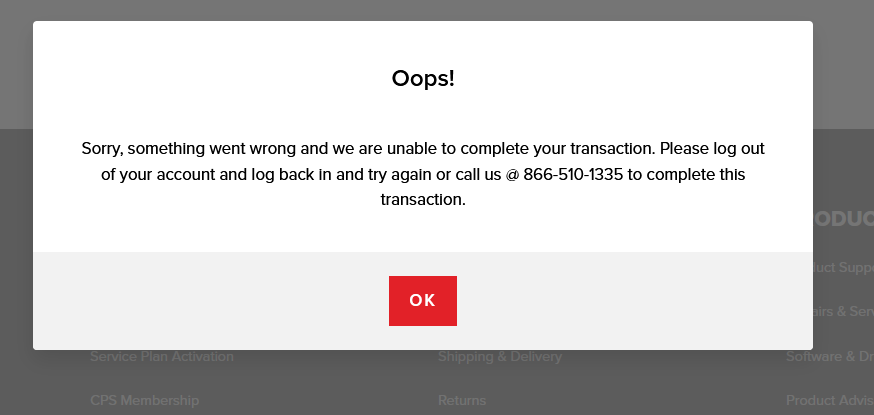
Last weekend, I posted about being unable to register a CPS account on Canon because each time my email address was automatically flagged as invalid. Well, that problem was fixed, I created a CPS account, registered two of my Canon products (R6 and RF 70-200/2.8L), and now I am trying to schedule and pay for maintenance. I have called Canon to leave feedback. I have left feedback for the IT team. But maybe you all can help me if I am doing something wrong? I get through the entire process, provide my credit card information, and click Submit and then get an error message (below). BUT my credit card is charged $1.00! Nothing else happens. I got the error message, my CC is charged $1.00, and no confirmation email is received by me.
I am beginning to think that the Canon website is maintained by a bunch of middle school kids somewhere. This supposed first-rate company has been knocked down to third-rate experience in my eyes due to my struggles with the website since last Saturday. I mean we are talking simple, elementary things this site should be capable of doing. The very basics!
Can anyone help? Am I alone here? Can someone contact me? I have logged out, logged back in, cleared cookies, tried different browsers (Chrome, Edge, Firefox), tried on different days. Nothing helps.
3 REPLIES 3


Options
- Mark as New
- Bookmark
- Subscribe
- Mute
- Subscribe to RSS Feed
- Permalink
- Report Inappropriate Content
05-04-2022 01:17 PM
That phone number is for our Service Information Group. They can look into this with you to see what is causing the transaction to fail. For privacy, you will need to speak with someone by phone.


Options
- Mark as New
- Bookmark
- Subscribe
- Mute
- Subscribe to RSS Feed
- Permalink
- Report Inappropriate Content
05-06-2022 09:23 AM
Thanks, Stephen.
Middle school kids are a lot smarter that we think. I knew of one who would solve computer hiccups for the high school teachers.
John
Canon EOS T7; EF-S 18-55mm IS; EF 28-135mm IS; EF 75-300mm; Sigma 150-600mm DG
Canon EOS T7; EF-S 18-55mm IS; EF 28-135mm IS; EF 75-300mm; Sigma 150-600mm DG

Options
- Mark as New
- Bookmark
- Subscribe
- Mute
- Subscribe to RSS Feed
- Permalink
- Report Inappropriate Content
06-05-2022 09:37 AM
One aspect of online credit card information can be how the web interface handles the input. I have experienced (not with the Canon site) times when I would cut and paste a credit card number into the page and it is not recognized as "valid." Inputing the same information using keystrokes works. I have never had any issues with Canon's web pages but when I have had questions of problems the CPS personnel have always given me the right solutions. Hope this helps.

Announcements
07/22/2026: New firmware updates are available.
EOS R6 Mark III - Version 1.1.0
05/13/2026: New firmware updates are available.
EOS R5 Mark II - Version 1.3.0
EOS R6 Mark II - Version 1.7.0
04/28/2026: Service Notice: Caution Concerning use of Lithium Batteries
03/17/2026: New firmware updates are available.
SELPHY CP1500 - Version 1.0.7.0
02/23/2026: New firmware update is available for EOS C50- Version 1.0.3.1
01/23/2026: New firmware update is available for RF 24-105mm F4 IS USM- Version 2.0.7
01/20/2026: New firmware updates are available.
10/21/2025: Service Notice: To Users of the Compact Digital Camera PowerShot V1
10/15/2025: New firmware updates are available.
Speedlite EL-5 - Version 1.2.0
Speedlite EL-1 - Version 1.1.0
Speedlite Transmitter ST-E10 - Version 1.2.0
07/28/2025: Notice of Free Repair Service for the Mirrorless Camera EOS R50 (Black)
05/21/2025: New firmware update available for EOS C500 Mark II - Version 1.1.5.1
Related Content
- Best first customer experience ever (not)! - Unable to cancel order in General Discussion
- Which Camera Gear Websites Should I Trust? in General Discussion
- Official website!!! Why is it so buggy soooo frequently? in General Discussion
- canon website typo in General Discussion
- MyCanon: 403 ERROR The request could not be satisfied. Request blocked. in General Discussion

Ⓒ 2026
Canon U.S.A Inc. All Rights Reserved. Reproduction in whole or part without permission is prohibited.
