Turn on suggestions
Auto-suggest helps you quickly narrow down your search results by suggesting possible matches as you type.
- Canon Community
- Discussions & Help
- EOS Webcam Utility Pro
- EOS Webcam Utility Pro - Discussions
- Re: EOS Utility Webcam Pro not recognizing my came...
Options
- Subscribe to RSS Feed
- Mark Topic as New
- Mark Topic as Read
- Float this Topic for Current User
- Bookmark
- Subscribe
- Mute
- Printer Friendly Page
EOS Utility Webcam Pro not recognizing my EOS 750D

Options
- Mark as New
- Bookmark
- Subscribe
- Mute
- Subscribe to RSS Feed
- Permalink
- Report Inappropriate Content
03-06-2024
07:20 PM
- last edited on
04-11-2024
09:43 AM
by
 Danny
Danny
I have a capture card and everything I searched on google tried everything and nothing is helping, now the pc does recognize usb2 video but I cant use it raw like this cuz it's basically just screen recording and the grids are still there, anyways I tried every software from beta to pro to others and yes I did make sure I turn off all the other utility softwares and still nothing
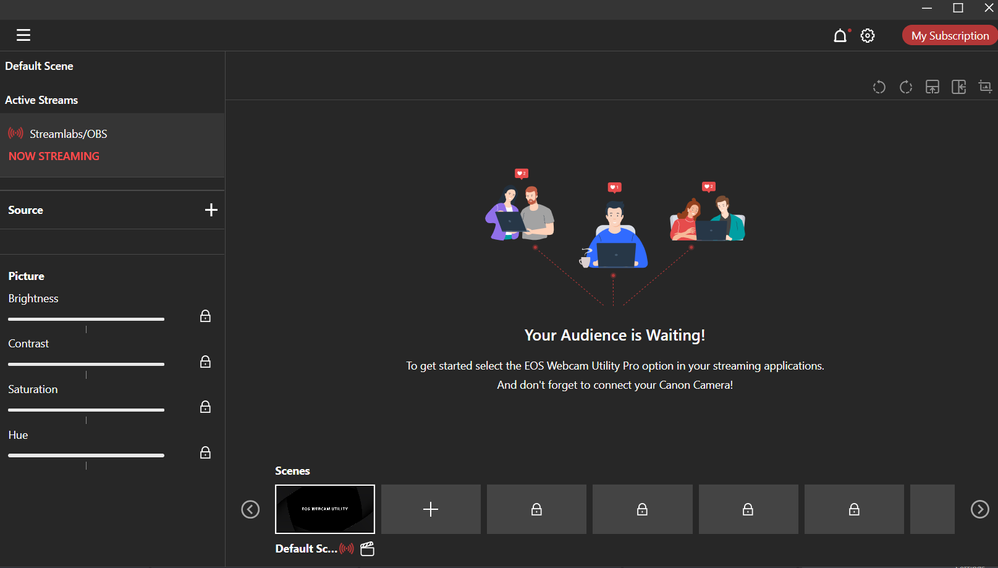
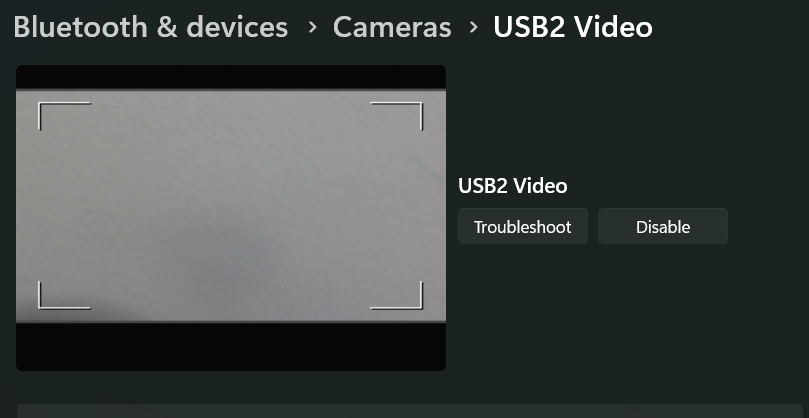
I am using canon 750d, WIFI turned off
8 REPLIES 8


Options
- Mark as New
- Bookmark
- Subscribe
- Mute
- Subscribe to RSS Feed
- Permalink
- Report Inappropriate Content
03-06-2024 08:08 PM
“ I have a capture card and everything I searched on google tried everything and nothing is helping, now the pc does recognize usb2 video but I cant use it raw like this cuz it's basically just screen recording and the grids are still there, anyways I tried every software from beta to pro to others and yes I did make sure I turn off all the other utility softwares and still nothing.. “
Do you need to disable Wi-Fi?
--------------------------------------------------------
"Enjoying photography since 1972."
"Enjoying photography since 1972."
Options
- Mark as New
- Bookmark
- Subscribe
- Mute
- Subscribe to RSS Feed
- Permalink
- Report Inappropriate Content
03-06-2024 08:17 PM - edited 03-09-2024 07:27 PM
from what Ive heard you have to disable wifi to use hdmi
Options
- Mark as New
- Bookmark
- Subscribe
- Mute
- Subscribe to RSS Feed
- Permalink
- Report Inappropriate Content
03-07-2024 07:06 AM
EWC Utility does not use HDMI.
--------------------------------------------------------
"Enjoying photography since 1972."
"Enjoying photography since 1972."
Options
- Mark as New
- Bookmark
- Subscribe
- Mute
- Subscribe to RSS Feed
- Permalink
- Report Inappropriate Content
03-09-2024 11:16 PM
I still need help
Options
- Mark as New
- Bookmark
- Subscribe
- Mute
- Subscribe to RSS Feed
- Permalink
- Report Inappropriate Content
03-10-2024 06:20 AM
You have been told that you need to use a USB cable, not an HDMI cable. Set it aside.
--------------------------------------------------------
"Enjoying photography since 1972."
"Enjoying photography since 1972."
Options
- Mark as New
- Bookmark
- Subscribe
- Mute
- Subscribe to RSS Feed
- Permalink
- Report Inappropriate Content
03-10-2024 10:20 AM
yeah but for some reason the stupid camera wont recognize any cable unless it's pushes and angled in a certain way it's so annoying. I guess that means I need to buy a new camera.
Options
- Mark as New
- Bookmark
- Subscribe
- Mute
- Subscribe to RSS Feed
- Permalink
- Report Inappropriate Content
03-10-2024 10:58 AM - edited 03-10-2024 11:03 AM
Help someon to help you. It would be beneficial if you could tell us what OS you are running, as well as which app you are trying to use with the EWC Utility..
It goes without saying that you need to make sure you USB cable is a data cable, not a USB charging and power cable. The best way to test your USB cable is to see if you can connect to the camera using the regular EOS Utility.
The online instructions also tell you to shutdown and disable the regular EOS Utility to allow the EWC Utility to access the camera.
--------------------------------------------------------
"Enjoying photography since 1972."
"Enjoying photography since 1972."
Options
- Mark as New
- Bookmark
- Subscribe
- Mute
- Subscribe to RSS Feed
- Permalink
- Report Inappropriate Content
03-25-2024 05:59 PM - edited 03-25-2024 05:59 PM
Hi,
Have you tried disabling the integrated webcam? Something about the presence of more than one camera seems to cause problems. I found anther issue where this was the case and disabling the integrated webcam fixed the issue.
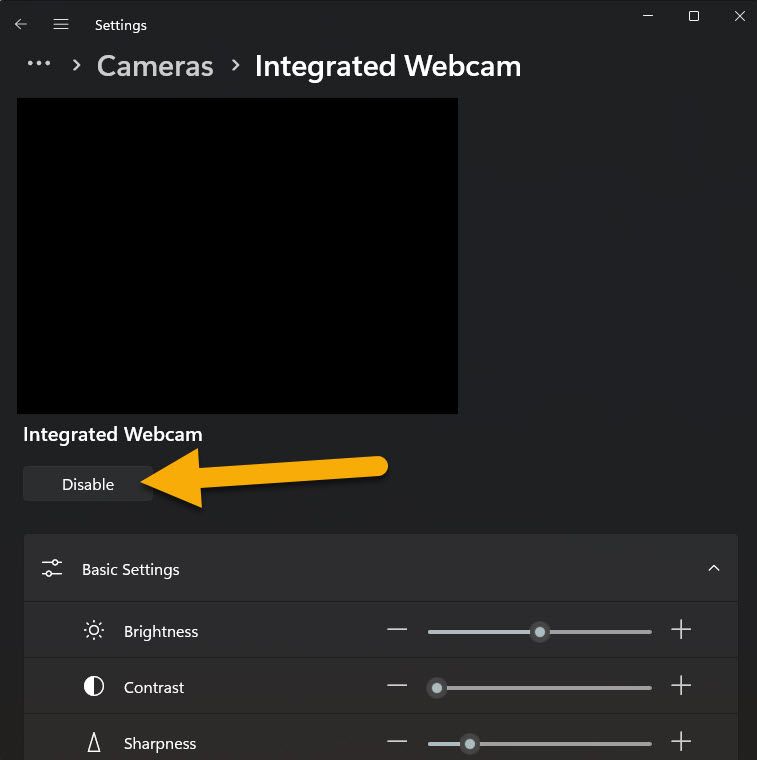
-Tony

Announcements
07/22/2026: New firmware updates are available.
EOS R6 Mark III - Version 1.1.0
05/13/2026: New firmware updates are available.
EOS R5 Mark II - Version 1.3.0
EOS R6 Mark II - Version 1.7.0
04/28/2026: Service Notice: Caution Concerning use of Lithium Batteries
03/17/2026: New firmware updates are available.
SELPHY CP1500 - Version 1.0.7.0
02/23/2026: New firmware update is available for EOS C50- Version 1.0.3.1
01/23/2026: New firmware update is available for RF 24-105mm F4 IS USM- Version 2.0.7
01/20/2026: New firmware updates are available.
10/21/2025: Service Notice: To Users of the Compact Digital Camera PowerShot V1
10/15/2025: New firmware updates are available.
Speedlite EL-5 - Version 1.2.0
Speedlite EL-1 - Version 1.1.0
Speedlite Transmitter ST-E10 - Version 1.2.0
07/28/2025: Notice of Free Repair Service for the Mirrorless Camera EOS R50 (Black)
05/21/2025: New firmware update available for EOS C500 Mark II - Version 1.1.5.1
Related Content
- EOS Webcam Utility stopped working after a Windows Update. in EOS Webcam Utility Pro - Discussions
- EOS Webcam utility pro not working with 6D Mark 2 in EOS Webcam Utility Pro - Discussions
- EOS Webcam Utility PRO does not work after upgrade to Windows 11 in EOS Webcam Utility Pro - Discussions
- EOS M50 mark ii Will not connect to EOS Utility Pro in EOS Webcam Utility Pro - Discussions
- Canon M50 won't connect to EOS Webcam Utility Pro in EOS Webcam Utility Pro - Discussions

Ⓒ 2026
Canon U.S.A Inc. All Rights Reserved. Reproduction in whole or part without permission is prohibited.
