Turn on suggestions
Auto-suggest helps you quickly narrow down your search results by suggesting possible matches as you type.
- Canon Community
- Discussions & Help
- EOS Webcam Utility Pro
- EOS Webcam Utility Pro - Discussions
- Canon EOS Rebel T6 not working with Webcam Utility
Options
- Subscribe to RSS Feed
- Mark Topic as New
- Mark Topic as Read
- Float this Topic for Current User
- Bookmark
- Subscribe
- Mute
- Printer Friendly Page

Options
- Mark as New
- Bookmark
- Subscribe
- Mute
- Subscribe to RSS Feed
- Permalink
- Report Inappropriate Content
12-30-2020 03:10 PM
I've been trying to get the webcam utility to work with my laptop, running Win10 Home, to no avail. Even after extracting and installing properly, it doesn't work and continues to display the USB error. I've tried all three USB ports and even the passthrough on my cooler, still no signal.
Solved! Go to Solution.
1 ACCEPTED SOLUTION
Accepted Solutions
Options
- Mark as New
- Bookmark
- Subscribe
- Mute
- Subscribe to RSS Feed
- Permalink
- Report Inappropriate Content
12-31-2020 12:01 AM
I had Wifi/NFC still turned on while trying to connect the USB. I completely failed to realize that having Wifi/NFC on disables any digital output via the ports on the camera.
8 REPLIES 8


Options
- Mark as New
- Bookmark
- Subscribe
- Mute
- Subscribe to RSS Feed
- Permalink
- Report Inappropriate Content
12-30-2020 03:58 PM
@Ignallis wrote:I've been trying to get the webcam utility to work with my laptop, running Win10 Home, to no avail. Even after extracting and installing properly, it doesn't work and continues to display the USB error. I've tried all three USB ports and even the passthrough on my cooler, still no signal.
What does "pass though on my cooler" mean?
Does the regular EOS Utility work with the camera? Can you use it to download files and perform remote shooting?
--------------------------------------------------------
"Enjoying photography since 1972."
"Enjoying photography since 1972."
Options
- Mark as New
- Bookmark
- Subscribe
- Mute
- Subscribe to RSS Feed
- Permalink
- Report Inappropriate Content
12-30-2020 04:30 PM
I have a laptop cooler with a USB passthrough port so I can still utilize the third USB port, and I haven't tried EOS Utility yet.
Options
- Mark as New
- Bookmark
- Subscribe
- Mute
- Subscribe to RSS Feed
- Permalink
- Report Inappropriate Content
12-30-2020 04:55 PM - edited 12-30-2020 04:56 PM
Update: Upon installing EOS Utility, it said the camera was not recognized, despite it being compatible (EOS Rebel T6) and trying all three ports.
Options
- Mark as New
- Bookmark
- Subscribe
- Mute
- Subscribe to RSS Feed
- Permalink
- Report Inappropriate Content
12-30-2020 05:21 PM
@Ignallis wrote:Update: Upon installing EOS Utility, it said the camera was not recognized, despite it being compatible (EOS Rebel T6) and trying all three ports.
I still don't know what "laptop cooler" might be. Disconnect it.
What is the exact error message from the EOS Utlity? What is the name of the program giving you the message?
Can you see a little icon in the system tray of icons near the system clock on the lower right? Before you connect the camera and turn it on, right-click that icon and select "Exit".
--------------------------------------------------------
"Enjoying photography since 1972."
"Enjoying photography since 1972."
Options
- Mark as New
- Bookmark
- Subscribe
- Mute
- Subscribe to RSS Feed
- Permalink
- Report Inappropriate Content
12-30-2020 05:23 PM
Refer to these forum pages for tips and tricks
https://community.usa.canon.com/t5/Canon-EOS-Webcam-Utility/bg-p/CanonEOSWebcamUtility
--------------------------------------------------------
"Enjoying photography since 1972."
"Enjoying photography since 1972."
Options
- Mark as New
- Bookmark
- Subscribe
- Mute
- Subscribe to RSS Feed
- Permalink
- Report Inappropriate Content
12-30-2020 06:11 PM
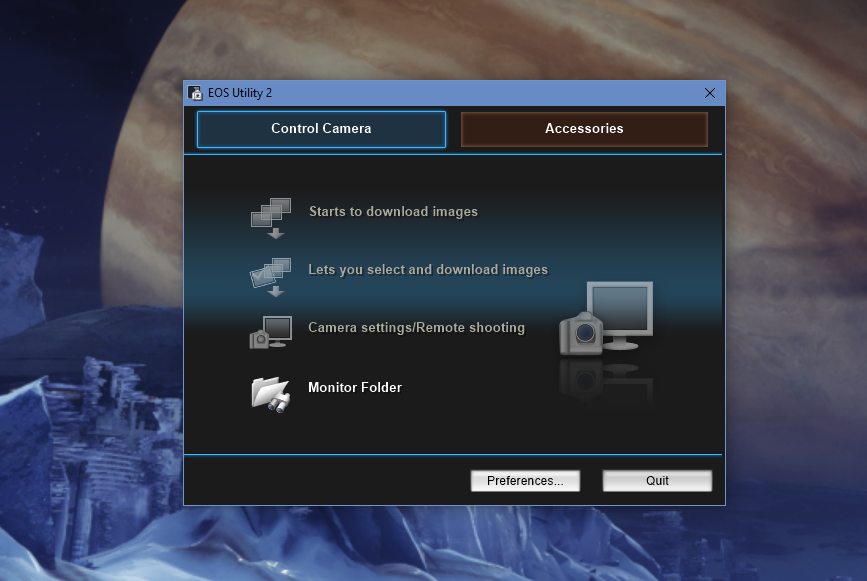
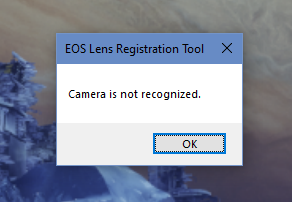
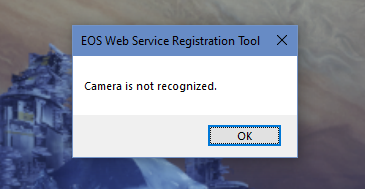
These are the errors I get from the registration tools, and when opening the EOS Utility 2 app, I don't get any highlighted option except for Monitor Folder
Options
- Mark as New
- Bookmark
- Subscribe
- Mute
- Subscribe to RSS Feed
- Permalink
- Report Inappropriate Content
12-31-2020 12:01 AM
I had Wifi/NFC still turned on while trying to connect the USB. I completely failed to realize that having Wifi/NFC on disables any digital output via the ports on the camera.
Options
- Mark as New
- Bookmark
- Subscribe
- Mute
- Subscribe to RSS Feed
- Permalink
- Report Inappropriate Content
11-29-2021 10:27 AM
This solved it for me! I had tried multiple cables, different ports... to no avail. Didn't realize that Wifi/NFC disabled the USB system -- I feel like that should be highlighted better by Canon somewhere in their tipcs/tricks for the EOS webcam documentation. Thank you!


Announcements
07/22/2026: New firmware updates are available.
EOS R6 Mark III - Version 1.1.0
05/13/2026: New firmware updates are available.
EOS R5 Mark II - Version 1.3.0
EOS R6 Mark II - Version 1.7.0
04/28/2026: Service Notice: Caution Concerning use of Lithium Batteries
03/17/2026: New firmware updates are available.
SELPHY CP1500 - Version 1.0.7.0
02/23/2026: New firmware update is available for EOS C50- Version 1.0.3.1
01/23/2026: New firmware update is available for RF 24-105mm F4 IS USM- Version 2.0.7
01/20/2026: New firmware updates are available.
10/21/2025: Service Notice: To Users of the Compact Digital Camera PowerShot V1
10/15/2025: New firmware updates are available.
Speedlite EL-5 - Version 1.2.0
Speedlite EL-1 - Version 1.1.0
Speedlite Transmitter ST-E10 - Version 1.2.0
07/28/2025: Notice of Free Repair Service for the Mirrorless Camera EOS R50 (Black)
05/21/2025: New firmware update available for EOS C500 Mark II - Version 1.1.5.1
Related Content
- eos webcam utility pro on windows 10 home not working in EOS Webcam Utility Pro - Discussions
- EOS Webcam Utility stopped working after a Windows Update. in EOS Webcam Utility Pro - Discussions
- This version of "EOSWebcamUtility" will not open in a future release of MacOS in EOS Webcam Utility Pro - Discussions
- EOS Webcam utility pro not working with 6D Mark 2 in EOS Webcam Utility Pro - Discussions
- EOS Webcam Utility PRO does not work after upgrade to Windows 11 in EOS Webcam Utility Pro - Discussions

Ⓒ 2026
Canon U.S.A Inc. All Rights Reserved. Reproduction in whole or part without permission is prohibited.
