Turn on suggestions
Auto-suggest helps you quickly narrow down your search results by suggesting possible matches as you type.
- Canon Community
- Discussions & Help
- Camera
- EOS DSLR & Mirrorless Cameras
- can i transfer pc pictures to the canon eos rebel ...
Options
- Subscribe to RSS Feed
- Mark Topic as New
- Mark Topic as Read
- Float this Topic for Current User
- Bookmark
- Subscribe
- Mute
- Printer Friendly Page

Options
- Mark as New
- Bookmark
- Subscribe
- Mute
- Subscribe to RSS Feed
- Permalink
- Report Inappropriate Content
08-13-2025 03:36 AM
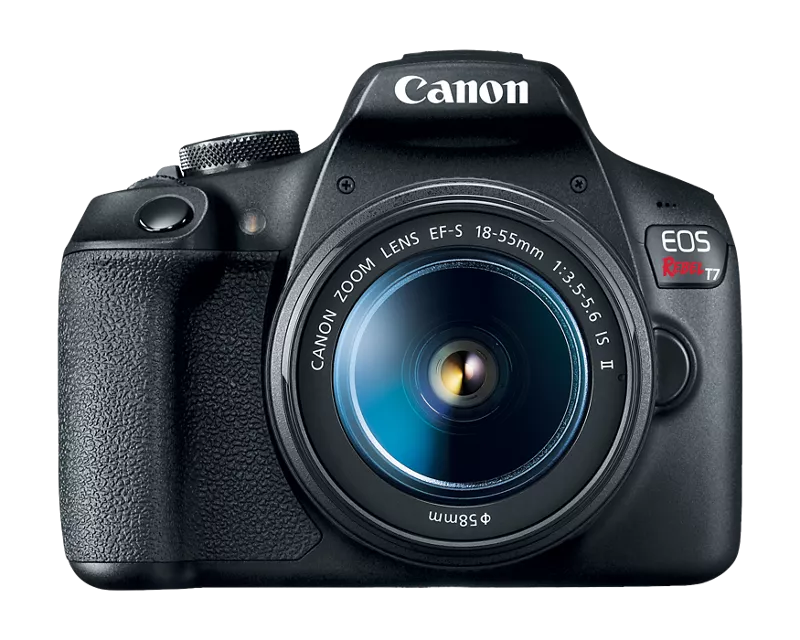
i was trying to format the card and i lost all my pictures and videos but i saved them to a folder on my pc and now i want to put it back on the camera. is there a way i can transfer the pictures and videos i saved to my pc onto the canon eos rebel t7? thank you so much for your help!
Solved! Go to Solution.
1 ACCEPTED SOLUTION
Accepted Solutions


Options
- Mark as New
- Bookmark
- Subscribe
- Mute
- Subscribe to RSS Feed
- Permalink
- Report Inappropriate Content
08-13-2025 03:53 AM
Negative. The only recognized media files that it saves. It will not recognize media files saved by anything else.
--------------------------------------------------------
"Enjoying photography since 1972."
"Enjoying photography since 1972."
4 REPLIES 4
Options
- Mark as New
- Bookmark
- Subscribe
- Mute
- Subscribe to RSS Feed
- Permalink
- Report Inappropriate Content
08-13-2025 03:53 AM
Negative. The only recognized media files that it saves. It will not recognize media files saved by anything else.
--------------------------------------------------------
"Enjoying photography since 1972."
"Enjoying photography since 1972."
Options
- Mark as New
- Bookmark
- Subscribe
- Mute
- Subscribe to RSS Feed
- Permalink
- Report Inappropriate Content
08-13-2025 09:40 AM - edited 08-13-2025 09:41 AM
Is there a reason that you would want the images back on the camera? I ask this because sooner or later you will have to copy them off to give you room on the memory card, and your hard drive is much more reliable for storage than a SD card. Also I would recommend to put your files in more than storage location for safety's sake.

Options
- Mark as New
- Bookmark
- Subscribe
- Mute
- Subscribe to RSS Feed
- Permalink
- Report Inappropriate Content
08-13-2025 12:36 PM
You say you were "trying" to format the SD card. Well, you succeeded. No surprise. Formatting wipes out whatever is there.
You're going backwards in your thinking. The camera SHOULD NOT be the storage place for your photos. Your computer's hard drive, external drives, flash drives, even CDs are for that. Yes, people fill their camera's memory card, or their smart phone, with their photos because they think of it as their portable photo album. That's dangerous. An accident, like in your case, or a memory card failure, means you lose EVERYTHING.
Move your photos OFF your camera routinely....weekly, daily, during the day, whatever. And use multiple SD cards. Swap during the day. This ensures that if you have a card failure or deleting/formatting accident, you will not be losing EVERYTHING!

Options
- Mark as New
- Bookmark
- Subscribe
- Mute
- Subscribe to RSS Feed
- Permalink
- Report Inappropriate Content
08-13-2025 05:00 PM
@kookiesensen wrote:
i was trying to format the card and i lost all my pictures and videos but i saved them to a folder on my pc and now i want to put it back on the camera. is there a way i can transfer the pictures and videos i saved to my pc onto the canon eos rebel t7? thank you so much for your help!
Provided the images haven't been edited by an image editor and were simply copied to a folder on your PC, then yes, you can copy them back to the DCIM folder on the card. Just do the reverse of what you did to copy them to the PC.
I just tested this on my T7i which shouldn't be much different than the T7 in this case.
Newton

Announcements
04/28/2026: Service Notice: Caution Concerning use of Lithium Batteries
02/23/2026: New firmware update is available for EOS C50- Version 1.0.3.1
01/23/2026: New firmware update is available for RF 24-105mm F4 IS USM- Version 2.0.7
12/22/2025: New firmware update is available for EOS R6 Mark III- Version 1.0.2
10/21/2025: Service Notice: To Users of the Compact Digital Camera PowerShot V1
07/28/2025: Notice of Free Repair Service for the Mirrorless Camera EOS R50 (Black)
05/21/2025: New firmware update available for EOS C500 Mark II - Version 1.1.5.1
03/17/2026: New firmware updates are available.
SELPHY CP1500 - Version 1.0.7.0
02/23/2026: New firmware update is available for EOS C50- Version 1.0.3.1
01/23/2026: New firmware update is available for RF 24-105mm F4 IS USM- Version 2.0.7
01/20/2026: New firmware updates are available.
12/22/2025: New firmware update is available for EOS R6 Mark III- Version 1.0.2
11/20/2025: New firmware updates are available.
EOS R5 Mark II - Version 1.2.0
PowerShot G7 X Mark III - Version 1.4.0
PowerShot SX740 HS - Version 1.0.2
10/21/2025: Service Notice: To Users of the Compact Digital Camera PowerShot V1
10/15/2025: New firmware updates are available.
Speedlite EL-5 - Version 1.2.0
Speedlite EL-1 - Version 1.1.0
Speedlite Transmitter ST-E10 - Version 1.2.0
07/28/2025: Notice of Free Repair Service for the Mirrorless Camera EOS R50 (Black)
7/17/2025: New firmware updates are available.
05/21/2025: New firmware update available for EOS C500 Mark II - Version 1.1.5.1
Related Content
- EOS R7 + EF-S 18-135 electronic shutter noise in EOS DSLR & Mirrorless Cameras
- Tinkering with aperture priority and Auto ISO in EOS DSLR & Mirrorless Cameras
- Nostalgic For Old Canon in Point & Shoot Digital Cameras
- Using the EF 85mm 1:1.8 in EOS DSLR & Mirrorless Cameras
- Canon PowerShot SX740 HS no image/funtion seems normal in Point & Shoot Digital Cameras

Ⓒ 2026
Canon U.S.A Inc. All Rights Reserved. Reproduction in whole or part without permission is prohibited.
