Turn on suggestions
Auto-suggest helps you quickly narrow down your search results by suggesting possible matches as you type.
- Canon Community
- Discussions & Help
- Camera
- EOS DSLR & Mirrorless Cameras
- Re: Using back button focus for LCD screen on the ...
Options
- Subscribe to RSS Feed
- Mark Topic as New
- Mark Topic as Read
- Float this Topic for Current User
- Bookmark
- Subscribe
- Mute
- Printer Friendly Page

Options
- Mark as New
- Bookmark
- Subscribe
- Mute
- Subscribe to RSS Feed
- Permalink
- Report Inappropriate Content
07-04-2016 03:48 PM - edited 07-04-2016 03:49 PM
I used this method all the time, but now when I press the back button focus, it clicks like it is taking a picture, but no picture is recorded on the SD card. When I look through the viewfinder and use the back button focus, it works perfectly. I would like to know how to get back to the former method of focusing on the LCD screen with the back button focus. My Canon is a 60D
Solved! Go to Solution.
1 ACCEPTED SOLUTION
Accepted Solutions

Options
- Mark as New
- Bookmark
- Subscribe
- Mute
- Subscribe to RSS Feed
- Permalink
- Report Inappropriate Content
07-04-2016 04:16 PM - edited 07-04-2016 04:17 PM
@pixeltaker wrote:I used this method all the time, but now when I press the back button focus, it clicks like it is taking a picture, but no picture is recorded on the SD card. When I look through the viewfinder and use the back button focus, it works perfectly. I would like to know how to get back to the former method of focusing on the LCD screen with the back button focus. My Canon is a 60D
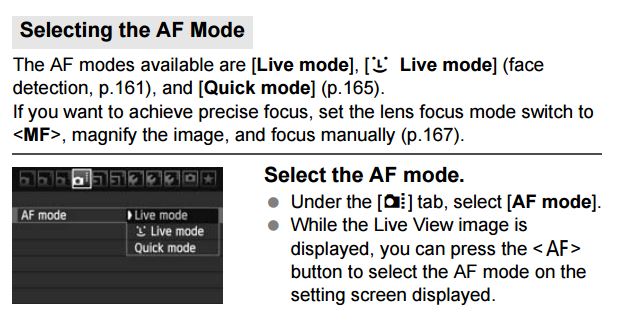
You need to go to the menu and change from Quick mode to Live Mode. In Quick mode, when you press the back button focus, the mirror flips back down (the audible click) and the camera is trying to focus. It hasn't taken the picture yet. To take a picture, you must listen to the AF confirm beep then press the shutter button. Quick mode is actually the slow mode, in my opinion :). Read more on this from page 160-168 of the instruction manual.
================================================
Diverhank's photos on Flickr
Diverhank's photos on Flickr
2 REPLIES 2
Options
- Mark as New
- Bookmark
- Subscribe
- Mute
- Subscribe to RSS Feed
- Permalink
- Report Inappropriate Content
07-04-2016 04:16 PM - edited 07-04-2016 04:17 PM
@pixeltaker wrote:I used this method all the time, but now when I press the back button focus, it clicks like it is taking a picture, but no picture is recorded on the SD card. When I look through the viewfinder and use the back button focus, it works perfectly. I would like to know how to get back to the former method of focusing on the LCD screen with the back button focus. My Canon is a 60D
You need to go to the menu and change from Quick mode to Live Mode. In Quick mode, when you press the back button focus, the mirror flips back down (the audible click) and the camera is trying to focus. It hasn't taken the picture yet. To take a picture, you must listen to the AF confirm beep then press the shutter button. Quick mode is actually the slow mode, in my opinion :). Read more on this from page 160-168 of the instruction manual.
================================================
Diverhank's photos on Flickr
Diverhank's photos on Flickr
Options
- Mark as New
- Bookmark
- Subscribe
- Mute
- Subscribe to RSS Feed
- Permalink
- Report Inappropriate Content
07-04-2016 04:22 PM
That was it!!! Thank you so much.


Announcements
07/22/2026: New firmware updates are available.
EOS R6 Mark III - Version 1.1.0
05/13/2026: New firmware updates are available.
EOS R5 Mark II - Version 1.3.0
EOS R6 Mark II - Version 1.7.0
04/28/2026: Service Notice: Caution Concerning use of Lithium Batteries
03/17/2026: New firmware updates are available.
SELPHY CP1500 - Version 1.0.7.0
02/23/2026: New firmware update is available for EOS C50- Version 1.0.3.1
01/23/2026: New firmware update is available for RF 24-105mm F4 IS USM- Version 2.0.7
01/20/2026: New firmware updates are available.
10/21/2025: Service Notice: To Users of the Compact Digital Camera PowerShot V1
10/15/2025: New firmware updates are available.
Speedlite EL-5 - Version 1.2.0
Speedlite EL-1 - Version 1.1.0
Speedlite Transmitter ST-E10 - Version 1.2.0
07/28/2025: Notice of Free Repair Service for the Mirrorless Camera EOS R50 (Black)
05/21/2025: New firmware update available for EOS C500 Mark II - Version 1.1.5.1
Related Content
- EOS Rebel XTi still usable with broken pin in card slot? in EOS DSLR & Mirrorless Cameras
- 7d mkii lcd screen is black on startup until I press a button ??? in EOS DSLR & Mirrorless Cameras
- EOS R5 + EF-EOS R Adapter: RF lenses work perfectly, but no AF and no shutter with any EF lenses in EOS DSLR & Mirrorless Cameras
- EOS R7 How to Create Panning Photos Using the Articulating Screen in EOS DSLR & Mirrorless Cameras
- PowerShot SX60 HS Difficulty focusing even in well-lit environments in Point & Shoot Digital Cameras

Ⓒ 2026
Canon U.S.A Inc. All Rights Reserved. Reproduction in whole or part without permission is prohibited.
