Turn on suggestions
Auto-suggest helps you quickly narrow down your search results by suggesting possible matches as you type.
- Canon Community
- Discussions & Help
- Camera
- EOS DSLR & Mirrorless Cameras
- Re: T6 Autofocus Issues
Options
- Subscribe to RSS Feed
- Mark Topic as New
- Mark Topic as Read
- Float this Topic for Current User
- Bookmark
- Subscribe
- Mute
- Printer Friendly Page
T6 Autofocus Issues

Options
- Mark as New
- Bookmark
- Subscribe
- Mute
- Subscribe to RSS Feed
- Permalink
- Report Inappropriate Content
07-23-2018 05:29 PM
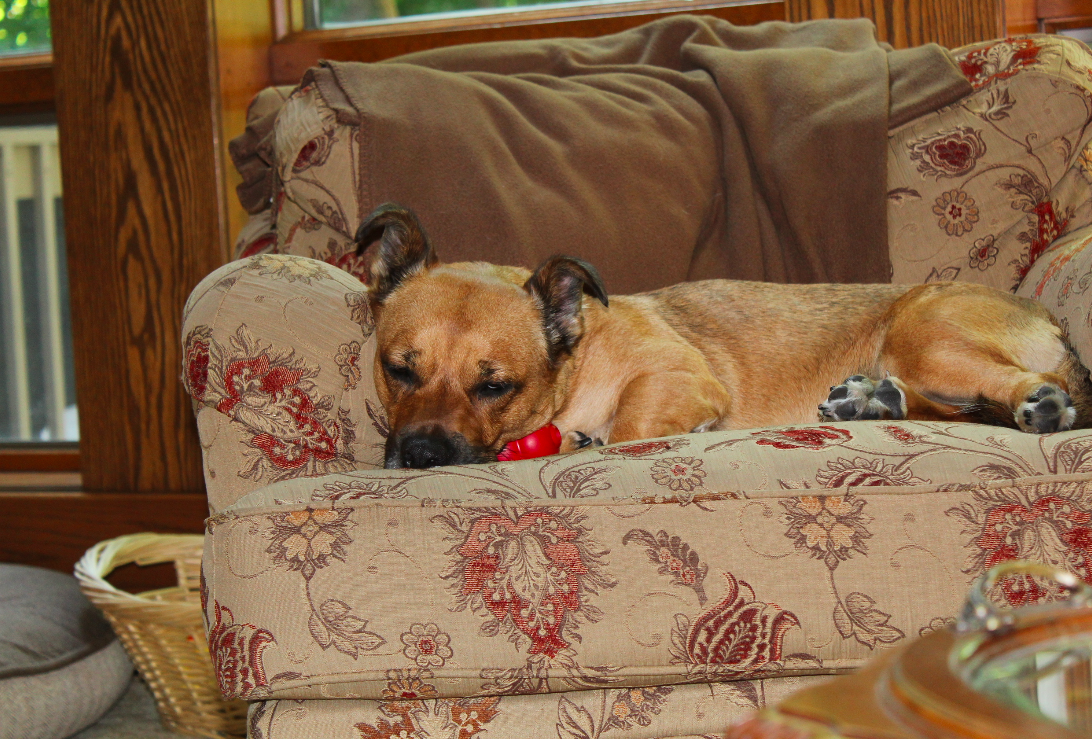
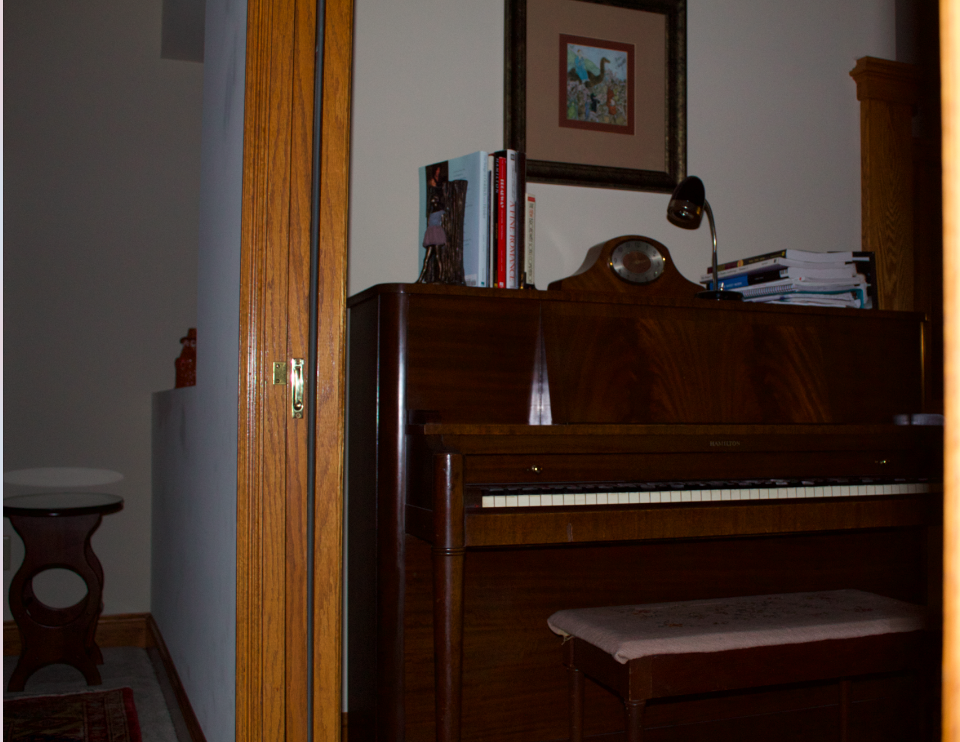
The auto mode for my T6 has been acting really weird. The first pic is what it normally looks like. The second is what it has looked like lately. Same lighting. I reset the settings and it hasnt seemed to do anything. I have gotten these to work on the other modes, but auto has been really wonky. Any ideas?
8 REPLIES 8
Options
- Mark as New
- Bookmark
- Subscribe
- Mute
- Subscribe to RSS Feed
- Permalink
- Report Inappropriate Content
07-23-2018 11:42 PM
Hello timthemusicman,
So the community may provide assistance, we recommend including more information. We recommend letting us know what lens or lenses you have tried on this issue. Also, it appears that the built in flash was used on the second photo which caused this harsh lighting effect.
Did this answer your question? Please click the Accept as Solution button so that others may find the answer as well.
Options
- Mark as New
- Bookmark
- Subscribe
- Mute
- Subscribe to RSS Feed
- Permalink
- Report Inappropriate Content
07-23-2018 11:46 PM
I was using the EF 75-300mm and the EF-S 18-55mm. And I believe the built in flash was used for both photos.


Options
- Mark as New
- Bookmark
- Subscribe
- Mute
- Subscribe to RSS Feed
- Permalink
- Report Inappropriate Content
07-24-2018 12:01 PM
If you used the ef 75-300mm zoom in either shot I am surprised you got anything. It is not an indoor lens at all.
First shot looks fine. Second shot shows some camera movement to me and if it was with the 75-300 that is probably the issue.
EB
EOS 1DX and many lenses.
EOS 1DX and many lenses.
Options
- Mark as New
- Bookmark
- Subscribe
- Mute
- Subscribe to RSS Feed
- Permalink
- Report Inappropriate Content
07-24-2018 12:02 PM
BTW, neither shot is bad.
EB
EOS 1DX and many lenses.
EOS 1DX and many lenses.

Options
- Mark as New
- Bookmark
- Subscribe
- Mute
- Subscribe to RSS Feed
- Permalink
- Report Inappropriate Content
07-24-2018 01:57 PM
@timthemusicman wrote:The auto mode for my T6 has been acting really weird. The first pic is what it normally looks like. The second is what it has looked like lately. Same lighting. I reset the settings and it hasnt seemed to do anything. I have gotten these to work on the other modes, but auto has been really wonky. Any ideas?
What I think you're seeing in the second shot is an ETTL flash's aversion to blown highlights. The camera and flash are exposing for the bright spots, leaving everything else too dark. If you were using an add-on flash, I'd tell you try to try bounce flash. As it is, you should probably expose for the background and treat the flash as fill.
Bob
Philadelphia, Pennsylvania USA
Philadelphia, Pennsylvania USA

Options
- Mark as New
- Bookmark
- Subscribe
- Mute
- Subscribe to RSS Feed
- Permalink
- Report Inappropriate Content
07-24-2018 03:38 PM
Do you really mean "Autofocus Issues" as your thread title states? Or are you questioning the Auto Exposure results you're getting?
Options
- Mark as New
- Bookmark
- Subscribe
- Mute
- Subscribe to RSS Feed
- Permalink
- Report Inappropriate Content
07-24-2018 03:39 PM
I probably mean the auto exposure. I'm new to this. I'm only seeing this issue on auto mode

Options
- Mark as New
- Bookmark
- Subscribe
- Mute
- Subscribe to RSS Feed
- Permalink
- Report Inappropriate Content
07-24-2018 08:04 PM
@timthemusicman wrote:
I probably mean the auto exposure. I'm new to this. I'm only seeing this issue on auto mode
I think your “this issue” is called DOF, Depth-Of-Field. I think your photos look fine for the gear and conditions.
--------------------------------------------------------
"Enjoying photography since 1972."
"Enjoying photography since 1972."


Announcements
07/22/2026: New firmware updates are available.
EOS R6 Mark III - Version 1.1.0
05/13/2026: New firmware updates are available.
EOS R5 Mark II - Version 1.3.0
EOS R6 Mark II - Version 1.7.0
04/28/2026: Service Notice: Caution Concerning use of Lithium Batteries
03/17/2026: New firmware updates are available.
SELPHY CP1500 - Version 1.0.7.0
02/23/2026: New firmware update is available for EOS C50- Version 1.0.3.1
01/23/2026: New firmware update is available for RF 24-105mm F4 IS USM- Version 2.0.7
01/20/2026: New firmware updates are available.
10/21/2025: Service Notice: To Users of the Compact Digital Camera PowerShot V1
10/15/2025: New firmware updates are available.
Speedlite EL-5 - Version 1.2.0
Speedlite EL-1 - Version 1.1.0
Speedlite Transmitter ST-E10 - Version 1.2.0
07/28/2025: Notice of Free Repair Service for the Mirrorless Camera EOS R50 (Black)
05/21/2025: New firmware update available for EOS C500 Mark II - Version 1.1.5.1
Related Content
- Manual focus not working with Canon RF 24-70mm F2.8L on R6MII in EF & RF Lenses
- EOS M100 Error E60 When Enabling Wi-Fi in EOS DSLR & Mirrorless Cameras
- Possible to tell if PowerShot V1 is refurbished? Should a new one be sealed? in Point & Shoot Digital Cameras
- Need disassembly instructions for a Canon F1-N 1984 Olympic version in EOS DSLR & Mirrorless Cameras
- CFexpress 128GB capacity error on Canon R6 V – Shows "Full" but only 6GB are used in EOS DSLR & Mirrorless Cameras

Ⓒ 2026
Canon U.S.A Inc. All Rights Reserved. Reproduction in whole or part without permission is prohibited.
