Turn on suggestions
Auto-suggest helps you quickly narrow down your search results by suggesting possible matches as you type.
- Canon Community
- Discussions & Help
- Camera
- EOS DSLR & Mirrorless Cameras
- Re: How do I shoot in Raw and jpeg at the same tim...
Options
- Subscribe to RSS Feed
- Mark Topic as New
- Mark Topic as Read
- Float this Topic for Current User
- Bookmark
- Subscribe
- Mute
- Printer Friendly Page

Options
- Mark as New
- Bookmark
- Subscribe
- Mute
- Subscribe to RSS Feed
- Permalink
- Report Inappropriate Content
01-10-2017 08:57 AM
Canon 6D. I've been shooting in jpeg for a long time. I'm trying to start using Raw some. When I select to shoot in Raw and Jpeg together (Raw/Ljpeg), it seems I'm only getting pics in Raw. All pics suffix are CR2. What am I doing wrong?
Solved! Go to Solution.
1 ACCEPTED SOLUTION
Accepted Solutions


Options
- Mark as New
- Bookmark
- Subscribe
- Mute
- Subscribe to RSS Feed
- Permalink
- Report Inappropriate Content
01-24-2017 10:02 PM
Mac or PC? For PC choose Edit->Preferences->General.
For Mac choose Lightroom->Preferences->General.
For Mac choose Lightroom->Preferences->General.
John Hoffman
Conway, NH
R6 Mark III, M200 (converted to infrared), RF lenses, Pixma PRO-100, Pixma TR8620a, Lr Classic
Conway, NH
R6 Mark III, M200 (converted to infrared), RF lenses, Pixma PRO-100, Pixma TR8620a, Lr Classic
19 REPLIES 19

Options
- Mark as New
- Bookmark
- Subscribe
- Mute
- Subscribe to RSS Feed
- Permalink
- Report Inappropriate Content
01-10-2017 09:40 AM
What software are you using? Have you tried a card reader to look at the files directly?
Options
- Mark as New
- Bookmark
- Subscribe
- Mute
- Subscribe to RSS Feed
- Permalink
- Report Inappropriate Content
01-10-2017 09:57 AM
Some software will treat RAW next to JPEG as a single file and only show the RAW.

John Hoffman
Conway, NH
R6 Mark III, M200 (converted to infrared), RF lenses, Pixma PRO-100, Pixma TR8620a, Lr Classic
Conway, NH
R6 Mark III, M200 (converted to infrared), RF lenses, Pixma PRO-100, Pixma TR8620a, Lr Classic

Options
- Mark as New
- Bookmark
- Subscribe
- Mute
- Subscribe to RSS Feed
- Permalink
- Report Inappropriate Content
01-10-2017 10:41 AM
"When I select to shoot in Raw and Jpeg together (Raw/Ljpeg), it seems I'm only getting pics in Raw."
I am just curious, why do you want a jpg at all? I know in the past there was some valid needs for a jpg. However, today that need is almost nonexistent. Today's software makes the need so very much less.
Anyway depending on what software you are using, it is likely a setting in it somewhere.
EB
EOS 1DX and many lenses.
EOS 1DX and many lenses.

Options
- Mark as New
- Bookmark
- Subscribe
- Mute
- Subscribe to RSS Feed
- Permalink
- Report Inappropriate Content
01-10-2017 12:03 PM
@chitch7 wrote:Canon 6D. I've been shooting in jpeg for a long time. I'm trying to start using Raw some. When I select to shoot in Raw and Jpeg together (Raw/Ljpeg), it seems I'm only getting pics in Raw. All pics suffix are CR2. What am I doing wrong?
Make sure you have the option set correctly. It should be like the lower left image for storing both formats.
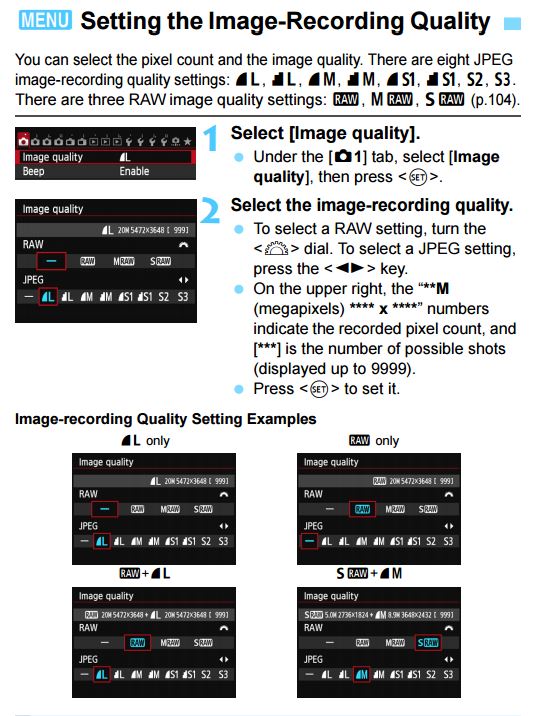
I’d just save in the RAW then use post processing to convert to jpeg. In the past I tried saving both but always ended up deleting the out of camera jpeg files anyway.
================================================
Diverhank's photos on Flickr
Diverhank's photos on Flickr
Options
- Mark as New
- Bookmark
- Subscribe
- Mute
- Subscribe to RSS Feed
- Permalink
- Report Inappropriate Content
01-12-2017 07:41 AM
I'm using Lightroom and all the pics have a suffix of CR2.
Options
- Mark as New
- Bookmark
- Subscribe
- Mute
- Subscribe to RSS Feed
- Permalink
- Report Inappropriate Content
01-12-2017 07:44 AM
It is Raw + L.
Options
- Mark as New
- Bookmark
- Subscribe
- Mute
- Subscribe to RSS Feed
- Permalink
- Report Inappropriate Content
01-12-2017 07:45 AM
Did you verify the setting shown in Message #3 above?
John Hoffman
Conway, NH
R6 Mark III, M200 (converted to infrared), RF lenses, Pixma PRO-100, Pixma TR8620a, Lr Classic
Conway, NH
R6 Mark III, M200 (converted to infrared), RF lenses, Pixma PRO-100, Pixma TR8620a, Lr Classic
Options
- Mark as New
- Bookmark
- Subscribe
- Mute
- Subscribe to RSS Feed
- Permalink
- Report Inappropriate Content
01-12-2017 07:45 AM
Thanks! I'll check that out this afternoon when I get off work.

Options
- Mark as New
- Bookmark
- Subscribe
- Mute
- Subscribe to RSS Feed
- Permalink
- Report Inappropriate Content
01-12-2017 08:30 AM
@jrhoffman75 wrote:Did you verify the setting shown in Message #3 above?
This also begs the question, how are photos being imported into LR from the camera. Seems like a USB cable, to me.
--------------------------------------------------------
"Enjoying photography since 1972."
"Enjoying photography since 1972."


Announcements
05/13/2026: New firmware updates are available.
EOS R5 Mark II - Version 1.3.0
EOS R6 Mark II - Version 1.7.0
04/28/2026: Service Notice: Caution Concerning use of Lithium Batteries
03/17/2026: New firmware updates are available.
SELPHY CP1500 - Version 1.0.7.0
02/23/2026: New firmware update is available for EOS C50- Version 1.0.3.1
01/23/2026: New firmware update is available for RF 24-105mm F4 IS USM- Version 2.0.7
01/20/2026: New firmware updates are available.
12/22/2025: New firmware update is available for EOS R6 Mark III- Version 1.0.2
10/21/2025: Service Notice: To Users of the Compact Digital Camera PowerShot V1
10/15/2025: New firmware updates are available.
Speedlite EL-5 - Version 1.2.0
Speedlite EL-1 - Version 1.1.0
Speedlite Transmitter ST-E10 - Version 1.2.0
07/28/2025: Notice of Free Repair Service for the Mirrorless Camera EOS R50 (Black)
05/21/2025: New firmware update available for EOS C500 Mark II - Version 1.1.5.1
Related Content
- Digital Photo Professional - New release 4.21.30 in Camera Software
- Realtime Exposure Zebras For Stills Photography in the Canon EOS R5 Mark II in EOS DSLR & Mirrorless Cameras
- Best way to remove ND color casts in DPP4? in Camera Software
- No White Balance option on Canon Camera Connect app in Camera Software
- Update Firmware on Powershot V1 with a blank screen? in Point & Shoot Digital Cameras

Ⓒ 2026
Canon U.S.A Inc. All Rights Reserved. Reproduction in whole or part without permission is prohibited.
