Turn on suggestions
Auto-suggest helps you quickly narrow down your search results by suggesting possible matches as you type.
- Canon Community
- Discussions & Help
- Camera
- EOS DSLR & Mirrorless Cameras
- Re: Focus issue with action shot
Options
- Subscribe to RSS Feed
- Mark Topic as New
- Mark Topic as Read
- Float this Topic for Current User
- Bookmark
- Subscribe
- Mute
- Printer Friendly Page
Focus issue with action shot

Options
- Mark as New
- Bookmark
- Subscribe
- Mute
- Subscribe to RSS Feed
- Permalink
- Report Inappropriate Content
04-26-2016 04:24 PM - edited 04-26-2016 04:29 PM
Hi everyone. We are having an ongoing issue with photographing running dogs. Almost every time, even with high shutter speed and in AI servo mode, the face of the dog is not in focus. We are focusing on the face, but it appears that the camera/lens is not locking on the face because, as you can see from this example, the tail is in focus, and the face isn't - leading me to believe the camera is not tracking the face. Can you also let us know which focus mode we should be in?
Canon T3i, stock 55-250 lens
Please help 🙂 Thank you
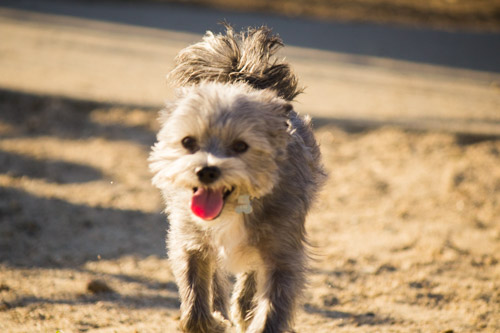
8 REPLIES 8


Options
- Mark as New
- Bookmark
- Subscribe
- Mute
- Subscribe to RSS Feed
- Permalink
- Report Inappropriate Content
04-26-2016 04:26 PM
What camera and lens?
Options
- Mark as New
- Bookmark
- Subscribe
- Mute
- Subscribe to RSS Feed
- Permalink
- Report Inappropriate Content
04-26-2016 04:29 PM
Sorry - t3i and the 55-250 lens that came with it
Options
- Mark as New
- Bookmark
- Subscribe
- Mute
- Subscribe to RSS Feed
- Permalink
- Report Inappropriate Content
04-26-2016 06:13 PM
That rules out micro-focus adjust.

Options
- Mark as New
- Bookmark
- Subscribe
- Mute
- Subscribe to RSS Feed
- Permalink
- Report Inappropriate Content
04-26-2016 07:15 PM
Are you putting center focus point on face and giving camera about ½ second with shutter depressed halfway to "do the math"?
John Hoffman
Conway, NH
R6 Mark III, M200 (converted to infrared), RF lenses, Pixma PRO-100, Pixma TR8620a, Lr Classic
Conway, NH
R6 Mark III, M200 (converted to infrared), RF lenses, Pixma PRO-100, Pixma TR8620a, Lr Classic

Options
- Mark as New
- Bookmark
- Subscribe
- Mute
- Subscribe to RSS Feed
- Permalink
- Report Inappropriate Content
04-26-2016 08:09 PM
Tend to agree with the above technique. AI Servo needs to be tracking for a bit in order to calculate where the AF thinks the target will be by the time the shutter does it's job.
"A skill is developed through constant practice with a passion to improve, not bought."

Options
- Mark as New
- Bookmark
- Subscribe
- Mute
- Subscribe to RSS Feed
- Permalink
- Report Inappropriate Content
04-26-2016 08:23 PM
Something running towards you is hard for the autofocus to deal with. T3i also does not have terribly sophisticated autofocus. Try dogs running perpendicular to you, and practice panning. Holding the button halfway to let the AI servo autofocus work on it is good too.
Scott
Canon 5d mk 4, Canon 6D, EF 70-200mm L f/2.8 IS mk2; EF 16-35 f/2.8 L mk. III; Sigma 35mm f/1.4 "Art" EF 100mm f/2.8L Macro; EF 85mm f/1.8; EF 1.4x extender mk. 3; EF 24-105 f/4 L; EF-S 17-55mm f/2.8 IS; 3x Phottix Mitros+ speedlites
Why do so many people say "FER-tographer"? Do they take "fertographs"?
Canon 5d mk 4, Canon 6D, EF 70-200mm L f/2.8 IS mk2; EF 16-35 f/2.8 L mk. III; Sigma 35mm f/1.4 "Art" EF 100mm f/2.8L Macro; EF 85mm f/1.8; EF 1.4x extender mk. 3; EF 24-105 f/4 L; EF-S 17-55mm f/2.8 IS; 3x Phottix Mitros+ speedlites
Why do so many people say "FER-tographer"? Do they take "fertographs"?

Options
- Mark as New
- Bookmark
- Subscribe
- Mute
- Subscribe to RSS Feed
- Permalink
- Report Inappropriate Content
04-26-2016 08:34 PM
Can't the T3i do back button focus, and lock focus onto a subject until you press the shutter?
--------------------------------------------------------
"Enjoying photography since 1972."
"Enjoying photography since 1972."

Options
- Mark as New
- Bookmark
- Subscribe
- Mute
- Subscribe to RSS Feed
- Permalink
- Report Inappropriate Content
04-27-2016 11:53 AM - edited 04-27-2016 11:56 AM
"Something running towards you is hard for the autofocus to deal with."
This is the problem.
This is the answer.
Put the, "... center focus point on face and giving camera about ½ second with shutter depressed halfway"
Plus, I would use just the center focus point. Turn all the others off.
EB
EOS 1DX and many lenses.
EOS 1DX and many lenses.

Announcements
07/22/2026: New firmware updates are available.
EOS R6 Mark III - Version 1.1.0
05/13/2026: New firmware updates are available.
EOS R5 Mark II - Version 1.3.0
EOS R6 Mark II - Version 1.7.0
04/28/2026: Service Notice: Caution Concerning use of Lithium Batteries
03/17/2026: New firmware updates are available.
SELPHY CP1500 - Version 1.0.7.0
02/23/2026: New firmware update is available for EOS C50- Version 1.0.3.1
01/23/2026: New firmware update is available for RF 24-105mm F4 IS USM- Version 2.0.7
01/20/2026: New firmware updates are available.
10/21/2025: Service Notice: To Users of the Compact Digital Camera PowerShot V1
10/15/2025: New firmware updates are available.
Speedlite EL-5 - Version 1.2.0
Speedlite EL-1 - Version 1.1.0
Speedlite Transmitter ST-E10 - Version 1.2.0
07/28/2025: Notice of Free Repair Service for the Mirrorless Camera EOS R50 (Black)
05/21/2025: New firmware update available for EOS C500 Mark II - Version 1.1.5.1
Related Content
- EOS Canon R6 mkIII Image write failure in EOS DSLR & Mirrorless Cameras
- EOS R1 Eye Detection and Focus issues in EOS DSLR & Mirrorless Cameras
- Canon 24-70mm F2.8 II stopped focusing in EF & RF Lenses
- EOS R5 Mark II minor Firmware Update, Version 1.3.1 in Camera Software
- PowerShot SX60 HS Difficulty focusing even in well-lit environments in Point & Shoot Digital Cameras

Ⓒ 2026
Canon U.S.A Inc. All Rights Reserved. Reproduction in whole or part without permission is prohibited.
