08-01-2023
10:58 PM
- last edited on
08-02-2023
09:01 AM
by
Danny
Hey. This has been going on since the beginning and we regrettably did nothing about it:
Every photo has a little "worm" that appears in the frame. It is not the lens as we have swapped lenses as a troubleshooting step. I imagine there's something physically on the sensor, but I otherwise have no idea what is wrong and what to do about it.
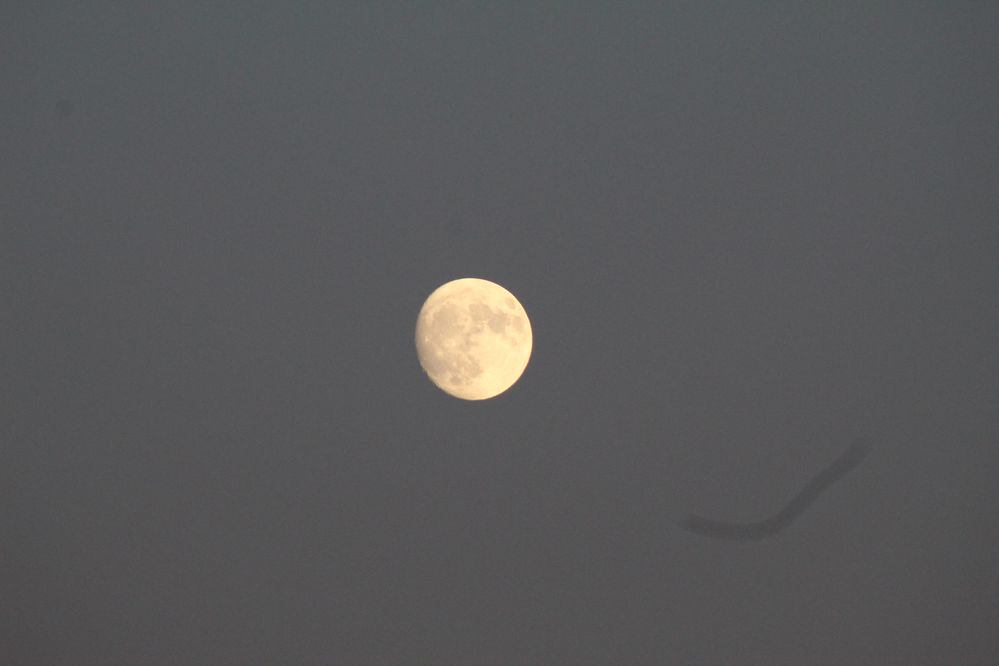
Camera is an EOS Rebel T6
MG

08-01-2023 11:25 PM
It appears to be a hair on your camera's sensor. You could take the lens off and put the camera in manual sensor cleaning mode which will cause the mirror to lockup. Then turn the camera with the lens mount facing down, use a rocket blower to blow air straight up into the camera opening to blow the hair out of the camera. Be very careful not to touch the sensor.
11/20/2025: New firmware updates are available.
EOS R6 Mark III - Version 1.0.1
EOS R5 Mark II - Version 1.2.0
PowerShot G7 X Mark III - Version 1.4.0
PowerShot SX740 HS - Version 1.0.2
10/15/2025: New firmware updates are available.
Speedlite EL-5 - Version 1.2.0
Speedlite EL-1 - Version 1.1.0
Speedlite Transmitter ST-E10 - Version 1.2.0
07/24/2025: New firmware updates are available.
07/23/2025: New firmware updates are available.
7/17/2025: New firmware updates are available.
02/20/2025: New firmware updates are available.
RF70-200mm F2.8 L IS USM Z - Version 1.0.6
RF24-105mm F2.8 L IS USM Z - Version 1.0.9
RF100-300mm F2.8 L IS USM - Version 1.0.8
RF50mm F1.4 L VCM - Version 1.0.2
RF24mm F1.4 L VCM - Version 1.0.3
Canon U.S.A Inc. All Rights Reserved. Reproduction in whole or part without permission is prohibited.