Turn on suggestions
Auto-suggest helps you quickly narrow down your search results by suggesting possible matches as you type.
- Canon Community
- Discussions & Help
- Camera
- EOS DSLR & Mirrorless Cameras
- Re: Long exposure Time Lapse with Canon SL2(200D)
Options
- Subscribe to RSS Feed
- Mark Topic as New
- Mark Topic as Read
- Float this Topic for Current User
- Bookmark
- Subscribe
- Mute
- Printer Friendly Page
EOS Rebel SL2 Unable to get shutter speed slower than 1/30 for time lapse

Options
- Mark as New
- Bookmark
- Subscribe
- Mute
- Subscribe to RSS Feed
- Permalink
- Report Inappropriate Content
09-23-2019
04:56 PM
- last edited on
10-21-2025
09:19 AM
by
 Danny
Danny
Hi,
I want to make a Time Lapse with long exposure on my Canon SL2 and I know that it's work on others Canon DSLR, but I have not been able to get an exposure lower than 1/30 in the Time Lapse mode. So I would want to know if I'm doing something wrong or that's just how the camera is made.
If it's really impossible to get it lower than 1/30 due to a software restriction, I would want to know how to send a request feature to Canon.
Thanks
23 REPLIES 23


Options
- Mark as New
- Bookmark
- Subscribe
- Mute
- Subscribe to RSS Feed
- Permalink
- Report Inappropriate Content
09-25-2019 10:45 AM
Get an intervalometer and you won't be limited by the camera at all.

Options
- Mark as New
- Bookmark
- Subscribe
- Mute
- Subscribe to RSS Feed
- Permalink
- Report Inappropriate Content
09-25-2019 11:05 AM
" I would want to know how to send a request feature to Canon"
This is a public forum so Canon won't know you made such a request here. As of the SL2, I doubt any feaure additions will be made especially since the SL3 is out.
EB
EOS 1DX and many lenses.
EOS 1DX and many lenses.

Options
- Mark as New
- Bookmark
- Subscribe
- Mute
- Subscribe to RSS Feed
- Permalink
- Report Inappropriate Content
09-25-2019 09:49 PM
@AlexisLem wrote:Hi,
I want to make a Time Lapse with long exposure on my Canon SL2 and I know that it's work on others Canon DSLR, but I have not been able to get an exposure lower than 1/30 in the Time Lapse mode. So I would want to know if I'm doing something wrong or that's just how the camera is made.
If it's really impossible to get it lower than 1/30 due to a software restriction, I would want to know how to send a request feature to Canon.
Thanks
What shooting mode are you using on the shooting mode dial. Your description sounds like Safety Shift is kicking in. You probably want to use M mode for time lapse photos.
--------------------------------------------------------
"Enjoying photography since 1972."
"Enjoying photography since 1972."
Options
- Mark as New
- Bookmark
- Subscribe
- Mute
- Subscribe to RSS Feed
- Permalink
- Report Inappropriate Content
09-26-2019 09:12 AM
There is no "Safety Shift" on entry level cameras.
Options
- Mark as New
- Bookmark
- Subscribe
- Mute
- Subscribe to RSS Feed
- Permalink
- Report Inappropriate Content
09-26-2019 04:53 PM
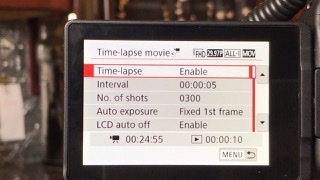
For clarification I'm using the built-in time lapse mode.
Options
- Mark as New
- Bookmark
- Subscribe
- Mute
- Subscribe to RSS Feed
- Permalink
- Report Inappropriate Content
09-26-2019 05:26 PM
It could have something to do with the "ALL-I" format, but I can't get much info on it.
The following is total WAG:
It looks like the ALL-I exposes each frame as if it was just taking a regular movie, not as a series of individual frames. Because of this, the exposure time is limited to that allowed by a movie shot with the ALL-I, resolution and framerate parameters.
Options
- Mark as New
- Bookmark
- Subscribe
- Mute
- Subscribe to RSS Feed
- Permalink
- Report Inappropriate Content
10-22-2019 10:47 PM
I am having the same problem. Has anyone found a solution or sent a request feature to Canon?
Options
- Mark as New
- Bookmark
- Subscribe
- Mute
- Subscribe to RSS Feed
- Permalink
- Report Inappropriate Content
10-23-2019 09:58 AM
Just get an intervalometer and be done with it.
Options
- Mark as New
- Bookmark
- Subscribe
- Mute
- Subscribe to RSS Feed
- Permalink
- Report Inappropriate Content
10-23-2019 06:30 PM
@davidnholt wrote:I am having the same problem. Has anyone found a solution or sent a request feature to Canon?
Just what exactly is the problem? A time-lapse movie grabs a frame of video at regular /intervals, which the user presets.
What end result are you looking to do? There is a world difference between a time-lapse exposure and a long exposure.
--------------------------------------------------------
"Enjoying photography since 1972."
"Enjoying photography since 1972."


Announcements
05/13/2026: New firmware updates are available.
EOS R5 Mark II - Version 1.3.0
EOS R6 Mark II - Version 1.7.0
04/28/2026: Service Notice: Caution Concerning use of Lithium Batteries
03/17/2026: New firmware updates are available.
SELPHY CP1500 - Version 1.0.7.0
02/23/2026: New firmware update is available for EOS C50- Version 1.0.3.1
01/23/2026: New firmware update is available for RF 24-105mm F4 IS USM- Version 2.0.7
01/20/2026: New firmware updates are available.
12/22/2025: New firmware update is available for EOS R6 Mark III- Version 1.0.2
10/21/2025: Service Notice: To Users of the Compact Digital Camera PowerShot V1
10/15/2025: New firmware updates are available.
Speedlite EL-5 - Version 1.2.0
Speedlite EL-1 - Version 1.1.0
Speedlite Transmitter ST-E10 - Version 1.2.0
07/28/2025: Notice of Free Repair Service for the Mirrorless Camera EOS R50 (Black)
05/21/2025: New firmware update available for EOS C500 Mark II - Version 1.1.5.1
Related Content
- Canon SX60HS focus issues in Point & Shoot Digital Cameras
- EOS R5 Mark II stopped sending photos to computer while tether capturing. in EOS DSLR & Mirrorless Cameras
- Location in metadata on camera but no longer transferring across since last R7ii firmware update. in EOS DSLR & Mirrorless Cameras
- Received a Product Advisory - EOS Network Setting Tool in Camera Software
- Please Download Latest Update EOS Utility to Resolve Vulnerabilities in Network Setting Tool in Camera Software

Ⓒ 2026
Canon U.S.A Inc. All Rights Reserved. Reproduction in whole or part without permission is prohibited.
