Turn on suggestions
Auto-suggest helps you quickly narrow down your search results by suggesting possible matches as you type.
- Canon Community
- Discussions & Help
- Camera
- EOS DSLR & Mirrorless Cameras
- Re: EOS R8 screen doesn't flip when i rotate it
Options
- Subscribe to RSS Feed
- Mark Topic as New
- Mark Topic as Read
- Float this Topic for Current User
- Bookmark
- Subscribe
- Mute
- Printer Friendly Page
EOS R8 screen doesn't flip when i rotate it

Options
- Mark as New
- Bookmark
- Subscribe
- Mute
- Subscribe to RSS Feed
- Permalink
- Report Inappropriate Content
06-16-2026
12:15 AM
- last edited on
06-16-2026
08:13 AM
by
 James_C
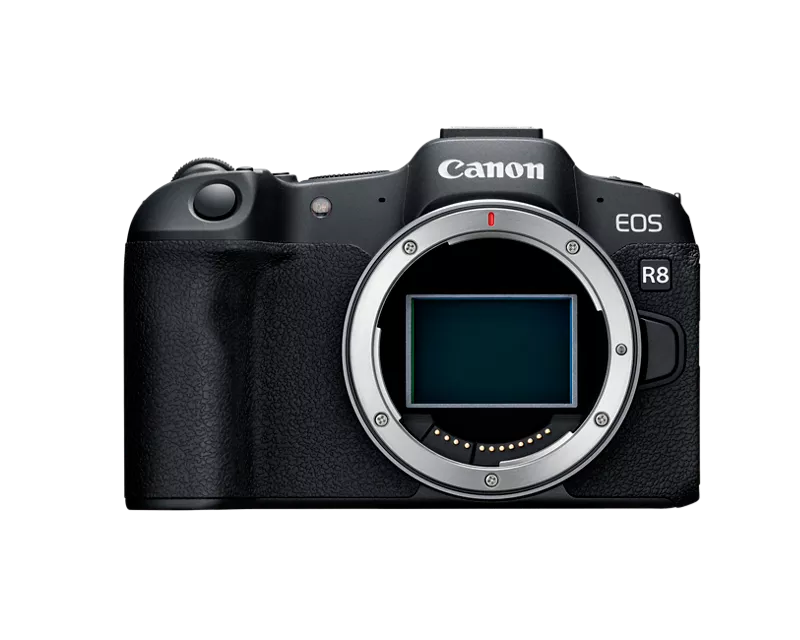
when i oppen the screen to see what the camera sees it doesnt flip, its upside down, im forced to rotate the screen then pish it back into the place when the screen is on the body of the camera while the screen facing me to be able to see it good, any solution to the problem? basically the screen dont flip when i rotate or move the screen.
19 REPLIES 19
Options
- Mark as New
- Bookmark
- Subscribe
- Mute
- Subscribe to RSS Feed
- Permalink
- Report Inappropriate Content
06-16-2026 09:35 AM
when i did a firmwere update to 1.16 the screen did flip correctly but after the firmwere it went back to what it was, wtf? plus the screen cant be rotated 360 degrees, there is a metal peaice that stops it


Options
- Mark as New
- Bookmark
- Subscribe
- Mute
- Subscribe to RSS Feed
- Permalink
- Report Inappropriate Content
06-16-2026 09:57 AM
Couldn't duplicate it on my R8.
-----
Choose to speak positively to people; the world has enough unhappy bullies.
Please ask for an invite to my Knowledge Base articles for tips on teaching photography, composition, and non-compensated product reviews.
Choose to speak positively to people; the world has enough unhappy bullies.
Please ask for an invite to my Knowledge Base articles for tips on teaching photography, composition, and non-compensated product reviews.

Options
- Mark as New
- Bookmark
- Subscribe
- Mute
- Subscribe to RSS Feed
- Permalink
- Report Inappropriate Content
06-16-2026 10:27 AM
“ when i did a firmwere update to 1.16 the screen did flip correctly but after the firmwere it went back to what it was, wtf? plus the screen cant be rotated 360 degrees, there is a metal peaice that stops it “
Attempting a firmware update is highly inadvisable when you anre suddenly experiencing hardware issues. The AI brains don’t understand that.
Yes, there is a physical stop to prevent the screen from being broken by rotating it in the wrong direction. But it is not very strong.
Have you allowed someone else to use the camera? It needs to be serviced.
--------------------------------------------------------
"Enjoying photography since 1972."
"Enjoying photography since 1972."
Options
- Mark as New
- Bookmark
- Subscribe
- Mute
- Subscribe to RSS Feed
- Permalink
- Report Inappropriate Content
06-16-2026 11:20 AM
What makes u think that the screen is 360? Because the screen where working first but slowly it stopped, and before it stopped I was forced to turn the camera off and on again then the screen will rotate til it stopped now

Options
- Mark as New
- Bookmark
- Subscribe
- Mute
- Subscribe to RSS Feed
- Permalink
- Report Inappropriate Content
06-16-2026 01:12 PM
Greetings @Khaled1 ,
On first glance it looked like the orientation sensor in the LCD might have malfunctioned. Sometimes this is recoverable by opening the screen and gently rotating it slowly to its limits and back. This can work if there isn't a hardware or software issue. I was initially willing to entertain the possibility that you had somehow made a combination of settings causing the behavior. However, you indicated that your menu button also doesn't work which would indicate a hardware problem. Worked before, doesn't now makes no difference.
In order to help you isolate or better troubleshoot the problem. We suggested performing a factory reset. If you're not able to do that, the camera will need to go to Canon for inspection / repair.
To add what my colleagues have already stated and recommended... Performing a firmware update on a camera that is malfunctioning is a very very bad idea. It is not the first troubleshooting step that should be performed and can further compound a problem or issue. Firmware updates should not be performed on a malfunctioning camera period. The only exception would be if it addresses the specific issue you are experiencing, which absolutely doesn't apply in your case. A firmware update doesn't disable buttons. There is another issue. It could however, mask an underlying problem. You also risk bricking your camera.
Your camera is crippled and to some extent unusable. Your reluctance to perform a reset because you think it's going to keep you from taking pictures in your preferred workflow is unfounded. Your camera is "broken" for lack of better words. Cause to be determined. I just wrote a help article about this.
My colleagues who are engaged with you on this thread are extremely knowledgeable, top tier, best in class. I'd go as far as to say experts.
Please accept their advice. Attempt to follow their instructions and accept if they don't work that your camera needs to be inspected by Canon.
We absolutely understand how painful it is when these types of issues happen, but you are being guided to the quickest resolution. I hope the issues with your camera get resolved soon.
~Rick
Bay Area - CA
~R5 C (1.1.2.1), ~R50v (1.2.0) ~RF Trinity, ~RF 100 Macro, ~RF 100~400, ~RF 100~500, ~RF 200-800 +RF 1.4x TC, BG-R10, 430EX III-RT ~DxO PhotoLab Elite ~DaVinci Resolve Studio ~ImageClass MF644Cdw/MF656Cdw ~Pixel 10 ~CarePaks Are Worth It
Options
- Mark as New
- Bookmark
- Subscribe
- Mute
- Subscribe to RSS Feed
- Permalink
- Report Inappropriate Content
06-16-2026 01:29 PM - edited 06-16-2026 01:46 PM
“ What makes u think that the screen is 360? Because the screen where working first but slowly it stopped, and before it stopped I was forced to turn the camera off and on again then the screen will rotate til it stopped now.. “
You are not the first to report this type of issue.
Your descriptions of how it normally would work for you is NOT how it should work. Your display seems to have been malfunctioning for some time. You just didn’t seem to notice.
Your descriptions are consistent with the display being rotated in the wrong direction. No one is accusing you of anything. We just call it like we see it.
What does it do when you fold it in, but with screen facing out?
Are camera menus also upside down?
--------------------------------------------------------
"Enjoying photography since 1972."
"Enjoying photography since 1972."
Options
- Mark as New
- Bookmark
- Subscribe
- Mute
- Subscribe to RSS Feed
- Permalink
- Report Inappropriate Content
06-16-2026 04:54 PM
well said
-----
Choose to speak positively to people; the world has enough unhappy bullies.
Please ask for an invite to my Knowledge Base articles for tips on teaching photography, composition, and non-compensated product reviews.
Choose to speak positively to people; the world has enough unhappy bullies.
Please ask for an invite to my Knowledge Base articles for tips on teaching photography, composition, and non-compensated product reviews.
Options
- Mark as New
- Bookmark
- Subscribe
- Mute
- Subscribe to RSS Feed
- Permalink
- Report Inappropriate Content
06-16-2026 05:33 PM
here is a video of my camera.
Options
- Mark as New
- Bookmark
- Subscribe
- Mute
- Subscribe to RSS Feed
- Permalink
- Report Inappropriate Content
06-16-2026 06:21 PM
The default [Menu] button isn’t working because you reassign the functionality to a different control. The camera doesn’t allow you to assign the same functionality to two different controls.
As for screen issues, have you tried any of the suggestions you have Beethoven? Have you tried FULLY resetting the camera back to factory defaults? If you are worried about losing your current settings, don’t. You can save them as a custom shooting mode.

Once you fully reset the camera, both basic and custom settings, test the camera in the Auto Shooting mode. Be sure to reset Custom Controls because this should restore the [Menu] button. Do not reset Custom Shooting modes. We saved the camera configuration there.
Let’s hope it restores the screen, tooo. If not, send your camera to a repair center:
--------------------------------------------------------
"Enjoying photography since 1972."
"Enjoying photography since 1972."
Options
- Mark as New
- Bookmark
- Subscribe
- Mute
- Subscribe to RSS Feed
- Permalink
- Report Inappropriate Content
06-16-2026 09:44 PM
i did that but still doesnt work, though i didnt do the controlls becuse the problem is that the menu button didnt work, and i dont remember how i changed it to another button, all i remember it was a dificult way to find out becuse going into the menu in the r8 is basically accesible by the menu button, but if i resety everything and it still dont work it gonna not be fun to me to know how to get back into menu, that is if you know a way of doing it, then i can reset everything on the cam.

- « Previous
-
- 1
- 2
- Next »
- « Previous
-
- 1
- 2
- Next »

Announcements
05/13/2026: New firmware updates are available.
EOS R5 Mark II - Version 1.3.0
EOS R6 Mark II - Version 1.7.0
04/28/2026: Service Notice: Caution Concerning use of Lithium Batteries
03/17/2026: New firmware updates are available.
SELPHY CP1500 - Version 1.0.7.0
02/23/2026: New firmware update is available for EOS C50- Version 1.0.3.1
01/23/2026: New firmware update is available for RF 24-105mm F4 IS USM- Version 2.0.7
01/20/2026: New firmware updates are available.
12/22/2025: New firmware update is available for EOS R6 Mark III- Version 1.0.2
10/21/2025: Service Notice: To Users of the Compact Digital Camera PowerShot V1
10/15/2025: New firmware updates are available.
Speedlite EL-5 - Version 1.2.0
Speedlite EL-1 - Version 1.1.0
Speedlite Transmitter ST-E10 - Version 1.2.0
07/28/2025: Notice of Free Repair Service for the Mirrorless Camera EOS R50 (Black)
05/21/2025: New firmware update available for EOS C500 Mark II - Version 1.1.5.1
Related Content
- EOS R8 screen doesn't flip when i rotate it in EOS DSLR & Mirrorless Cameras
- EOS R5 Time-lapse movies don't save, .dat file shows up on card in EOS DSLR & Mirrorless Cameras
- SX 740 HS Preview screen goes blank when camera rotated 90 degrees. in Point & Shoot Digital Cameras
- Canon R5 EV activation on shutter half press in EOS DSLR & Mirrorless Cameras
- RF-S18-45 IS STM lens frozen in EF & RF Lenses

Ⓒ 2026
Canon U.S.A Inc. All Rights Reserved. Reproduction in whole or part without permission is prohibited.
