Turn on suggestions
Auto-suggest helps you quickly narrow down your search results by suggesting possible matches as you type.
- Canon Community
- Discussions & Help
- Camera
- EOS DSLR & Mirrorless Cameras
- EOS R5 How to improve autofocus for birds
Options
- Subscribe to RSS Feed
- Mark Topic as New
- Mark Topic as Read
- Float this Topic for Current User
- Bookmark
- Subscribe
- Mute
- Printer Friendly Page
EOS R5 How to improve autofocus for birds

Options
- Mark as New
- Bookmark
- Subscribe
- Mute
- Subscribe to RSS Feed
- Permalink
- Report Inappropriate Content
02-10-2024
01:07 PM
- last edited on
02-10-2024
03:31 PM
by
 Danny
Danny
I have a Canon R5 and took this photograph of a Great (Parus major) this morning in dull conditions. Camera focused roughly on the branch at the red square rather than the bird.
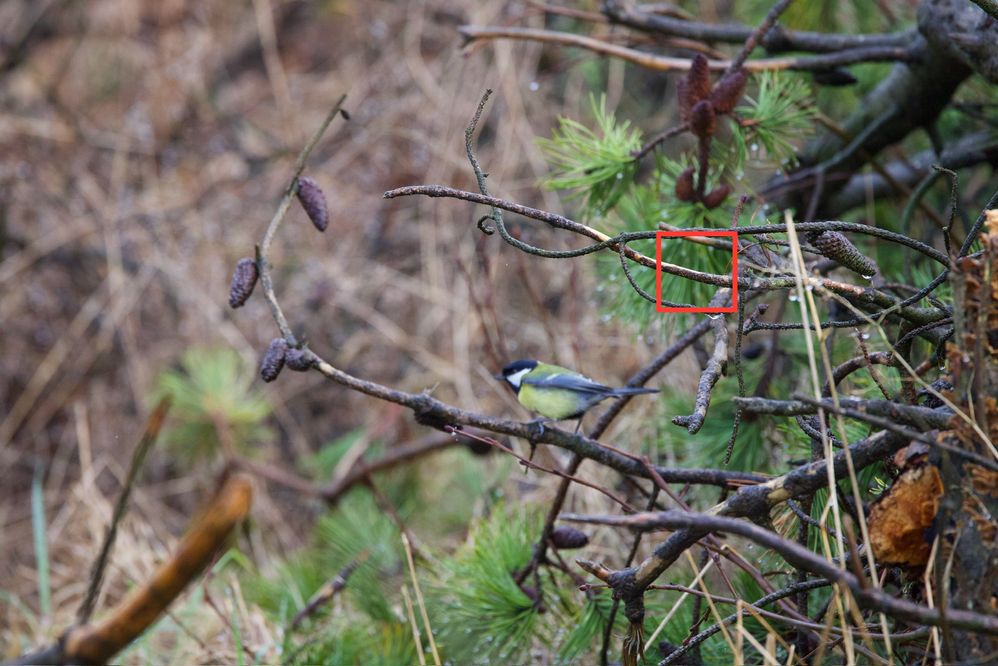
[Sorry, but our system won't let the bird's proper name be typed out. We substituted it with its scientific name.]
13 REPLIES 13


Options
- Mark as New
- Bookmark
- Subscribe
- Mute
- Subscribe to RSS Feed
- Permalink
- Report Inappropriate Content
02-10-2024 04:05 PM
@luciano wrote:1.6x crop mode might be what I need - this is basically digital zoom right? Can I assign it to a single button that will enable/disable it?
It is not digital zoom unless you use software outside of the camera later. I have the C3 mode set to 1.6x and Av. I do not think a singe button can enable/disable crop mode. If I will end up cropping later anyway, then nothing is lost by cropping 1.6x when I make the photo. In my example, even at 800mm much cropping would have been needed. I cropped my example to 3600x2400 and then reduced it to 50% when I put it on my web server. The 1.6x crop mode is only a few less pixels than I got with my EOS 80D.
Others say that the 1.6x crop mode does not help eye detection. Yesterday when it was cloudy and the bird was among foliage, the camera was focusing on everything but the bird until I switched to crop mode. This is my experience.

Options
- Mark as New
- Bookmark
- Subscribe
- Mute
- Subscribe to RSS Feed
- Permalink
- Report Inappropriate Content
02-10-2024 04:17 PM - edited 02-10-2024 04:26 PM
"If I will end up cropping later anyway, then nothing is lost by cropping 1.6x when I make the photo." With respect, I disagree with this statement.
This is from the EOS R5 Advanced User guide, P923 - note that number of recorded pixels is reduced when shooting in 1.6 crop. See: Canon EOS R5 Advanced User Guide

Just to be sure that this was not a phenomena related to JPGs, I just shot the same image in 1.0 and 1.6 crops, using RAW and had the image appear cropped and the the pixel size reduced according to that value on the bottom row.
cheers, TREVOR
The mark of good photographer is less what they hold in their hand, it's more what they hold in their head;
"All the variety, all the charm, all the beauty of life is made up of light and shadow", Leo Tolstoy;
"Skill in photography is acquired by practice and not by purchase" Percy W. Harris
Options
- Mark as New
- Bookmark
- Subscribe
- Mute
- Subscribe to RSS Feed
- Permalink
- Report Inappropriate Content
02-10-2024 04:47 PM
@Tronhard wrote:"If I will end up cropping later anyway, then nothing is lost by cropping 1.6x when I make the photo." With respect, I disagree with this statement.
This is from the EOS R5 Advanced User guide, P923 - note that number of recorded pixels is reduced when shooting in 1.6 crop. See: Canon EOS R5 Advanced User Guide...
Just to be sure that this was not a phenomena related to JPGs, I just shot the same image in 1.0 and 1.6 crops, using RAW and had the image appear cropped and the the pixel size reduced according to that value on the bottom row.
In the case of my example, I ended up cropping to 3600x2400. None of the missing pixels would have been used. I could not get closer to the bird, because one is restricted to staying on the trails at that wildlife refuge. The reduced pixels when I use the 1.6x crop on my EOS R5 is only a few less than on my EOS 80D and is a few more than on my EOS 500D. I knew in advance that the extra pixels would be discarded.
I did shoot that photo with DPRAW and used Canon DPP to increase the fine detail contrast in the DPRAW "Fine Tuning Sharpness" tool.
Options
- Mark as New
- Bookmark
- Subscribe
- Mute
- Subscribe to RSS Feed
- Permalink
- Report Inappropriate Content
02-10-2024 04:51 PM
I totally agree that cropping a FF image in post and doing so via the in-body camera are very similar, the main benefit in the R5 being one sees a magnified image in real time, which is convenient for composition. I just wanted to clarify that using 1.6 crop mode will reduce the image size and the full image is not stored as I took your comment to suggest.
All that said, I think that the OP's issue is not the FoV but that his camera was focusing on the nearest object according to the box displaying the point of focus. That is why I suggested taking more control of that, to locate the focus point on the bird's eye (especially when there is more that one bird), combined with eye tracking to follow it, once selected.
cheers, TREVOR
The mark of good photographer is less what they hold in their hand, it's more what they hold in their head;
"All the variety, all the charm, all the beauty of life is made up of light and shadow", Leo Tolstoy;
"Skill in photography is acquired by practice and not by purchase" Percy W. Harris

- « Previous
-
- 1
- 2
- Next »
- « Previous
-
- 1
- 2
- Next »
Announcements
07/22/2026: New firmware updates are available.
EOS R6 Mark III - Version 1.1.0
05/13/2026: New firmware updates are available.
EOS R5 Mark II - Version 1.3.0
EOS R6 Mark II - Version 1.7.0
04/28/2026: Service Notice: Caution Concerning use of Lithium Batteries
03/17/2026: New firmware updates are available.
SELPHY CP1500 - Version 1.0.7.0
02/23/2026: New firmware update is available for EOS C50- Version 1.0.3.1
01/23/2026: New firmware update is available for RF 24-105mm F4 IS USM- Version 2.0.7
01/20/2026: New firmware updates are available.
10/21/2025: Service Notice: To Users of the Compact Digital Camera PowerShot V1
10/15/2025: New firmware updates are available.
Speedlite EL-5 - Version 1.2.0
Speedlite EL-1 - Version 1.1.0
Speedlite Transmitter ST-E10 - Version 1.2.0
07/28/2025: Notice of Free Repair Service for the Mirrorless Camera EOS R50 (Black)
05/21/2025: New firmware update available for EOS C500 Mark II - Version 1.1.5.1
Related Content
- Reminder to all R5 Mark II owners to update your firmware to the new ver. 1.3.0 in EOS DSLR & Mirrorless Cameras
- Trouble with focusing using Canon SX70HS in Point & Shoot Digital Cameras
- RF 100-500mm F4.5-7.1 L IS USM, Auto Focus focuses too close in EF & RF Lenses
- EOS R1 Eye Control AF unreliable for sports or tracking birds in flight in EOS DSLR & Mirrorless Cameras
- EOS 90D Trouble focusing on birds in flight when panning in EOS DSLR & Mirrorless Cameras

Ⓒ 2026
Canon U.S.A Inc. All Rights Reserved. Reproduction in whole or part without permission is prohibited.
