Turn on suggestions
Auto-suggest helps you quickly narrow down your search results by suggesting possible matches as you type.
- Canon Community
- Discussions & Help
- Camera
- EOS DSLR & Mirrorless Cameras
- Re: EOS R100 Camera Settings for Aviation Photogra...
Options
- Subscribe to RSS Feed
- Mark Topic as New
- Mark Topic as Read
- Float this Topic for Current User
- Bookmark
- Subscribe
- Mute
- Printer Friendly Page
EOS R100 Camera Settings for Aviation Photography

Options
- Mark as New
- Bookmark
- Subscribe
- Mute
- Subscribe to RSS Feed
- Permalink
- Report Inappropriate Content
08-14-2026
11:52 AM
- last edited on
08-14-2026
12:39 PM
by
 Danny
Danny
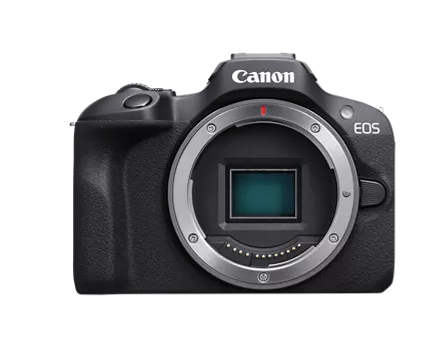
Hey, so I do aviation photography but I'm kind of new to photography overall and I've been finding myself with kind of bad and low quality images that aren't as good as other photos I've seen taken with the R100 and I don't know how to kind of achieve this level of sharpness with my camera, another thing is I don't know if it's the lens I have either (RF75-300mm) and I should look into getting something better like an RF55-210mm or RF200-800mm and yea. So if you have some settings you would use or do use on you're R100 for this stuff and would like to share or if you think I should get a better lens either works! Thank you!

high quality image using same camera

My low quality image (unedited as imported)
7 REPLIES 7


Options
- Mark as New
- Bookmark
- Subscribe
- Mute
- Subscribe to RSS Feed
- Permalink
- Report Inappropriate Content
08-14-2026 12:23 PM - edited 08-14-2026 12:24 PM
On a calibrated monitor zoomed I cannot tell the difference in quality of the image. Are they the same aperture and shutter speed? It could be that the second suffers a bit from the length of the plane vs the focal plane. The first one clearly has a slow enough shutter speed to show your tracking of the plane. So, you might need to increase shutter speed so that your shot doesn't have to depend upon your tracking the plane accurately. So my best recommendation is increase the shutter speed and raise your ISOs to ensure the shot isn't as dependent upon your personal ability to track the movement of the plane. It might help if you share your settings on the shots, but that's a first-order approximation (aka "guess").
>> Owns/Owned both Canon EOS mirrorless full-frame and APS-C cameras and associated RF, RF-S and EF adapted lenses - inventory tends to change on short notice. Same for flashes, tripods, bags, straps, etc.
Plus>> Canon imagePROGRAF PRO-1100 Printer. My photos are edited using no Adobe products.
>>The opinions and assistance are my own. Please don't blame Canon for any mistakes on my part.
Options
- Mark as New
- Bookmark
- Subscribe
- Mute
- Subscribe to RSS Feed
- Permalink
- Report Inappropriate Content
08-14-2026 12:47 PM
@SignifDigits the first image that shows the AirEuropa 737 is an example of a high quality image that someone else has taken with that camera, the second image is my personal image. The settings used with taking the second image were, ISO 200, 130mm, F/8, 1/1250, so its not the shutter speed that's the issue. I don't know if its a mix of my ISO being at 200 and my aperture being F/8, but if you have any other ideas I would love to hear!

Options
- Mark as New
- Bookmark
- Subscribe
- Mute
- Subscribe to RSS Feed
- Permalink
- Report Inappropriate Content
08-14-2026 09:20 PM
TuckerW,
You say that your second photo is unedited. When I blow it up, I'm seeing chromatic aberration around the outline of the 0lane, the engines and the wheels.
You might want to go into DPP4, or another editing program and see if you can correct for that.
Steve Thomas

Options
- Mark as New
- Bookmark
- Subscribe
- Mute
- Subscribe to RSS Feed
- Permalink
- Report Inappropriate Content
08-15-2026 11:58 AM
"My low quality image (unedited as imported)"
You said "unedited" but the sample has extreme downsizing so it has been edited. Here is the same sample with unsharp mask applied in Photoshop. The sample is so small there really isn't enough data to work with.

" I've been finding myself with kind of bad and low quality images ..."
When most people complain about this they mean IQ. The sharpness of the image isn't where they want or expect. That is almost always the lens. The camera is basically just a storage device for what the lens saw. Of course you must give the camera the correct instruction for saving that data. First and foremost is to use raw and not jpg. An appreciate SS and aperture settings for the conditions. You might be surprised at how well P mode will work with a optimal ISO setting. My preference Av mode.

300mm at f8, 1/2500, ISO 800, One shot AF, raw format. The camera is a 1DX with my Sigma 120-300mm f/2.8 DG OS HSM Sports zoom lens. I used Av mode with the other settings as noted. In this case the 1DX selected the SS as is the case for Av mode. The image is heavily cropped to center it.
EB
EOS 1DX and many lenses.
EOS 1DX and many lenses.
Options
- Mark as New
- Bookmark
- Subscribe
- Mute
- Subscribe to RSS Feed
- Permalink
- Report Inappropriate Content
08-15-2026 12:30 PM
Is this the lens you own, Canon RF 75-300mm f/4-5.6 Lens? If it is a lens I am not familiar with that lens but at its price point I suspect it isn't a top IQ contender. If this is true, I think what you got is expected but a few tweaks will make it better. First is to d/l DPP4 form Canon it is free. DPP4 is a post editor like Photoshop. Second is to use raw file format and forget jpg. Make sure you set the highest quality raw in camera. All cameras always record every image at full resolution. Even jpg. The damage is done when the camera saves that image. That is why you never use jpg because so much data that could be useful is simply tossed away and discarded. Raw nothing is ever lost or discarded unless you select a lesser quality in camera.
DPP4 will read your camera's lens correction data and it applies it when the images are opened Do lens corrections in DPP4 on every image.
You might ask why jpg at all? Well, jpg is fast and it makes a presentable and viewable file for folks to see and use quickly. The difference is the camera is doing all the edits and deciding what should be kept and what should be discarded. Cameras are pretty smart and they do a pretty good job. Here's the difference you may apply the same settings and/or accept the settings the camera did when you view them in DPP4 but you decide what is important and what you want. It could be totally different than what the camera did. Not what the camera thought you wanted. Plus the ability to do special effects if wanted.
Now don't say you can't learn a new post editor because they are pretty complicated..No, that is not a good reason because DPP4 can be used to transfer your images to your computer from camera and will apply the lens corrections without much effort on your part. Then if you want, you can do as much or as little as you feel comfortable with or necessary. Lots of vids on YouTube too.
EB
EOS 1DX and many lenses.
EOS 1DX and many lenses.

Options
- Mark as New
- Bookmark
- Subscribe
- Mute
- Subscribe to RSS Feed
- Permalink
- Report Inappropriate Content
08-15-2026 12:43 PM - edited 08-15-2026 12:50 PM
“ Hey, so I do aviation photography but I'm kind of new to photography overall… “
if you’re new to photography then you need to get up to speed on the basics of photography. No one can really tell you what to do without being there with you. Camera settings and techniques can change depending upon the weather, sunny or cloudy.
You’re facing two different learning curves. The basics of photography and how to use a digital camera. I would recommend getting in YouTube and searching for videos about the basics of photography first and foremost.
--------------------------------------------------------
"Enjoying photography since 1972."
"Enjoying photography since 1972."
Options
- Mark as New
- Bookmark
- Subscribe
- Mute
- Subscribe to RSS Feed
- Permalink
- Report Inappropriate Content
08-15-2026 03:00 PM - edited 08-15-2026 03:01 PM
@TuckerW, as others have pointed out the only way to improve on a lens with lower image quality (IQ) - chromatic aberration that xtevet1 mentioned is common there - is digitally. That will mean you would be best off saving full-res RAW. Canon's Digital Photo Professional (DPP) has a lens optimizer that Canon developed for your lens that will adjust the image digitally.
I don't see that you mentioned cropping. At 130mm I'm assuming that image is cropped? That will zoom in on any issues.
I will say that personally it has been hard to adapt from the old "must have ISO of 100 or 200 for a quality image" mentality. You will find that your camera will perform very well with higher ISOs than what you might have been used to with film. I am just mentioning it in case you need a faster shutter speed.
If you haven't shot in RAW and post-processed with DPP, I would definitely suggest that first. Then if you are still displeased with the results perhaps then you can look into a higher quality lens.
Sorry, but I don't have that lens or any experience with it.
>> Owns/Owned both Canon EOS mirrorless full-frame and APS-C cameras and associated RF, RF-S and EF adapted lenses - inventory tends to change on short notice. Same for flashes, tripods, bags, straps, etc.
Plus>> Canon imagePROGRAF PRO-1100 Printer. My photos are edited using no Adobe products.
>>The opinions and assistance are my own. Please don't blame Canon for any mistakes on my part.


Announcements
07/22/2026: New firmware updates are available.
EOS R6 Mark III - Version 1.1.0
05/13/2026: New firmware updates are available.
EOS R5 Mark II - Version 1.3.0
EOS R6 Mark II - Version 1.7.0
04/28/2026: Service Notice: Caution Concerning use of Lithium Batteries
03/17/2026: New firmware updates are available.
SELPHY CP1500 - Version 1.0.7.0
02/23/2026: New firmware update is available for EOS C50- Version 1.0.3.1
01/23/2026: New firmware update is available for RF 24-105mm F4 IS USM- Version 2.0.7
01/20/2026: New firmware updates are available.
10/21/2025: Service Notice: To Users of the Compact Digital Camera PowerShot V1
10/15/2025: New firmware updates are available.
Speedlite EL-5 - Version 1.2.0
Speedlite EL-1 - Version 1.1.0
Speedlite Transmitter ST-E10 - Version 1.2.0
07/28/2025: Notice of Free Repair Service for the Mirrorless Camera EOS R50 (Black)
05/21/2025: New firmware update available for EOS C500 Mark II - Version 1.1.5.1
Related Content
- EOS R100 Camera Settings for Aviation Photography in EOS DSLR & Mirrorless Cameras
- Best Portrait Photography Settings for EOS R5 Mark II in EOS DSLR & Mirrorless Cameras
- Photography tips to record a train journey? in EOS DSLR & Mirrorless Cameras
- No White Balance option on Canon Camera Connect app in Camera Software
- EOS R5 Mark II firmware 1.30 notes in Camera Software

Ⓒ 2026
Canon U.S.A Inc. All Rights Reserved. Reproduction in whole or part without permission is prohibited.
