Turn on suggestions
Auto-suggest helps you quickly narrow down your search results by suggesting possible matches as you type.
- Canon Community
- Discussions & Help
- Camera
- EOS DSLR & Mirrorless Cameras
- Re: EOS 6D Mark II
Options
- Subscribe to RSS Feed
- Mark Topic as New
- Mark Topic as Read
- Float this Topic for Current User
- Bookmark
- Subscribe
- Mute
- Printer Friendly Page

Options
- Mark as New
- Bookmark
- Subscribe
- Mute
- Subscribe to RSS Feed
- Permalink
- Report Inappropriate Content
03-29-2024
07:12 AM
- last edited on
03-29-2024
08:37 AM
by
 Danny
Danny
Hi,
I'm receiving error 70 when trying to turn on live view or take picture on 6D mark II.
LCD display is working fine. I can access menu.
Few testing scenarios on video
- check LCD functionality
- run live view -> error 70
- take a picture -> error 70
- sensor cleaning + clean manually -> mirror do lockup and sensor is exposed but after 2-3 seconds mirror is back and error 70
- turn on mirror lockup function + take picture -> after first click on shutter button mirror do lockup and shutter is closed after second click on shutter button error 70
https://www.youtube.com/watch?v=ZBTBY2AHzsU
Any ideas what is causing problems? I tried different lenses/ batteries and removing/ formatting SD-card. I tried remove battery/ SD-car for few hours. I was able to see older pictures on LCD panel.
Solved! Go to Solution.
1 ACCEPTED SOLUTION
Accepted Solutions
Options
- Mark as New
- Bookmark
- Subscribe
- Mute
- Subscribe to RSS Feed
- Permalink
- Report Inappropriate Content
04-01-2024 06:03 AM - edited 04-01-2024 06:09 AM
Just for info for people with a similar problem. I fixed the camera by disconnecting and reconnecting the flex cable between the motherboard and the sensor. I think I accidentally partially disconnected it earlier. 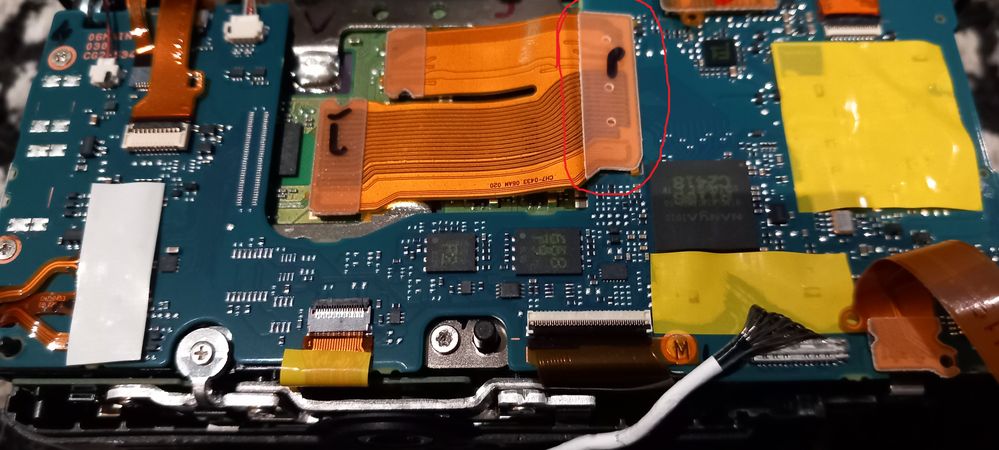
7 REPLIES 7


Options
- Mark as New
- Bookmark
- Subscribe
- Mute
- Subscribe to RSS Feed
- Permalink
- Report Inappropriate Content
03-29-2024 07:49 AM
Not a good sign. Stop cleaning it.
What lens are you using? I suspect your camera needs service.
https://support.usa.canon.com/kb/index?page=content&id=ART177684
--------------------------------------------------------
"Enjoying photography since 1972."
"Enjoying photography since 1972."
Options
- Mark as New
- Bookmark
- Subscribe
- Mute
- Subscribe to RSS Feed
- Permalink
- Report Inappropriate Content
03-29-2024 08:29 AM
Samyang 12mm f/2.8, Sigma 24mm f/1.4 art. The same error for both

Options
- Mark as New
- Bookmark
- Subscribe
- Mute
- Subscribe to RSS Feed
- Permalink
- Report Inappropriate Content
03-29-2024 09:22 AM
Do you have a Canon lens to try?
Options
- Mark as New
- Bookmark
- Subscribe
- Mute
- Subscribe to RSS Feed
- Permalink
- Report Inappropriate Content
03-29-2024 12:37 PM
no
Options
- Mark as New
- Bookmark
- Subscribe
- Mute
- Subscribe to RSS Feed
- Permalink
- Report Inappropriate Content
03-29-2024 01:00 PM - edited 03-29-2024 01:05 PM
I didnt mention that this camera was astro-modified. Original UV/ IR filter was replaced(not by me) with Baader filter that allow more IR light[1]
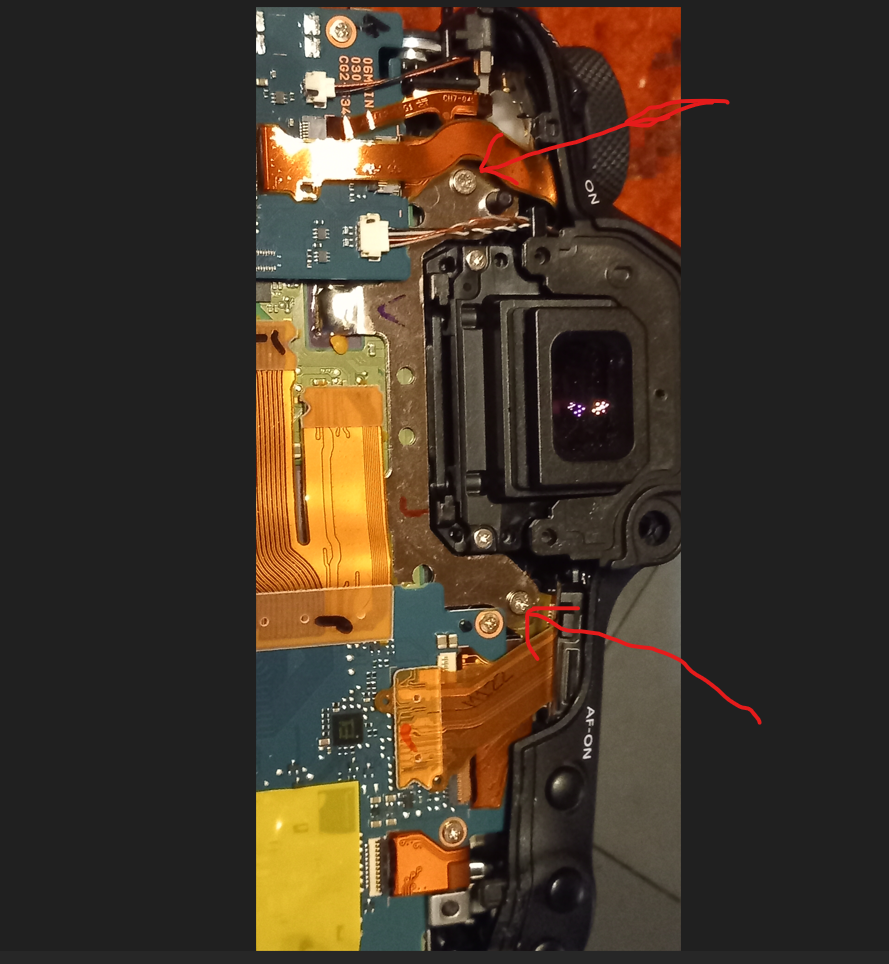
After modification the camera was working fine but I was not able to focus with my 12mm lens- focus was little bit behind hard stop. After some investigation I found out that it was most probably caused by incorrect sensor position- maybe less than 1mm.
After few weeks I found courage to try to fix it by myself. There are 3 screws on springs which keep sensor in correct position. I tried to adjust them by 1/4 of a turn in clockwise direction but I was not able to move then in any direction... So I reassembled camera but I am now receiving error 70. The most probably I accidentally damaged sensor?/ motherboard?/ ... with my lumberjack fingers and the only solution is fix/replacement at canon service but first I wanted to try all other possible fixes.
Thanks anyway!
[1] https://noctilove.co.uk/astro-modification-guide/
Options
- Mark as New
- Bookmark
- Subscribe
- Mute
- Subscribe to RSS Feed
- Permalink
- Report Inappropriate Content
03-29-2024 04:56 PM
I’m sorry. Your camera has been modified and you have taken it apart to make repairs. Your issue is beyond my ability to diagnose in a forum.
--------------------------------------------------------
"Enjoying photography since 1972."
"Enjoying photography since 1972."
Options
- Mark as New
- Bookmark
- Subscribe
- Mute
- Subscribe to RSS Feed
- Permalink
- Report Inappropriate Content
04-01-2024 06:03 AM - edited 04-01-2024 06:09 AM
Just for info for people with a similar problem. I fixed the camera by disconnecting and reconnecting the flex cable between the motherboard and the sensor. I think I accidentally partially disconnected it earlier.

Announcements
07/22/2026: New firmware updates are available.
EOS R6 Mark III - Version 1.1.0
05/13/2026: New firmware updates are available.
EOS R5 Mark II - Version 1.3.0
EOS R6 Mark II - Version 1.7.0
04/28/2026: Service Notice: Caution Concerning use of Lithium Batteries
03/17/2026: New firmware updates are available.
SELPHY CP1500 - Version 1.0.7.0
02/23/2026: New firmware update is available for EOS C50- Version 1.0.3.1
01/23/2026: New firmware update is available for RF 24-105mm F4 IS USM- Version 2.0.7
01/20/2026: New firmware updates are available.
10/21/2025: Service Notice: To Users of the Compact Digital Camera PowerShot V1
10/15/2025: New firmware updates are available.
Speedlite EL-5 - Version 1.2.0
Speedlite EL-1 - Version 1.1.0
Speedlite Transmitter ST-E10 - Version 1.2.0
07/28/2025: Notice of Free Repair Service for the Mirrorless Camera EOS R50 (Black)
05/21/2025: New firmware update available for EOS C500 Mark II - Version 1.1.5.1
Related Content
- New Firmware Available For All R5 Mark II Owners... in EOS DSLR & Mirrorless Cameras
- Trying to estimate the Manufacture Date for the Canon R5 Mark II camera in EOS DSLR & Mirrorless Cameras
- Experience with the Kiwifotos long Eyecup for the R5 Mark II in Camera Accessories
- EOS R5 Mark II How and Why to Use Picture Style settings and In-Camera Sharpening in EOS DSLR & Mirrorless Cameras
- Canon 24-70mm F2.8 II stopped focusing in EF & RF Lenses

Ⓒ 2026
Canon U.S.A Inc. All Rights Reserved. Reproduction in whole or part without permission is prohibited.
