Turn on suggestions
Auto-suggest helps you quickly narrow down your search results by suggesting possible matches as you type.
- Canon Community
- Discussions & Help
- Camera
- EOS DSLR & Mirrorless Cameras
- Re: Does this histogram look right?
Options
- Subscribe to RSS Feed
- Mark Topic as New
- Mark Topic as Read
- Float this Topic for Current User
- Bookmark
- Subscribe
- Mute
- Printer Friendly Page

Options
- Mark as New
- Bookmark
- Subscribe
- Mute
- Subscribe to RSS Feed
- Permalink
- Report Inappropriate Content
02-24-2024
02:33 PM
- last edited on
02-24-2024
02:58 PM
by
 SamanthaW
I've been advised that a good exposure for histograms should be in the middle, what do you think of this? Is it over exposed or underexposed? My issue is if I get the big curve to go in the middle of the picture, it looks darker, the other issue is I'm using a calibrate colour chart and their suggestion is the 4th grey patch should be RGB 128, to get it to 128 there's no way I can get the curve to be in the middle, am I missing something? This current histogram gets me close enough to 128 so does that mean the exposure is correct? 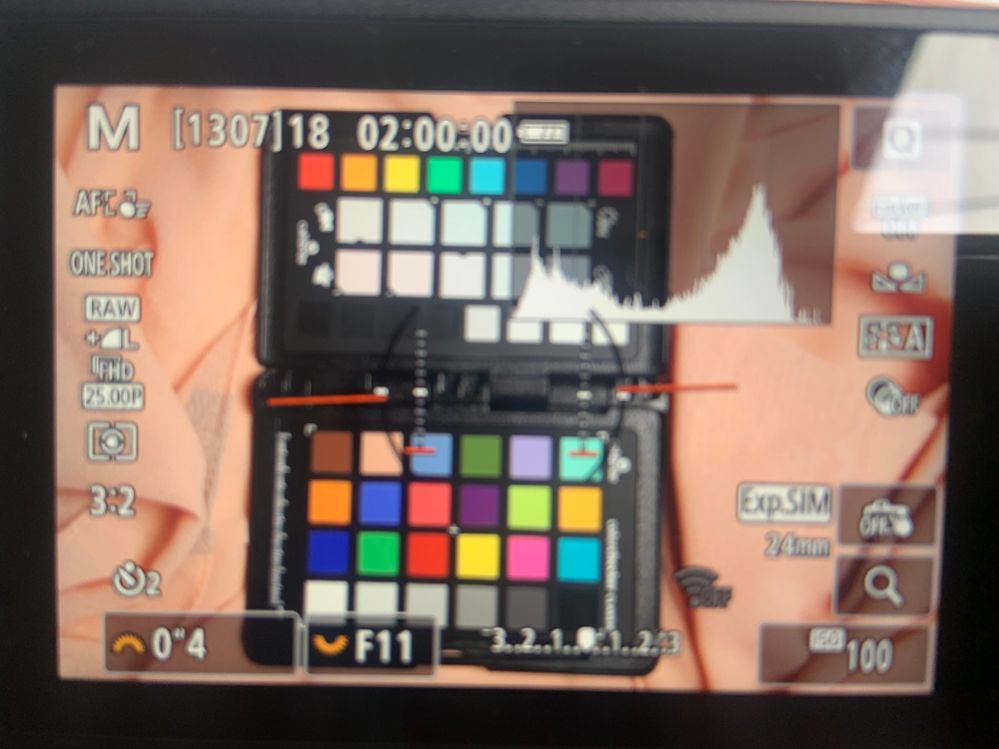
Solved! Go to Solution.
11 REPLIES 11


Options
- Mark as New
- Bookmark
- Subscribe
- Mute
- Subscribe to RSS Feed
- Permalink
- Report Inappropriate Content
02-24-2024 05:49 PM
If one of these replies has solved the original question, please mark it as the solution. That helps other forum users know which topics have been solved as well as helping others with similar questions. Thank you.
--
Ricky
Camera: EOS R5 II, RF 50mm f/1.2L, RF 135mm f/1.8L
Lighting: Profoto Lights & Modifiers
Ricky
Camera: EOS R5 II, RF 50mm f/1.2L, RF 135mm f/1.8L
Lighting: Profoto Lights & Modifiers
Options
- Mark as New
- Bookmark
- Subscribe
- Mute
- Subscribe to RSS Feed
- Permalink
- Report Inappropriate Content
02-24-2024 05:54 PM
They all did, to be fair!

- « Previous
-
- 1
- 2
- Next »
- « Previous
-
- 1
- 2
- Next »
Announcements
07/22/2026: New firmware updates are available.
EOS R6 Mark III - Version 1.1.0
05/13/2026: New firmware updates are available.
EOS R5 Mark II - Version 1.3.0
EOS R6 Mark II - Version 1.7.0
04/28/2026: Service Notice: Caution Concerning use of Lithium Batteries
03/17/2026: New firmware updates are available.
SELPHY CP1500 - Version 1.0.7.0
02/23/2026: New firmware update is available for EOS C50- Version 1.0.3.1
01/23/2026: New firmware update is available for RF 24-105mm F4 IS USM- Version 2.0.7
01/20/2026: New firmware updates are available.
10/21/2025: Service Notice: To Users of the Compact Digital Camera PowerShot V1
10/15/2025: New firmware updates are available.
Speedlite EL-5 - Version 1.2.0
Speedlite EL-1 - Version 1.1.0
Speedlite Transmitter ST-E10 - Version 1.2.0
07/28/2025: Notice of Free Repair Service for the Mirrorless Camera EOS R50 (Black)
05/21/2025: New firmware update available for EOS C500 Mark II - Version 1.1.5.1
Related Content
- GX7 Mark III Histogram and Exposure Bracketing in Point & Shoot Digital Cameras
- R6 MkII Won't Display Shooting Info- Firmware Update Failed in EOS DSLR & Mirrorless Cameras
- R7 photos turned black on both SD cards in EOS DSLR & Mirrorless Cameras
- EOS R7 LCD Fault - lines appear on screen in EOS DSLR & Mirrorless Cameras
- R1 Waveform or histogram in video mode in EOS DSLR & Mirrorless Cameras

Ⓒ 2026
Canon U.S.A Inc. All Rights Reserved. Reproduction in whole or part without permission is prohibited.
