Turn on suggestions
Auto-suggest helps you quickly narrow down your search results by suggesting possible matches as you type.
- Canon Community
- Discussions & Help
- Camera
- EOS DSLR & Mirrorless Cameras
- Canon M50 LCD screen not displaying final result
Options
- Subscribe to RSS Feed
- Mark Topic as New
- Mark Topic as Read
- Float this Topic for Current User
- Bookmark
- Subscribe
- Mute
- Printer Friendly Page
Canon M50 LCD screen not displaying final result

Options
- Mark as New
- Bookmark
- Subscribe
- Mute
- Subscribe to RSS Feed
- Permalink
- Report Inappropriate Content
05-08-2019 01:24 PM
Hello.
I recently bought a Canon M50, and it's actually my first time ever taking pictures with a camera other than my phone, so I'm super noob.
Today I was playing around with my M50, trying different photo modes and I notice that when I use the Av mode and change the F value, I can't see any differences in the LCD of the camera. But there are clearly differences between the photos taken. I made a video to illustrate the problem.
https://youtu.be/3_fCPCXn51c
As you can see, the purple sticker in the back is unreadable with the 2 pictures when being taken (when I change the F value), but then when we check the picture with the view button, we can (kind of) read the sticker with one picture, but not with the other.
Maybe the camera is supposed to be like this because it's mirrorless and I wasn't aware of this? As I said, all of this is new for me, but I'm very frustrated that I can't trust the LCD.
Só is that a defect or that's normal?
Thank you.
I recently bought a Canon M50, and it's actually my first time ever taking pictures with a camera other than my phone, so I'm super noob.
Today I was playing around with my M50, trying different photo modes and I notice that when I use the Av mode and change the F value, I can't see any differences in the LCD of the camera. But there are clearly differences between the photos taken. I made a video to illustrate the problem.
https://youtu.be/3_fCPCXn51c
As you can see, the purple sticker in the back is unreadable with the 2 pictures when being taken (when I change the F value), but then when we check the picture with the view button, we can (kind of) read the sticker with one picture, but not with the other.
Maybe the camera is supposed to be like this because it's mirrorless and I wasn't aware of this? As I said, all of this is new for me, but I'm very frustrated that I can't trust the LCD.
Só is that a defect or that's normal?
Thank you.
5 REPLIES 5


Options
- Mark as New
- Bookmark
- Subscribe
- Mute
- Subscribe to RSS Feed
- Permalink
- Report Inappropriate Content
05-08-2019 04:38 PM
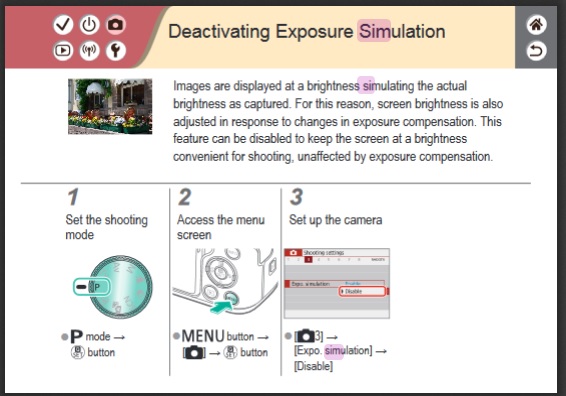
What is the state of Exposure Simulation? I believe you have to be in M or P for this to work.
Options
- Mark as New
- Bookmark
- Subscribe
- Mute
- Subscribe to RSS Feed
- Permalink
- Report Inappropriate Content
05-09-2019 07:53 AM
Thank you for the fast reply.
I just checked and its enabled.
So this was actually supposed to work, I mean, what I see in my screen should reflect the saved photo file? Do you think maybe there is a problem/wrong setting with my camera?
Thank you
I just checked and its enabled.
So this was actually supposed to work, I mean, what I see in my screen should reflect the saved photo file? Do you think maybe there is a problem/wrong setting with my camera?
Thank you
Options
- Mark as New
- Bookmark
- Subscribe
- Mute
- Subscribe to RSS Feed
- Permalink
- Report Inappropriate Content
05-09-2019 08:49 AM
I don't know. Could the ISO be increasing to compensate for the smaller aperture?
Options
- Mark as New
- Bookmark
- Subscribe
- Mute
- Subscribe to RSS Feed
- Permalink
- Report Inappropriate Content
05-09-2019 09:01 AM
Yes it is, I am using the Av mode, so I can change the F-number and the other settings are adjusted accordingly.
But the end result photo file is different. With lower and higher f-number, it looks the same on the LCD, but it is different in the photo file.
But the end result photo file is different. With lower and higher f-number, it looks the same on the LCD, but it is different in the photo file.
Options
- Mark as New
- Bookmark
- Subscribe
- Mute
- Subscribe to RSS Feed
- Permalink
- Report Inappropriate Content
05-09-2019 10:18 AM
Ok looks like I needed to assign the DOF to the function button. Now it works 😄 😄 😄

Announcements
07/22/2026: New firmware updates are available.
EOS R6 Mark III - Version 1.1.0
05/13/2026: New firmware updates are available.
EOS R5 Mark II - Version 1.3.0
EOS R6 Mark II - Version 1.7.0
04/28/2026: Service Notice: Caution Concerning use of Lithium Batteries
03/17/2026: New firmware updates are available.
SELPHY CP1500 - Version 1.0.7.0
02/23/2026: New firmware update is available for EOS C50- Version 1.0.3.1
01/23/2026: New firmware update is available for RF 24-105mm F4 IS USM- Version 2.0.7
01/20/2026: New firmware updates are available.
10/21/2025: Service Notice: To Users of the Compact Digital Camera PowerShot V1
10/15/2025: New firmware updates are available.
Speedlite EL-5 - Version 1.2.0
Speedlite EL-1 - Version 1.1.0
Speedlite Transmitter ST-E10 - Version 1.2.0
07/28/2025: Notice of Free Repair Service for the Mirrorless Camera EOS R50 (Black)
05/21/2025: New firmware update available for EOS C500 Mark II - Version 1.1.5.1
Related Content
- EOS M10 "Memory Card Error" & Corrupted Files – Found a Bent Pin in the SD Slot. in EOS DSLR & Mirrorless Cameras
- EOS R8 overheats after 60-120 seconds in EOS DSLR & Mirrorless Cameras
- EOS R6 Mark III How to turn off LCD/EVF for night photography/time-lapse in EOS DSLR & Mirrorless Cameras
- RF 100-500mm F4.5-7.1 L IS USM, Auto Focus focuses too close in EF & RF Lenses
- EOS R8 not displaying through HDMI in EOS DSLR & Mirrorless Cameras

Ⓒ 2026
Canon U.S.A Inc. All Rights Reserved. Reproduction in whole or part without permission is prohibited.
