Turn on suggestions
Auto-suggest helps you quickly narrow down your search results by suggesting possible matches as you type.
- Canon Community
- Discussions & Help
- Camera
- EF & RF Lenses
- Re: Lens Serial Number Exif Data
Options
- Subscribe to RSS Feed
- Mark Topic as New
- Mark Topic as Read
- Float this Topic for Current User
- Bookmark
- Subscribe
- Mute
- Printer Friendly Page
Options
- Mark as New
- Bookmark
- Subscribe
- Mute
- Subscribe to RSS Feed
- Permalink
- Report Inappropriate Content
08-29-2016 09:51 PM - edited 01-19-2017 07:39 PM
1 ACCEPTED SOLUTION
Accepted Solutions


Options
- Mark as New
- Bookmark
- Subscribe
- Mute
- Subscribe to RSS Feed
- Permalink
- Report Inappropriate Content
08-31-2016 06:19 AM - edited 08-31-2016 08:56 AM
@Bannach wrote:I thank the friends who are anxious to help me in the sense of find out why the Serial my lenses do not appear the Exif.
After a more thorough search, I found that the serial lens is inserted manually in the camera settings, however my EOS - 5D Mark II, does not offer this function and do not know if have any further update (firmaVer) I'm using version 2.0. 9.PrScn follows, referring to the serial number input mode (this refers to EOS - 5D - Mark III)
Thank you all!
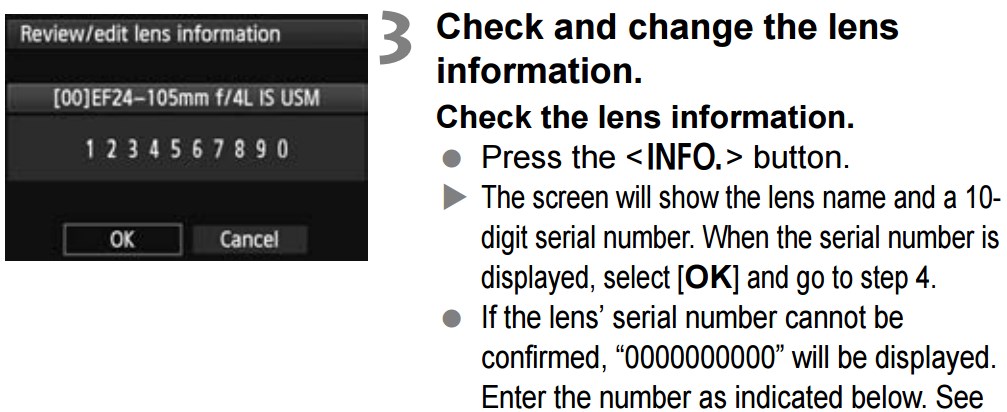
This is what I was getting at earlier. You do realize that any EF 24-105mm f/4L will look identical to the camera. Right?
--------------------------------------------------------
"Enjoying photography since 1972."
"Enjoying photography since 1972."
15 REPLIES 15

Options
- Mark as New
- Bookmark
- Subscribe
- Mute
- Subscribe to RSS Feed
- Permalink
- Report Inappropriate Content
08-30-2016 02:20 PM
Does it show up in DPP?

Options
- Mark as New
- Bookmark
- Subscribe
- Mute
- Subscribe to RSS Feed
- Permalink
- Report Inappropriate Content
08-30-2016 03:25 PM - edited 08-30-2016 03:45 PM
@kvbarkley wrote:Does it show up in DPP?
If it does, I can't find it. But it does show in Irfanview. Go figure.
Well forget that. I just checked the lens, and the serial number reported by Irfanview is wrong.
Bob
Philadelphia, Pennsylvania USA
Philadelphia, Pennsylvania USA
Options
- Mark as New
- Bookmark
- Subscribe
- Mute
- Subscribe to RSS Feed
- Permalink
- Report Inappropriate Content
08-30-2016 03:32 PM
I don't think Canon DSLRs record the lens serial number. In fact, the AFMA adjustment doesn't even distinguish between lenses with the same model number. The lens model number is entered by hand, for AFMA.
If you are seeing lens serial number in EXIF information of photos taken with Canon gear, it was most likely added in post.
--------------------------------------------------------
"Enjoying photography since 1972."
"Enjoying photography since 1972."
Options
- Mark as New
- Bookmark
- Subscribe
- Mute
- Subscribe to RSS Feed
- Permalink
- Report Inappropriate Content
08-30-2016 03:46 PM
I don't have the lens handy, so I can't check the actual serial number but EXIFTool on my Mac reports this:
ExifTool Version Number : 10.15
File Name : IMG_7718.JPG
File Size : 854 kB
Make : Canon
Camera Model Name : Canon EOS DIGITAL REBEL XS
Canon Image Type : Canon EOS DIGITAL REBEL XS
Canon Firmware Version : Firmware Version 1.0.6
Owner Name : xxxxxxx
Serial Number : 05702xxxx
Flash Metering Mode : Off
Focus Distance Lower : 1.5 m
Lens Model : EF-S15-85mm f/3.5-5.6 IS USM
Internal Serial Number : L0180193UU
Dust Removal Data : (Binary data 1024 bytes, use -b option to extract)
Options
- Mark as New
- Bookmark
- Subscribe
- Mute
- Subscribe to RSS Feed
- Permalink
- Report Inappropriate Content
08-30-2016 04:05 PM
Is there an "EXIF Version" entry associated with any of that?
--------------------------------------------------------
"Enjoying photography since 1972."
"Enjoying photography since 1972."
Options
- Mark as New
- Bookmark
- Subscribe
- Mute
- Subscribe to RSS Feed
- Permalink
- Report Inappropriate Content
08-30-2016 04:12 PM
Exif Version : 0221
I was also pleased to see:
Camera Type : EOS High-end
Pretty good for an XS!
Options
- Mark as New
- Bookmark
- Subscribe
- Mute
- Subscribe to RSS Feed
- Permalink
- Report Inappropriate Content
08-30-2016 04:33 PM - edited 01-19-2017 07:39 PM
Options
- Mark as New
- Bookmark
- Subscribe
- Mute
- Subscribe to RSS Feed
- Permalink
- Report Inappropriate Content
08-30-2016 04:36 PM - edited 08-30-2016 04:37 PM
What was the EXIF version for both?
Does the 400 mm show a serial number?
Options
- Mark as New
- Bookmark
- Subscribe
- Mute
- Subscribe to RSS Feed
- Permalink
- Report Inappropriate Content
08-30-2016 04:50 PM
I used the ExifTool 10:25 version for both tests.
I've watched the ExifTool the serial number Lens, Lens canon 70 ~ 200mm 100 ~ 400mm, 400mm, and other models.

Announcements
07/22/2026: New firmware updates are available.
EOS R6 Mark III - Version 1.1.0
05/13/2026: New firmware updates are available.
EOS R5 Mark II - Version 1.3.0
EOS R6 Mark II - Version 1.7.0
04/28/2026: Service Notice: Caution Concerning use of Lithium Batteries
03/17/2026: New firmware updates are available.
SELPHY CP1500 - Version 1.0.7.0
02/23/2026: New firmware update is available for EOS C50- Version 1.0.3.1
01/23/2026: New firmware update is available for RF 24-105mm F4 IS USM- Version 2.0.7
01/20/2026: New firmware updates are available.
10/21/2025: Service Notice: To Users of the Compact Digital Camera PowerShot V1
10/15/2025: New firmware updates are available.
Speedlite EL-5 - Version 1.2.0
Speedlite EL-1 - Version 1.1.0
Speedlite Transmitter ST-E10 - Version 1.2.0
07/28/2025: Notice of Free Repair Service for the Mirrorless Camera EOS R50 (Black)
05/21/2025: New firmware update available for EOS C500 Mark II - Version 1.1.5.1
Related Content
- Product Registration Problem: Unable to read serial number on PowerShot SX620 HS in Point & Shoot Digital Cameras
- Canon EOS 700D- country manufactured in? in EOS DSLR & Mirrorless Cameras
- EOS R5 Mark II minor Firmware Update, Version 1.3.1 in Camera Software
- R5 Mark II Owners Update Your Firmware to Version 1.3.1 in EOS DSLR & Mirrorless Cameras
- Support Request: Unable to register my Canon EOS R50 (Serial number already registered) in EOS DSLR & Mirrorless Cameras

Ⓒ 2026
Canon U.S.A Inc. All Rights Reserved. Reproduction in whole or part without permission is prohibited.
