09-13-2022 04:35 PM
my ts9521c just stopped printing from my laptop but will print from my iphone. it printed 3 copies and then just quit but will go through the motions of feeding the paper through. i deleted the printer and reinstalled it but still won't work. i must say it started doing this after i tried to print on both sides but i don't think this had anything to do with it. thx for any help
09-14-2022 03:49 PM
Hi thescot67,
First, a test should be performed of your PIXMA TS9521C. To do this, please load letter sized plain paper into the cassette and follow these steps:
1. Please tap the gear icon at the bottom of your printer's display
2. Tap Maintenance
3. Tap Print nozzle check pattern and then Yes
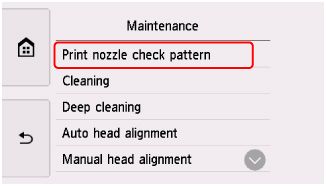
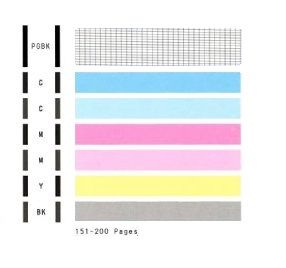
A test page will print. Please compare your printout with the example below.
On your page that printed, did a black grid print to the right of |PGBK| ?
Below that, did 2 blue, 2 pink, 1 yellow and 1 gray bar print?
12/18/2025: New firmware updates are available.
11/20/2025: New firmware updates are available.
EOS R5 Mark II - Version 1.2.0
PowerShot G7 X Mark III - Version 1.4.0
PowerShot SX740 HS - Version 1.0.2
10/15/2025: New firmware updates are available.
Speedlite EL-5 - Version 1.2.0
Speedlite EL-1 - Version 1.1.0
Speedlite Transmitter ST-E10 - Version 1.2.0
7/17/2025: New firmware updates are available.
02/20/2025: New firmware updates are available.
RF70-200mm F2.8 L IS USM Z - Version 1.0.6
RF24-105mm F2.8 L IS USM Z - Version 1.0.9
RF100-300mm F2.8 L IS USM - Version 1.0.8
Canon U.S.A Inc. All Rights Reserved. Reproduction in whole or part without permission is prohibited.


