Hi,
I've a Canon 4820d printer which connected to a Windows 7 system via USB. The printer is working good with the Windows 7 system to which it's connected. The printer is shared via Homegroup to other Windows 7 systems. There also it's working fine.I try to share the same printer(Canon 4820d Printer). The printer is shared and I've set the printer as default printer. But when I try to change the Printer Properties, to customize the default print settings(like changing 2 side printing to 1 sided etc.,) the printer gets stuck. More over the language of Property Pages is also changed to Chinese. But it shown in english every where else.
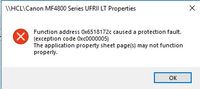
The printer displays a "Function address fault error". I've attached the error message here with. Can anybody help to resolve this issue?