10-14-2020 05:07 PM
I have never seen a brand new computer behave this way.
It is shrinking the page into a barely readable size and images as well.
I'm not sure what is going on nor how to fix it. Any ideas, suggestions are welcome.
10-21-2020 03:54 PM
Hi JJeremie,
Are you using letter sized (8.5" x 11") plain paper with your PIXMA TS3122?
If so does LTR appear on the display of your PIXMA TS3122?
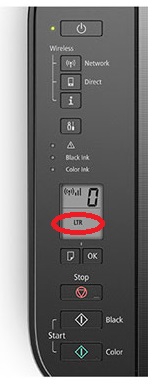
If not, please press the paper button on the printer until LTR appears on the display and then press the OK button.
Once set, please attempt to print.
You do not have to only use the Canon PRINT Inkjet/SELPHY app to print with your PIXMA TS3122.
The PIXMA TS3122 is compatible with Airprint.
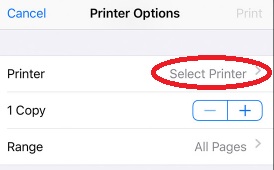
To print from a different application on your iPhone, please open what you would like to print and then tap
or tap
. In the next window that appears, tap "Select Printer" and select your TS3100 series. Once set, please print.
12/18/2025: New firmware updates are available.
11/20/2025: New firmware updates are available.
EOS R5 Mark II - Version 1.2.0
PowerShot G7 X Mark III - Version 1.4.0
PowerShot SX740 HS - Version 1.0.2
10/15/2025: New firmware updates are available.
Speedlite EL-5 - Version 1.2.0
Speedlite EL-1 - Version 1.1.0
Speedlite Transmitter ST-E10 - Version 1.2.0
7/17/2025: New firmware updates are available.
02/20/2025: New firmware updates are available.
RF70-200mm F2.8 L IS USM Z - Version 1.0.6
RF24-105mm F2.8 L IS USM Z - Version 1.0.9
RF100-300mm F2.8 L IS USM - Version 1.0.8
Canon U.S.A Inc. All Rights Reserved. Reproduction in whole or part without permission is prohibited.


