Turn on suggestions
Auto-suggest helps you quickly narrow down your search results by suggesting possible matches as you type.
- Canon Community
- Discussions & Help
- Printer
- Desktop Inkjet Printers
- PIXMA TR4720 photo comes out blank
Options
- Subscribe to RSS Feed
- Mark Topic as New
- Mark Topic as Read
- Float this Topic for Current User
- Bookmark
- Subscribe
- Mute
- Printer Friendly Page
PIXMA TR4720 photo comes out blank

Options
- Mark as New
- Bookmark
- Subscribe
- Mute
- Subscribe to RSS Feed
- Permalink
- Report Inappropriate Content
04-11-2022
09:06 AM
- last edited on
03-19-2026
08:46 AM
by
 Danny
Danny
I put the paper in the right way, and presume I have ink installed correctly, but I press enter and it acts as though its printing and the photo comes out blank.
3 REPLIES 3

Options
- Mark as New
- Bookmark
- Subscribe
- Mute
- Subscribe to RSS Feed
- Permalink
- Report Inappropriate Content
04-15-2022 03:21 PM
Hi briangevans,
Please load plain paper into your PIXMA TR4720 and follow these steps:
1. Please press the wrench and screwdriver button on your printer one time.
2. Use the right arrow key to select Maintenance and press OK.
3. Select Nozzle Check and press OK.
A page will print.
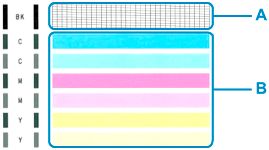
Did a black grid print to the right of |BK| ?
Below that, did 2 blue, 2 pink and 2 yellow bars print?
Options
- Mark as New
- Bookmark
- Subscribe
- Mute
- Subscribe to RSS Feed
- Permalink
- Report Inappropriate Content
03-18-2026 03:35 PM
Yes I got the black and the blue, pink and yellow but wont print from docs


Options
- Mark as New
- Bookmark
- Subscribe
- Mute
- Subscribe to RSS Feed
- Permalink
- Report Inappropriate Content
03-18-2026 03:43 PM - edited 03-18-2026 03:44 PM
What computer operating system are you using? Sounds like you have a driver/software issue. All drivers and programs for your printer are found here:

Announcements
07/22/2026: New firmware updates are available.
EOS R6 Mark III - Version 1.1.0
05/13/2026: New firmware updates are available.
EOS R5 Mark II - Version 1.3.0
EOS R6 Mark II - Version 1.7.0
04/28/2026: Service Notice: Caution Concerning use of Lithium Batteries
03/17/2026: New firmware updates are available.
SELPHY CP1500 - Version 1.0.7.0
02/23/2026: New firmware update is available for EOS C50- Version 1.0.3.1
01/23/2026: New firmware update is available for RF 24-105mm F4 IS USM- Version 2.0.7
01/20/2026: New firmware updates are available.
10/21/2025: Service Notice: To Users of the Compact Digital Camera PowerShot V1
10/15/2025: New firmware updates are available.
Speedlite EL-5 - Version 1.2.0
Speedlite EL-1 - Version 1.1.0
Speedlite Transmitter ST-E10 - Version 1.2.0
07/28/2025: Notice of Free Repair Service for the Mirrorless Camera EOS R50 (Black)
05/21/2025: New firmware update available for EOS C500 Mark II - Version 1.1.5.1
Related Content
- After system rebuild, cannot use PIXMA TR4720 printer in Printer Software & Networking
- My canon printer print the blank page in Desktop Inkjet Printers
- PIXMA PRO-200 Trouble printing from Photoshop Elements and selecting paper sizes in Professional Photo Printers
- PIXMA TR4720 - Cannon 275 Black ink already low after 20 black text pages in Desktop Inkjet Printers
- Just purchase a PIXMA TR4720 and ink cartridge error in Desktop Inkjet Printers

Ⓒ 2026
Canon U.S.A Inc. All Rights Reserved. Reproduction in whole or part without permission is prohibited.
