cancel
Showing results for 
Show  only  | Search instead for 
Did you mean: 

PIXMA MG6620 and Big Sur 11.2.2 - unable to find scan function

ian3376
Apprentice

I have 2 Macbooks, both running Big Sur 11.2.2.   


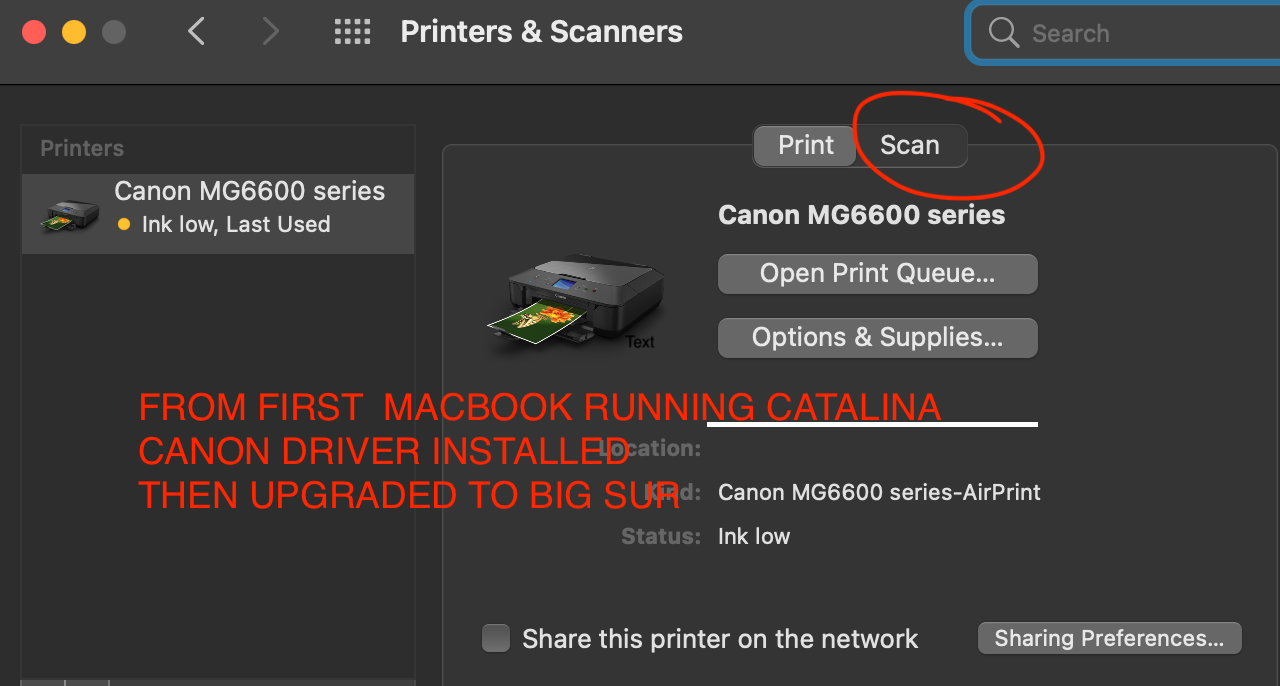
1. The 1st  Macbook  was running Catalina and had canon driver installed on it.   It was then upgraded to Big Sur.   The ability to click Scan exists.    (See attached photo)

2.  The 2nd Macbook was built from scratch and Big Sur was loaded onto it.   Then the canon driver was installed.   On this machine, it is impossible to get the Scan function to appear.


I have installed every driver on this page to no avail. https://www.usa.canon.com/internet/portal/us/home/support/details/printers/inkjet-multifunction/mg-s...

Has anyone experiencing this problem? 

Thanks in advanceprinter.with.scan.png

1 REPLY 1

ian3376
Apprentice

I finally figured it out and hopefully this can help someone else. 

From the driver download site:

1. select OS Catalina 10.15
2. Click on DRIVERS tab

3. Download and install ICA Driver Ver. 4.1.3a (Mac)
4. Download and install MG6600 series CUPS Printer Driver Ver.16.40.1.0 (Mac)
5. Delete your printer and re-add it.
5a). Make sure you select Kind="Bonjour Multifunction" and Use=Airprint


6. At this point, you can see the scan function but it won't support preview

7. To allow preview, you need to click the "Software" tab
8. Download and install IJ Scan Utility2 Ver.2.3.8 (Mac)
9. Repeat step 5 and 5a)

 

Holiday
Announcements

12/18/2025: New firmware updates are available.

EOS C400 - Version 1.0.4.1

EOS C80 - Version 1.0.4.1

XF605 - Version 1.0.7.1


12/15/2025: New firmware update available for EOS C50 - Version 1.0.1.1

11/20/2025: New firmware updates are available.

EOS R6 Mark III - Version 1.0.1

EOS R3 - Version 2.0.0

EOS R1 - Version 1.2.0

EOS R5 Mark II - Version 1.2.0

EOS R5 - Version 2.2.1

PowerShot G7 X Mark III - Version 1.4.0

PowerShot SX740 HS - Version 1.0.2


10/21/2025: Service Notice: To Users of the Compact Digital Camera PowerShot V1

10/15/2025: New firmware updates are available.

Speedlite EL-5 - Version 1.2.0

Speedlite EL-1 - Version 1.1.0

Speedlite Transmitter ST-E10 - Version 1.2.0


07/28/2025: Notice of Free Repair Service for the Mirrorless Camera EOS R50 (Black)

7/17/2025: New firmware updates are available.

EOS R7 - Version 1.7.1

EOS R10 - Version 1.7.0

EOS R8 - Version 1.5.0

EOS R50 - Version 1.4.0

Powershot V10 - Version 1.4.0

Powershot V1 - Version 1.1.0

EOS R50V - Version 1.1.1


05/21/2025: New firmware update available for EOS C500 Mark II - Version 1.1.5.1

02/20/2025: New firmware updates are available.

RF70-200mm F2.8 L IS USM Z - Version 1.0.6

RF24-105mm F2.8 L IS USM Z - Version 1.0.9

RF100-300mm F2.8 L IS USM - Version 1.0.8

RF50mm F1.4 L VCM - Version 1.0.2

RF24mm F1.4 L VCM - Version 1.0.3


01/22/2024: Canon Supports Disaster Relief Efforts in California
01/14/2025: Steps to resolve still image problem when using certain SanDisk SD cards with the Canon EOS R5 Mark II
