05-25-2022 10:10 AM
I've seen similar posts but no solutions. Recently my printer (MG3520) has been printing all my b&w prints (which were originally b&w - not converted color) as sepia or browish colors. In some cases that might be acceptable but these look awful.
I've check settings in Adobe and in the printer setting and I can't find what might be causing this. Help. I'm working on a portfolio.
06-03-2022 02:44 PM
Hi jofal511,
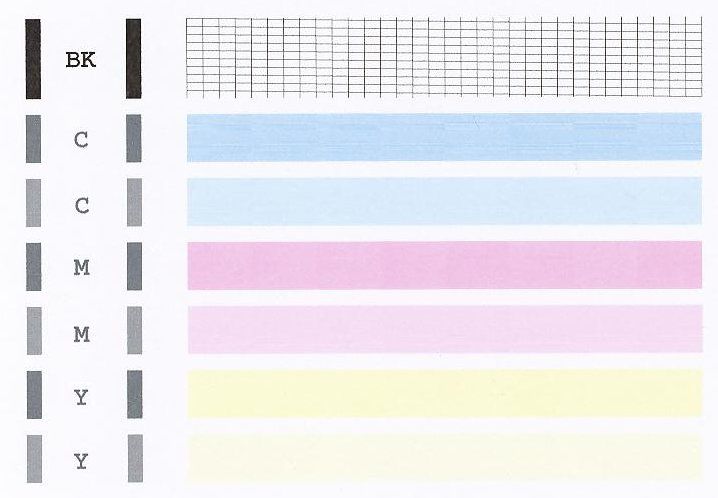
First, a test of your PIXMA MG3520 should be performed. Please load plain paper into your printer. Please hold down the STOP button until the error light blinks 1 time, then release it immediately.
A test page will print.
Does your test page print like the example below?
06-03-2022 04:36 PM
the print out does look like the example except there are broad vertical bands down the page
12/18/2025: New firmware updates are available.
11/20/2025: New firmware updates are available.
EOS R5 Mark II - Version 1.2.0
PowerShot G7 X Mark III - Version 1.4.0
PowerShot SX740 HS - Version 1.0.2
10/15/2025: New firmware updates are available.
Speedlite EL-5 - Version 1.2.0
Speedlite EL-1 - Version 1.1.0
Speedlite Transmitter ST-E10 - Version 1.2.0
7/17/2025: New firmware updates are available.
02/20/2025: New firmware updates are available.
RF70-200mm F2.8 L IS USM Z - Version 1.0.6
RF24-105mm F2.8 L IS USM Z - Version 1.0.9
RF100-300mm F2.8 L IS USM - Version 1.0.8
Canon U.S.A Inc. All Rights Reserved. Reproduction in whole or part without permission is prohibited.


