02-05-2020 05:30 PM
Ladies/Gents
My printer: Pixma TS9120
Changed ink tanks recently and now the machine is starting to print a lot of pink and won't read the ink level of the cyan tank.
I know this has been discussed an awful lot already but I need some help as I have tried just about every idea I came across to solve this issue.
Thanks , Rafiki
Solved! Go to Solution.
02-07-2020 01:15 PM
Hi Rafiki,
Please follow these steps:
1. Please press the gear icon at the bottom of the display of your PIXMA TS9120
2. Tap Maintenance
3. Tap Print nozzle check pattern
4. Tap Yes
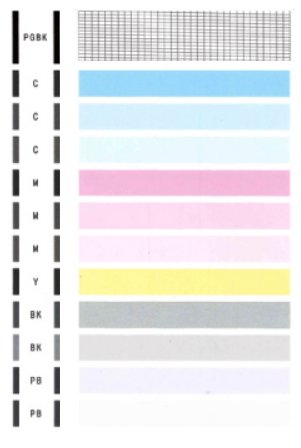
Does the test page that printed match the example below?
View solution in original post
07/22/2026: New firmware updates are available.
EOS R6 Mark III - Version 1.1.0
EOS R6 V - Version 1.1.0
05/13/2026: New firmware updates are available.
EOS R3 - Version 2.1.0
EOS R1 - Version 1.3.0
EOS R5 Mark II - Version 1.3.0
EOS R6 Mark II - Version 1.7.0
EOS R8 - Version 1.6.0
EOS R10 - Version 1.8.0
EOS R100 - Version 1.3.0
EOS R50V - Version 1.2.0
PowerShot V1 - Version 1.2.0
03/17/2026: New firmware updates are available.
EOS R7 - Version 1.8.0
EOS R50 - Version 1.5.0
SELPHY CP1500 - Version 1.0.7.0
PowerShot V10 - Version 1.5.0
01/20/2026: New firmware updates are available.
EOS C70 - Version 1.1.3.1
EOS C80 - Version 1.0.5.1
EOS C400 - Version 1.0.8.1
XF605 - Version 1.0.8.1
10/15/2025: New firmware updates are available.
Speedlite EL-5 - Version 1.2.0
Speedlite EL-1 - Version 1.1.0
Speedlite Transmitter ST-E10 - Version 1.2.0