Turn on suggestions
Auto-suggest helps you quickly narrow down your search results by suggesting possible matches as you type.
- Canon Community
- Discussions & Help
- Camera
- Camera Software
- ZommBrowser Ex Image import failed with runtime er...
Options
- Subscribe to RSS Feed
- Mark Topic as New
- Mark Topic as Read
- Float this Topic for Current User
- Bookmark
- Subscribe
- Mute
- Printer Friendly Page

Options
- Mark as New
- Bookmark
- Subscribe
- Mute
- Subscribe to RSS Feed
- Permalink
- Report Inappropriate Content
08-11-2019 09:50 AM - edited 08-11-2019 09:54 AM
ZoomBrowser Ex image import tool (mcu.exe) crashes with runtime error after selecting images and clicking the download button.
MCU.exe caused c++ library to terminate unexpectedly.
I am using zoom browser 1.5.2 with windows 10. Maybe last windows update caused these problems? anybody any idea how to solve the issue? reinstallation did not help.
thx
Solved! Go to Solution.
1 ACCEPTED SOLUTION
Accepted Solutions


Options
- Mark as New
- Bookmark
- Subscribe
- Mute
- Subscribe to RSS Feed
- Permalink
- Report Inappropriate Content
11-12-2019 08:32 AM
Hi GavM ,
Thanks for checking in with us.
We believe the issue is due to the latest .net framework update from Microsoft and that Microsoft is working on an update to correct that. In the meantime, you can check with Microsoft or your computer manufacturer about the possibility of downgrading to an earlier version of .net framework.
5 REPLIES 5
Options
- Mark as New
- Bookmark
- Subscribe
- Mute
- Subscribe to RSS Feed
- Permalink
- Report Inappropriate Content
08-12-2019 01:06 AM
Hi netsrac,
ZoomBrowser is an older program that we developed before modern operating systems were available. We've phased it out of our software lineup and have enhanced EOS Utility and Digital Photo Professional to take its place.
With our current software, you'll use EOS Utility to download images from the camera and Digital Photo Professional to do RAW editing, color correction, and image organization.
Since ZoomBrowser is no longer supported and not designed to run on Windows 10, I would recommend that you uninstall it and then get the updated software from our website.
You can find the new software by visiting www.canoneos.com. On the new page that loads, click on DRIVERS & DOWNLOADS link on the top right. Enter your camera model in the prompt, select it from the options that load under the box, and then press the GET DRIVERS & DOWNLOADS button.
I hope that helps!
Options
- Mark as New
- Bookmark
- Subscribe
- Mute
- Subscribe to RSS Feed
- Permalink
- Report Inappropriate Content
11-12-2019 01:33 AM
I'm having the same issue with the latest version of DPP 4.11.02.
I do have another computer and everything works fine.
The small error window that pops up over the DPP 4.0 splash screen reads;
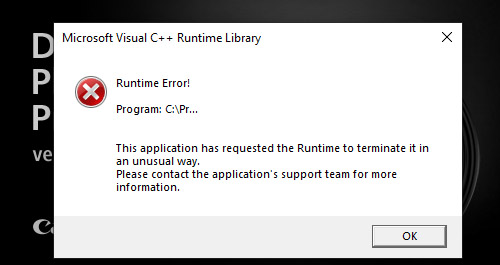
"Microsoft Visual C+ + Runtime Library
Runtime Error!
Program: C:\Pr...
This application has requested the Runtime to terminate it in
an unusual way.
Please contact the application's support team for more
information."
DPP has been uninstalled and reinstalled multiple times using different versions up to DPP 4.11.02.
Microsoft Visual C++ 2015-2019 Redistributable (x64) - 14.23.27820 is installed
Microsoft Visual C++ 2017 Redistributable (x86) - 14.11.25325 is installed
Windows 10 Pro 64bit
Version: 1903
OS Build: 18362.449
Options
- Mark as New
- Bookmark
- Subscribe
- Mute
- Subscribe to RSS Feed
- Permalink
- Report Inappropriate Content
11-12-2019 04:10 AM
I'm also having C++ and Java runtime errors on all EOS software - DPP, Lens Tool, EOS Utility, etc. A number of people on this forum are...
People say 'contact Canon', which I did about a week ago and had no response.
Any advice from anyone who has solved these issues would be greatly appreciated. Thanks.
People say 'contact Canon', which I did about a week ago and had no response.
Any advice from anyone who has solved these issues would be greatly appreciated. Thanks.
Options
- Mark as New
- Bookmark
- Subscribe
- Mute
- Subscribe to RSS Feed
- Permalink
- Report Inappropriate Content
11-12-2019 08:32 AM
Hi GavM ,
Thanks for checking in with us.
We believe the issue is due to the latest .net framework update from Microsoft and that Microsoft is working on an update to correct that. In the meantime, you can check with Microsoft or your computer manufacturer about the possibility of downgrading to an earlier version of .net framework.
Options
- Mark as New
- Bookmark
- Subscribe
- Mute
- Subscribe to RSS Feed
- Permalink
- Report Inappropriate Content
11-17-2019 10:08 AM - edited 11-17-2019 10:11 AM
See this thread here in the community:
Canon Digital Photo Professional wouldn't start after the latest win10 update
Sorry, doesn't allow me to post a link, just insert in search line.
That should help you with this issue!


Announcements
07/22/2026: New firmware updates are available.
EOS R6 Mark III - Version 1.1.0
05/13/2026: New firmware updates are available.
EOS R5 Mark II - Version 1.3.0
EOS R6 Mark II - Version 1.7.0
04/28/2026: Service Notice: Caution Concerning use of Lithium Batteries
03/17/2026: New firmware updates are available.
SELPHY CP1500 - Version 1.0.7.0
02/23/2026: New firmware update is available for EOS C50- Version 1.0.3.1
01/23/2026: New firmware update is available for RF 24-105mm F4 IS USM- Version 2.0.7
01/20/2026: New firmware updates are available.
10/21/2025: Service Notice: To Users of the Compact Digital Camera PowerShot V1
10/15/2025: New firmware updates are available.
Speedlite EL-5 - Version 1.2.0
Speedlite EL-1 - Version 1.1.0
Speedlite Transmitter ST-E10 - Version 1.2.0
07/28/2025: Notice of Free Repair Service for the Mirrorless Camera EOS R50 (Black)
05/21/2025: New firmware update available for EOS C500 Mark II - Version 1.1.5.1

Ⓒ 2026
Canon U.S.A Inc. All Rights Reserved. Reproduction in whole or part without permission is prohibited.
