Turn on suggestions
Auto-suggest helps you quickly narrow down your search results by suggesting possible matches as you type.
- Canon Community
- Discussions & Help
- Camera
- Camera Software
- Re: Why is DPP 4.17.0.0 so slow processing CRAW .C...
Options
- Subscribe to RSS Feed
- Mark Topic as New
- Mark Topic as Read
- Float this Topic for Current User
- Bookmark
- Subscribe
- Mute
- Printer Friendly Page
Why is DPP 4.17.0.0 so slow processing CRAW .CR3 images?

Options
- Mark as New
- Bookmark
- Subscribe
- Mute
- Subscribe to RSS Feed
- Permalink
- Report Inappropriate Content
01-10-2023 01:54 PM
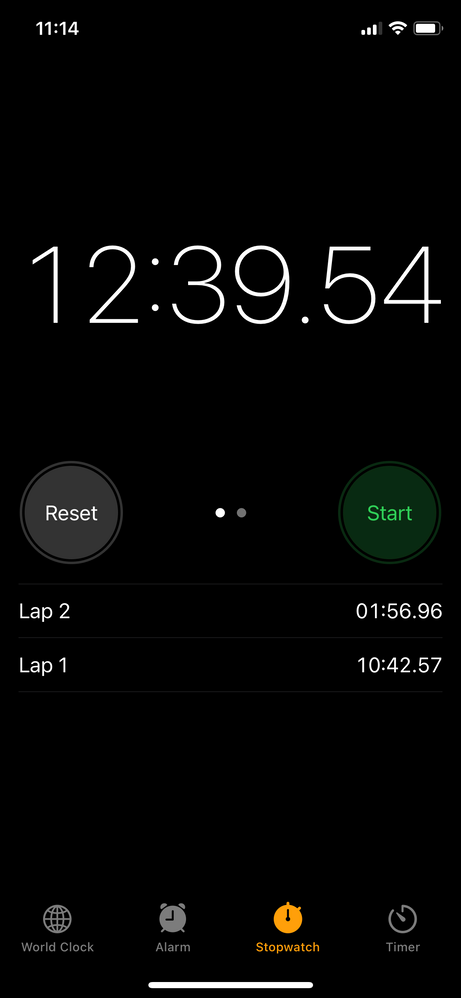
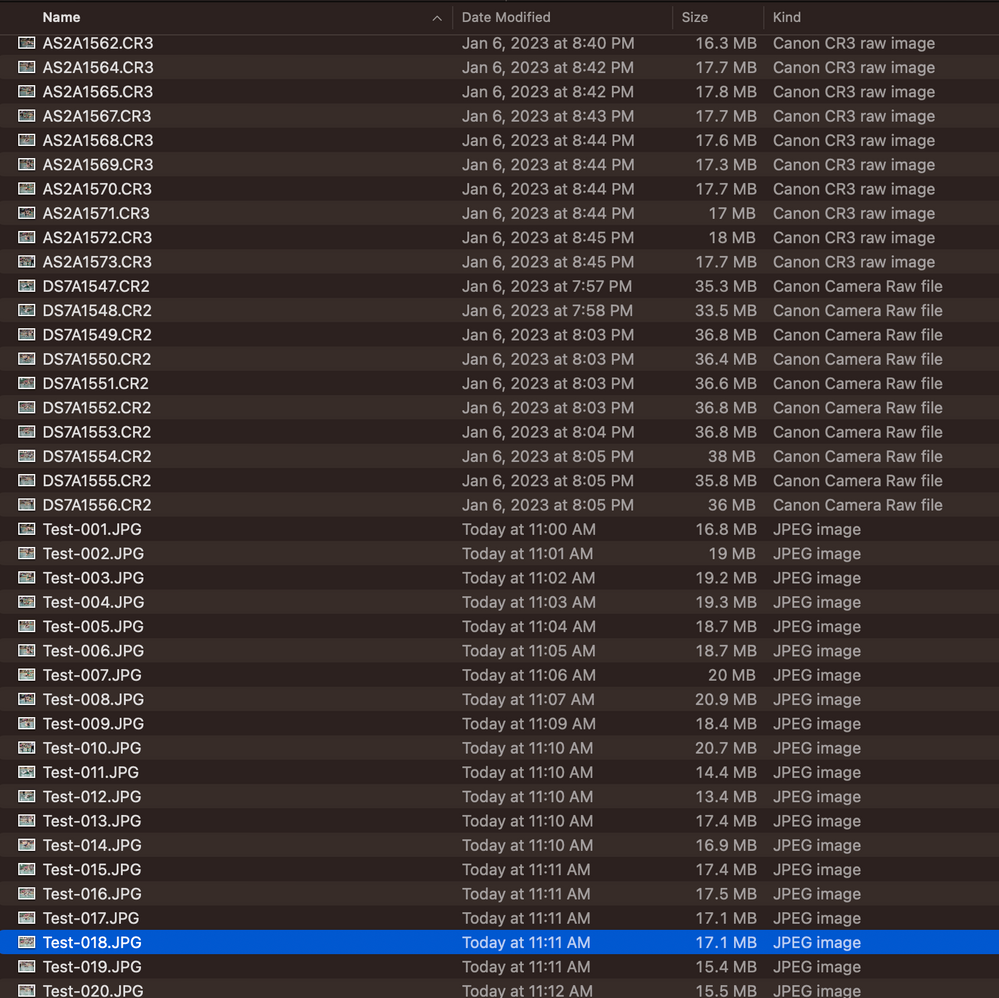
I'm shooting with new R6MK2 (and struggled to find a newly updated DPP to process images). I noticed immediately how tremendously slow .CR3 (using CRAW compression) take to batch process convert to JPG v .CR2 images. Note that Lap 1 in the first photo was 10 .CR2 images averaging 35MB files size that processed successfully in less than 2 minutes. Lap2 is 10 .CR3 images averaging half the size taking nearly 11 minutes (5 times longer!) to process. I'm on a 2020 MacBook Pro with M1 chip using Ventura 13.0.1 macOS. I've tried both CRAW and non CRAW .CR3 with same results. I desperately need to see significant improvements as my clients are "time is of the essence" type. Appreciate suggestions and other feedback.
Dennis
13 REPLIES 13
Options
- Mark as New
- Bookmark
- Subscribe
- Mute
- Subscribe to RSS Feed
- Permalink
- Report Inappropriate Content
02-03-2023 10:35 AM
Any response you might care to share would be deeply appreciated.
Options
- Mark as New
- Bookmark
- Subscribe
- Mute
- Subscribe to RSS Feed
- Permalink
- Report Inappropriate Content
02-03-2023 10:39 AM
I'll give those a shot John and consider results. Appreciate your feedback!
Options
- Mark as New
- Bookmark
- Subscribe
- Mute
- Subscribe to RSS Feed
- Permalink
- Report Inappropriate Content
07-15-2023 12:53 AM
Yes I'm very unimpressed with DPP4 on my Mac M1 machine. 550 images takes me approx 5 hours.
You shouldn't have to spend another $7k to upgrade to the M2 as stated below?
Options
- Mark as New
- Bookmark
- Subscribe
- Mute
- Subscribe to RSS Feed
- Permalink
- Report Inappropriate Content
07-15-2023 07:15 PM
Don't see this getting any better, or me buying any additional new Canon mirrorless gear anytime soon.😒

- « Previous
-
- 1
- 2
- Next »
- « Previous
-
- 1
- 2
- Next »
Announcements
07/22/2026: New firmware updates are available.
EOS R6 Mark III - Version 1.1.0
05/13/2026: New firmware updates are available.
EOS R5 Mark II - Version 1.3.0
EOS R6 Mark II - Version 1.7.0
04/28/2026: Service Notice: Caution Concerning use of Lithium Batteries
03/17/2026: New firmware updates are available.
SELPHY CP1500 - Version 1.0.7.0
02/23/2026: New firmware update is available for EOS C50- Version 1.0.3.1
01/23/2026: New firmware update is available for RF 24-105mm F4 IS USM- Version 2.0.7
01/20/2026: New firmware updates are available.
10/21/2025: Service Notice: To Users of the Compact Digital Camera PowerShot V1
10/15/2025: New firmware updates are available.
Speedlite EL-5 - Version 1.2.0
Speedlite EL-1 - Version 1.1.0
Speedlite Transmitter ST-E10 - Version 1.2.0
07/28/2025: Notice of Free Repair Service for the Mirrorless Camera EOS R50 (Black)
05/21/2025: New firmware update available for EOS C500 Mark II - Version 1.1.5.1
Related Content
- Canon trying to charge me for repeat repair and general issues with professional services in EF & RF Lenses
- EOS R5 Mark II How and Why to Use Picture Style settings and In-Camera Sharpening in EOS DSLR & Mirrorless Cameras
- EOS Canon R6 mkIII Image write failure in EOS DSLR & Mirrorless Cameras
- EOS R50 Failed Bluetooth Connection in EOS DSLR & Mirrorless Cameras
- EOS R1 Eye Detection and Focus issues in EOS DSLR & Mirrorless Cameras

Ⓒ 2026
Canon U.S.A Inc. All Rights Reserved. Reproduction in whole or part without permission is prohibited.
