Turn on suggestions
Auto-suggest helps you quickly narrow down your search results by suggesting possible matches as you type.
- Canon Community
- Discussions & Help
- Camera
- Camera Software
- Using iPhone to send GPS data to Canon R5
Options
- Subscribe to RSS Feed
- Mark Topic as New
- Mark Topic as Read
- Float this Topic for Current User
- Bookmark
- Subscribe
- Mute
- Printer Friendly Page
Using iPhone to send GPS data to Canon R5

Options
- Mark as New
- Bookmark
- Subscribe
- Mute
- Subscribe to RSS Feed
- Permalink
- Report Inappropriate Content
11-30-2022 04:52 PM
Hello,
Connected my iPhone to R5 and it appears to be successful. The images in the Camera Connect app now have the little sattelite icon and the viewfinder on the back shows the GPS blinking which according to the instructions means they are sending/receiving data.
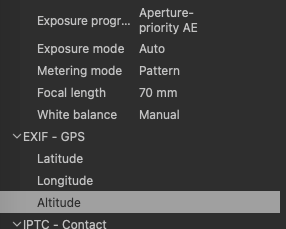
When I open the .CR3 file in Photoshop or Capture One and look at the EXIF data I don't see the GPS info.
Any ideas what I am doing wrong?
Thanks,
Pat
3 REPLIES 3


Options
- Mark as New
- Bookmark
- Subscribe
- Mute
- Subscribe to RSS Feed
- Permalink
- Report Inappropriate Content
11-30-2022 05:25 PM
Read the EXIF data in image files. There should be fields for GPS coordinates.
--------------------------------------------------------
"Enjoying photography since 1972."
"Enjoying photography since 1972."
Options
- Mark as New
- Bookmark
- Subscribe
- Mute
- Subscribe to RSS Feed
- Permalink
- Report Inappropriate Content
11-30-2022 05:42 PM
Hmm…tried that in photoshop and capture one and blank in both EXIF
Options
- Mark as New
- Bookmark
- Subscribe
- Mute
- Subscribe to RSS Feed
- Permalink
- Report Inappropriate Content
12-08-2022 10:46 AM
Wanted to report I have figured out my issue with the GPS not transferring from my phone to the R5 and then showing up in the EXIF data. I had been connecting with wifi. As long as I make and keep that connection with Bluetooth it works every time. Hope this helps someone with the same issue in the future.
Pat

Announcements
12/22/2025: New firmware update is available for EOS R6 Mark III- Version 1.0.2
12/15/2025: New firmware update available for EOS C50 - Version 1.0.1.1
10/21/2025: Service Notice: To Users of the Compact Digital Camera PowerShot V1
07/28/2025: Notice of Free Repair Service for the Mirrorless Camera EOS R50 (Black)
05/21/2025: New firmware update available for EOS C500 Mark II - Version 1.1.5.1
12/18/2025: New firmware updates are available.
12/15/2025: New firmware update available for EOS C50 - Version 1.0.1.1
11/20/2025: New firmware updates are available.
EOS R5 Mark II - Version 1.2.0
PowerShot G7 X Mark III - Version 1.4.0
PowerShot SX740 HS - Version 1.0.2
10/21/2025: Service Notice: To Users of the Compact Digital Camera PowerShot V1
10/15/2025: New firmware updates are available.
Speedlite EL-5 - Version 1.2.0
Speedlite EL-1 - Version 1.1.0
Speedlite Transmitter ST-E10 - Version 1.2.0
07/28/2025: Notice of Free Repair Service for the Mirrorless Camera EOS R50 (Black)
7/17/2025: New firmware updates are available.
05/21/2025: New firmware update available for EOS C500 Mark II - Version 1.1.5.1
02/20/2025: New firmware updates are available.
RF70-200mm F2.8 L IS USM Z - Version 1.0.6
RF24-105mm F2.8 L IS USM Z - Version 1.0.9
RF100-300mm F2.8 L IS USM - Version 1.0.8
Related Content
- image.canon How to change image download folders in Camera Software
- Canon R5 Mark 2HELP. I can not change focus mode. The field is grayed out. in EOS DSLR & Mirrorless Cameras
- DM-E100 Mic: Video has loud static — Please help! in Camera Accessories
- Canon Camera Connect app & Eos Rebel T100: error connecting to wifi in Camera Software
- Canon 5D photo recall / review inop in EOS DSLR & Mirrorless Cameras

Ⓒ 2026
Canon U.S.A Inc. All Rights Reserved. Reproduction in whole or part without permission is prohibited.
