Turn on suggestions
Auto-suggest helps you quickly narrow down your search results by suggesting possible matches as you type.
- Canon Community
- Discussions & Help
- Camera
- Camera Software
- Re: Using Canon Connect > DPP for RAW files from R...
Options
- Subscribe to RSS Feed
- Mark Topic as New
- Mark Topic as Read
- Float this Topic for Current User
- Bookmark
- Subscribe
- Mute
- Printer Friendly Page
Using Canon Connect > DPP for RAW files from R7 to iPhone darkens image substantially!

Options
- Mark as New
- Bookmark
- Subscribe
- Mute
- Subscribe to RSS Feed
- Permalink
- Report Inappropriate Content
04-17-2024 10:19 AM
I take RAW photos using my Canon r7. To transfer to iphone I upload using Canon Connect and then it transfers to Canon's DPP so I can export to my iPhone 15Pro then can use Lightroom. I have to edit the images substanitally since it is so much darker resulting in noise when lightened.
8 REPLIES 8


Options
- Mark as New
- Bookmark
- Subscribe
- Mute
- Subscribe to RSS Feed
- Permalink
- Report Inappropriate Content
04-17-2024 11:09 AM
Can you share a raw file from your card (using a card reader) and one transferred from your phone?
Options
- Mark as New
- Bookmark
- Subscribe
- Mute
- Subscribe to RSS Feed
- Permalink
- Report Inappropriate Content
04-17-2024
11:51 AM
- last edited on
04-17-2024
12:58 PM
by
 Danny
Danny
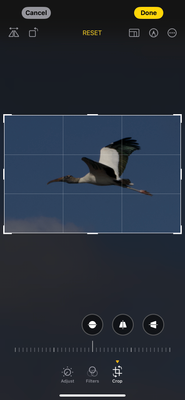
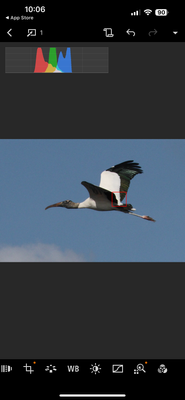
Darker image raw file on iPhone. Lighter image DPP raw image. I wasn’t able to upload photo before. Thank you!! I hope you can help!!very frustrating.
Options
- Mark as New
- Bookmark
- Subscribe
- Mute
- Subscribe to RSS Feed
- Permalink
- Report Inappropriate Content
04-17-2024 11:52 AM
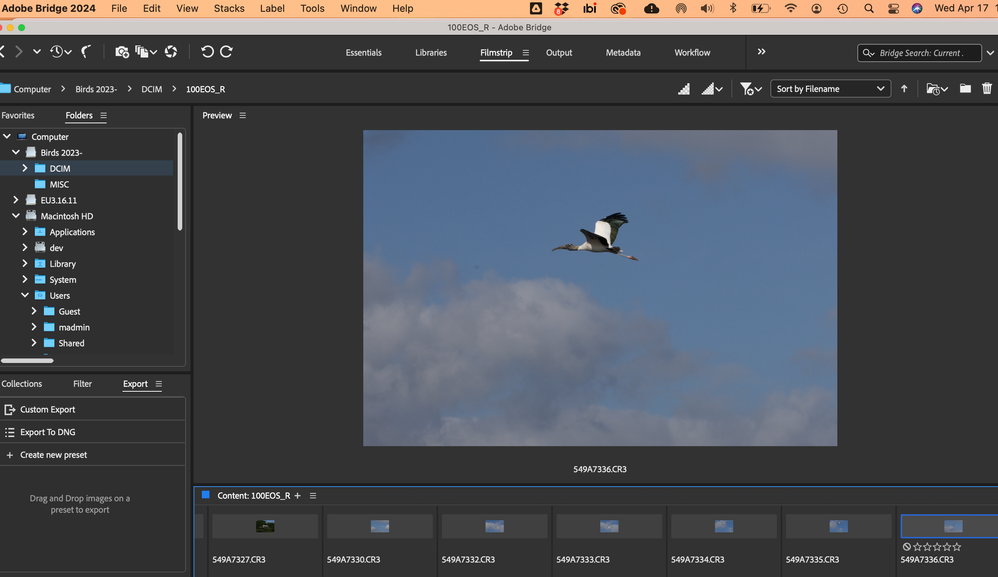
Thanks so much! I attached the two images. Hope you can help!! I appreciate it!
Options
- Mark as New
- Bookmark
- Subscribe
- Mute
- Subscribe to RSS Feed
- Permalink
- Report Inappropriate Content
04-17-2024 12:16 PM - edited 04-17-2024 12:19 PM
Actually I was more interested in the raw file itself. That's why I asked about the file before any Camera connect and after when you have transferred it.
Anyway, a guess is that no tone curve is applied to the darker one.
Options
- Mark as New
- Bookmark
- Subscribe
- Mute
- Subscribe to RSS Feed
- Permalink
- Report Inappropriate Content
04-17-2024 01:10 PM
I tried to upload directly from the SD card and it said did not accept CR3 files. There was no editing on either image. Wouldn’t a tone curve be an edit? If not, I’m sorry can you please explain how I could remedy. Thanks!
Options
- Mark as New
- Bookmark
- Subscribe
- Mute
- Subscribe to RSS Feed
- Permalink
- Report Inappropriate Content
04-17-2024 01:16 PM
Options
- Mark as New
- Bookmark
- Subscribe
- Mute
- Subscribe to RSS Feed
- Permalink
- Report Inappropriate Content
04-17-2024 03:09 PM
A filehost is a good thing when you want to share large files.
Anyway, to view a raw file you need to set the black level, white balance, demosaic it, set a color matrix and crop the borders. Lightroom also removes bad pixels and adds a tone curve. The last part was maybe never done in the software you use to view the picture.
Options
- Mark as New
- Bookmark
- Subscribe
- Mute
- Subscribe to RSS Feed
- Permalink
- Report Inappropriate Content
04-17-2024 03:39 PM
I’ve (obviously) never done this. It I’ll try! Thank you! I hope it works!!

Announcements
07/22/2026: New firmware updates are available.
EOS R6 Mark III - Version 1.1.0
05/13/2026: New firmware updates are available.
EOS R5 Mark II - Version 1.3.0
EOS R6 Mark II - Version 1.7.0
04/28/2026: Service Notice: Caution Concerning use of Lithium Batteries
03/17/2026: New firmware updates are available.
SELPHY CP1500 - Version 1.0.7.0
02/23/2026: New firmware update is available for EOS C50- Version 1.0.3.1
01/23/2026: New firmware update is available for RF 24-105mm F4 IS USM- Version 2.0.7
01/20/2026: New firmware updates are available.
10/21/2025: Service Notice: To Users of the Compact Digital Camera PowerShot V1
10/15/2025: New firmware updates are available.
Speedlite EL-5 - Version 1.2.0
Speedlite EL-1 - Version 1.1.0
Speedlite Transmitter ST-E10 - Version 1.2.0
07/28/2025: Notice of Free Repair Service for the Mirrorless Camera EOS R50 (Black)
05/21/2025: New firmware update available for EOS C500 Mark II - Version 1.1.5.1

Ⓒ 2026
Canon U.S.A Inc. All Rights Reserved. Reproduction in whole or part without permission is prohibited.
