- Meet Our Illuminaries
- Discussions & Help
- Gallery
- Learn With Canon
- About Our Community
- Meet Our Illuminaries
- Discussions & Help
- Gallery
- Learn With Canon
- About Our Community
Turn on suggestions
Auto-suggest helps you quickly narrow down your search results by suggesting possible matches as you type.
- Canon Community
- Discussions & Help
- Camera
- Camera Software
- Re: Eos Utility More than 1 camera
Options
- Subscribe to RSS Feed
- Mark Topic as New
- Mark Topic as Read
- Float this Topic for Current User
- Bookmark
- Subscribe
- Mute
- Printer Friendly Page

Options
- Mark as New
- Bookmark
- Subscribe
- Mute
- Subscribe to RSS Feed
- Permalink
- Report Inappropriate Content
09-09-2019 04:17 PM
Is there a way for the Eos utility to continue the numbering sequence for each different camera I plug in to upload from.
I use a 5d3, Eos R, Eos M6 and an Eos M and although the files are each recognised by the Camera model and number as the prefix the actual number count is continuous.
Is there an automated way to do this or do I have to manually keep track of where each cameras last number sequence left off?
Solved! Go to Solution.
1 ACCEPTED SOLUTION
Accepted Solutions

Options
- Mark as New
- Bookmark
- Subscribe
- Mute
- Subscribe to RSS Feed
- Permalink
- Report Inappropriate Content
09-09-2019 04:51 PM
AussieCoop,
Aside from the prefix, there wouldn't be a cast iron method to continue the numbering sequence for each camera as you upload them. This would be a situation where manually keeping track of each camera individually.
Did this answer your question? Please click the Accept as Solution button so that others may find the answer as well.
5 REPLIES 5
Options
- Mark as New
- Bookmark
- Subscribe
- Mute
- Subscribe to RSS Feed
- Permalink
- Report Inappropriate Content
09-09-2019 04:51 PM
AussieCoop,
Aside from the prefix, there wouldn't be a cast iron method to continue the numbering sequence for each camera as you upload them. This would be a situation where manually keeping track of each camera individually.
Did this answer your question? Please click the Accept as Solution button so that others may find the answer as well.
Options
- Mark as New
- Bookmark
- Subscribe
- Mute
- Subscribe to RSS Feed
- Permalink
- Report Inappropriate Content
09-09-2019 05:08 PM
Can we get this passed on to the R&D team to see if this is possible or feasible in an update?
Options
- Mark as New
- Bookmark
- Subscribe
- Mute
- Subscribe to RSS Feed
- Permalink
- Report Inappropriate Content
09-09-2019 05:09 PM
Can we get this passed on to the R&D team to see if this is possible or feasible in an update?
Options
- Mark as New
- Bookmark
- Subscribe
- Mute
- Subscribe to RSS Feed
- Permalink
- Report Inappropriate Content
09-14-2019 09:02 AM
I have two Rebels (a T3i and T6s) that I have configured to do what I think you want to do, merge images from multiple cameras. Here are my config settings that allow both cameras to save unique file names to the same folder structure. This way I can use both cameras whithout having to swap lenses, yet have the files sorted by time in the same folder. This way the image sequence number can be anything without affecting sorting.
I had to configure this for each camera.
Folder Settings:

File Name Settings:
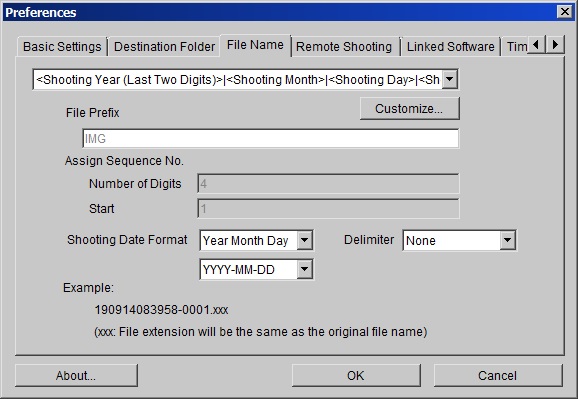
File Name customization settings:
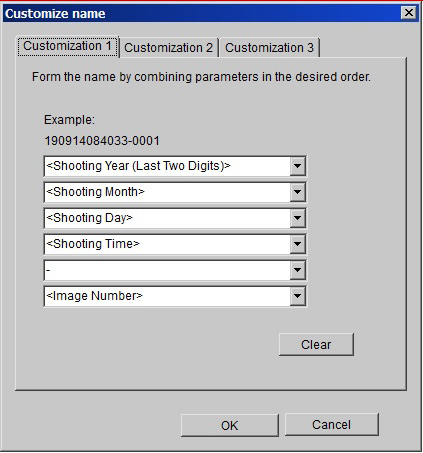
Options
- Mark as New
- Bookmark
- Subscribe
- Mute
- Subscribe to RSS Feed
- Permalink
- Report Inappropriate Content
07-30-2020 10:28 AM
Nice solution, very well documented. Did not fit my specific problem, but it showed me some alternatives.
thanks AL

Announcements
07/22/2026: New firmware updates are available.
EOS R6 Mark III - Version 1.1.0
05/13/2026: New firmware updates are available.
EOS R5 Mark II - Version 1.3.0
EOS R6 Mark II - Version 1.7.0
04/28/2026: Service Notice: Caution Concerning use of Lithium Batteries
03/17/2026: New firmware updates are available.
SELPHY CP1500 - Version 1.0.7.0
02/23/2026: New firmware update is available for EOS C50- Version 1.0.3.1
01/23/2026: New firmware update is available for RF 24-105mm F4 IS USM- Version 2.0.7
01/20/2026: New firmware updates are available.
10/21/2025: Service Notice: To Users of the Compact Digital Camera PowerShot V1
10/15/2025: New firmware updates are available.
Speedlite EL-5 - Version 1.2.0
Speedlite EL-1 - Version 1.1.0
Speedlite Transmitter ST-E10 - Version 1.2.0
07/28/2025: Notice of Free Repair Service for the Mirrorless Camera EOS R50 (Black)
05/21/2025: New firmware update available for EOS C500 Mark II - Version 1.1.5.1
Related Content
- View finder cap in EOS DSLR & Mirrorless Cameras
- EOS R50 Failed Bluetooth Connection in EOS DSLR & Mirrorless Cameras
- Dropped my canon powershot elph360 A in Point & Shoot Digital Cameras
- PLEASE HELP!!! PowerShot ELPH 300 HS turns itself on and glitching in Point & Shoot Digital Cameras
- Where to download Canon Camera Connect v3 for Windows 11 in Camera Software

Ⓒ 2026
Canon U.S.A Inc. All Rights Reserved. Reproduction in whole or part without permission is prohibited.
