Turn on suggestions
Auto-suggest helps you quickly narrow down your search results by suggesting possible matches as you type.
- Canon Community
- Discussions & Help
- Camera
- Camera Software
- Re: EOS Utility Ver 3 latest ver-Preview not work
Options
- Subscribe to RSS Feed
- Mark Topic as New
- Mark Topic as Read
- Float this Topic for Current User
- Bookmark
- Subscribe
- Mute
- Printer Friendly Page
EOS Utility Ver 3 latest ver-Preview not work

Options
- Mark as New
- Bookmark
- Subscribe
- Mute
- Subscribe to RSS Feed
- Permalink
- Report Inappropriate Content
06-21-2021 01:01 PM - edited 06-21-2021 01:15 PM
I've been using the varous EOS programs and utilites for years without any issues. About a year ago I noticed there is no preview, when using the EOS Uitlity - the pictures will download from my camera EOS 5D Mark 4 (latest firmware) but will not show previews of each RAW file as they are downloaded.
I've looked throw this forum and others on the web and can find no fixes. As of this writing, I am using windows 10 with all of the latest patches and updates.
Suggestions to get the preview window to work?
Best and grooviest -
Nelson
9 REPLIES 9


Options
- Mark as New
- Bookmark
- Subscribe
- Mute
- Subscribe to RSS Feed
- Permalink
- Report Inappropriate Content
06-21-2021 07:09 PM
Depending on how old your previous version of EOSU was there is a change in behavior.
The image is now loner saved to the camera, it is svaed to the computer hard disk.
And you need Canon DPP installed to view the image as it is taken.

John Hoffman
Conway, NH
R6 Mark III, M200 (converted to infrared), RF lenses, Pixma PRO-100, Pixma TR8620a, Lr Classic
Conway, NH
R6 Mark III, M200 (converted to infrared), RF lenses, Pixma PRO-100, Pixma TR8620a, Lr Classic
Options
- Mark as New
- Bookmark
- Subscribe
- Mute
- Subscribe to RSS Feed
- Permalink
- Report Inappropriate Content
06-22-2021 05:03 PM
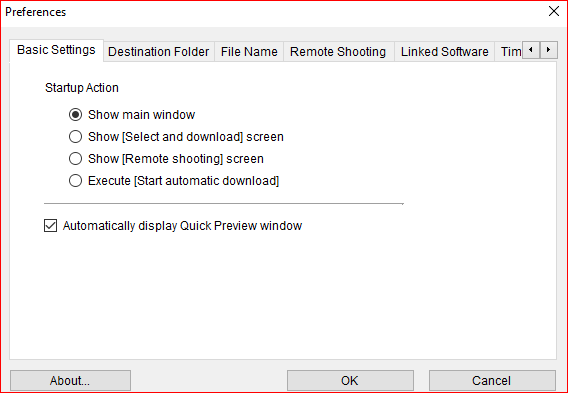
Not sure you understand what my issue is. When I launch the EOS Utility, there is an option you can select called "Automatically display Quick Preview Window". I have that option selected, yet there is NO Quick preview window opening WHILE my photos from my camera are being transferred to my PC. It has always worked in the past, but not in the last year or so. When the utility finishes downloading the photo's from the camera, DPP4 opens, and I of course can see the pictures just downloaded. BUT, I want to know why the quick preview no longer works - any suggestions?

Options
- Mark as New
- Bookmark
- Subscribe
- Mute
- Subscribe to RSS Feed
- Permalink
- Report Inappropriate Content
06-22-2021 05:17 PM
@nelsonsdavis wrote:
Not sure you understand what my issue is. When I launch the EOS Utility, there is an option you can select called "Automatically display Quick Preview Window". I have that option selected, yet there is NO Quick preview window opening WHILE my photos from my camera are being transferred to my PC. It has always worked in the past, but not in the last year or so. When the utility finishes downloading the photo's from the camera, DPP4 opens, and I of course can see the pictures just downloaded. BUT, I want to know why the quick preview no longer works - any suggestions?
Try re-installing the application.
--------------------------------------------------------
"Enjoying photography since 1972."
"Enjoying photography since 1972."
Options
- Mark as New
- Bookmark
- Subscribe
- Mute
- Subscribe to RSS Feed
- Permalink
- Report Inappropriate Content
06-22-2021 07:52 PM
Is this setting enabled?

John Hoffman
Conway, NH
R6 Mark III, M200 (converted to infrared), RF lenses, Pixma PRO-100, Pixma TR8620a, Lr Classic
Conway, NH
R6 Mark III, M200 (converted to infrared), RF lenses, Pixma PRO-100, Pixma TR8620a, Lr Classic
Options
- Mark as New
- Bookmark
- Subscribe
- Mute
- Subscribe to RSS Feed
- Permalink
- Report Inappropriate Content
06-22-2021 08:48 PM
Which setting? In your post, all I see is a box with thin lines around it and a red X in the center. What is the setting called?
Options
- Mark as New
- Bookmark
- Subscribe
- Mute
- Subscribe to RSS Feed
- Permalink
- Report Inappropriate Content
06-22-2021 08:50 PM

John Hoffman
Conway, NH
R6 Mark III, M200 (converted to infrared), RF lenses, Pixma PRO-100, Pixma TR8620a, Lr Classic
Conway, NH
R6 Mark III, M200 (converted to infrared), RF lenses, Pixma PRO-100, Pixma TR8620a, Lr Classic
Options
- Mark as New
- Bookmark
- Subscribe
- Mute
- Subscribe to RSS Feed
- Permalink
- Report Inappropriate Content
06-22-2021 08:50 PM
Site didn't post image first time.
John Hoffman
Conway, NH
R6 Mark III, M200 (converted to infrared), RF lenses, Pixma PRO-100, Pixma TR8620a, Lr Classic
Conway, NH
R6 Mark III, M200 (converted to infrared), RF lenses, Pixma PRO-100, Pixma TR8620a, Lr Classic
Options
- Mark as New
- Bookmark
- Subscribe
- Mute
- Subscribe to RSS Feed
- Permalink
- Report Inappropriate Content
06-22-2021 09:08 PM
Your suggestion does not apply to my issue. Here is the screen I refer to, note the Auotmatically display quick preview window. It is checked, yet, when I attach my camera, launch the EOS utiliy, click download, there is no preview as the files are downloaded from the camera to my PC. When the download, as mentioned earleir, is completed, DPP4 opens.
Options
- Mark as New
- Bookmark
- Subscribe
- Mute
- Subscribe to RSS Feed
- Permalink
- Report Inappropriate Content
06-23-2021 07:52 AM
I just tried it with my camera. Quick Preview window opened for both downloading and remote shooting.
My version of EOSU is 3.13.20.4.
It would appear the issue would be something related to your particular computer or setup.
John Hoffman
Conway, NH
R6 Mark III, M200 (converted to infrared), RF lenses, Pixma PRO-100, Pixma TR8620a, Lr Classic
Conway, NH
R6 Mark III, M200 (converted to infrared), RF lenses, Pixma PRO-100, Pixma TR8620a, Lr Classic

Announcements
07/22/2026: New firmware updates are available.
EOS R6 Mark III - Version 1.1.0
05/13/2026: New firmware updates are available.
EOS R5 Mark II - Version 1.3.0
EOS R6 Mark II - Version 1.7.0
04/28/2026: Service Notice: Caution Concerning use of Lithium Batteries
03/17/2026: New firmware updates are available.
SELPHY CP1500 - Version 1.0.7.0
02/23/2026: New firmware update is available for EOS C50- Version 1.0.3.1
01/23/2026: New firmware update is available for RF 24-105mm F4 IS USM- Version 2.0.7
01/20/2026: New firmware updates are available.
10/21/2025: Service Notice: To Users of the Compact Digital Camera PowerShot V1
10/15/2025: New firmware updates are available.
Speedlite EL-5 - Version 1.2.0
Speedlite EL-1 - Version 1.1.0
Speedlite Transmitter ST-E10 - Version 1.2.0
07/28/2025: Notice of Free Repair Service for the Mirrorless Camera EOS R50 (Black)
05/21/2025: New firmware update available for EOS C500 Mark II - Version 1.1.5.1
Related Content
- Image Transfer Utility 2 doesn't work if G7X M3 is plugged into USB power in Camera Software
- EOS Utility Launcher not detecting EOS R7 in Camera Software
- How to synch Canon DPP with photo files on Windows 11, without using Onedrive in Camera Software
- EF 75-300mm f/4-5.6 IS USM Aberration data needed in EF & RF Lenses
- Can't update firmware on EOS R50 in EOS DSLR & Mirrorless Cameras

Ⓒ 2026
Canon U.S.A Inc. All Rights Reserved. Reproduction in whole or part without permission is prohibited.
