Turn on suggestions
Auto-suggest helps you quickly narrow down your search results by suggesting possible matches as you type.
- Canon Community
- Discussions & Help
- Camera
- Camera Software
- Re: EOS Utility 3 not showing Remote Shooting opti...
Options
- Subscribe to RSS Feed
- Mark Topic as New
- Mark Topic as Read
- Float this Topic for Current User
- Bookmark
- Subscribe
- Mute
- Printer Friendly Page
EOS Utility 3 not showing Remote Shooting option

Options
- Mark as New
- Bookmark
- Subscribe
- Mute
- Subscribe to RSS Feed
- Permalink
- Report Inappropriate Content
09-02-2018 07:11 PM
Hi all,
I've got an EOS M6 connected to my Microsoft Surface Pro 4 via USB with a fresh install of Windows. After installing EOS Utility, strangely I'm not getting the option to choose Remote Shooting:
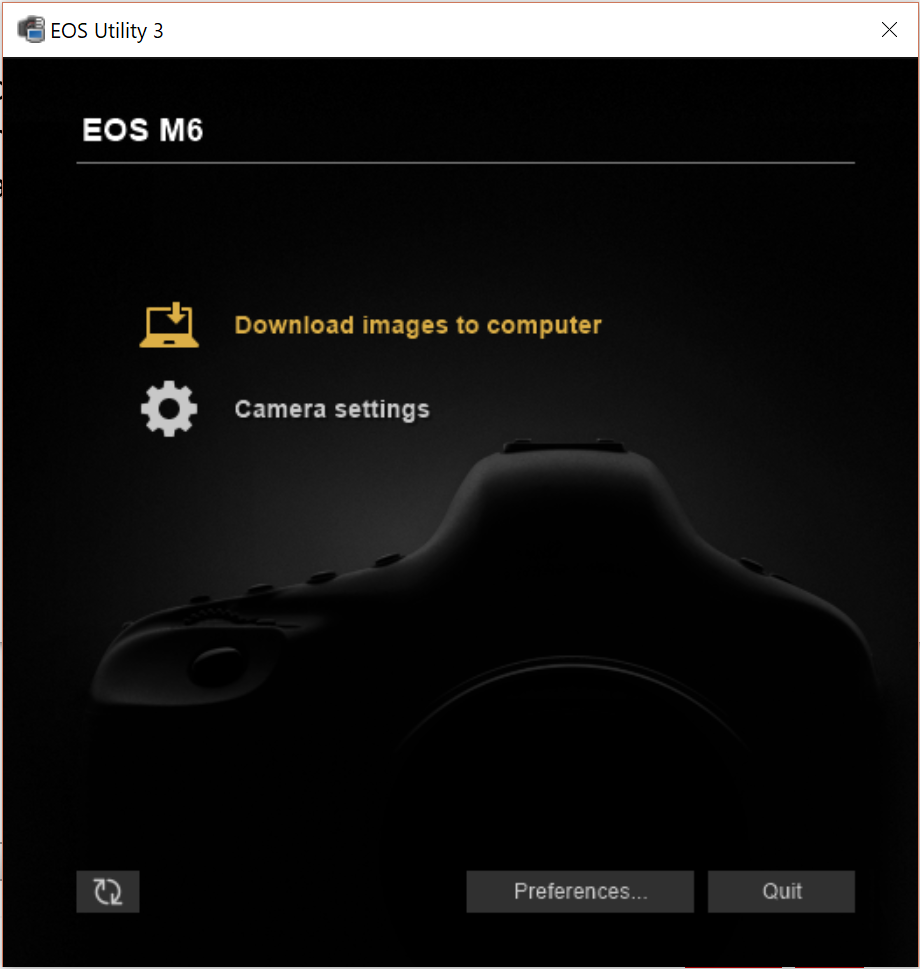
Have tried the usual reboot, restart and windows updates.
Have also tried digiCam Control but to no avail.
Next step for troubleshooting might be another computer - any better ideas?
Thanks
8 REPLIES 8


Options
- Mark as New
- Bookmark
- Subscribe
- Mute
- Subscribe to RSS Feed
- Permalink
- Report Inappropriate Content
09-03-2018 04:00 AM
I do not think remote shooting is an option with that camera body.
--------------------------------------------------------
"Enjoying photography since 1972."
"Enjoying photography since 1972."
Options
- Mark as New
- Bookmark
- Subscribe
- Mute
- Subscribe to RSS Feed
- Permalink
- Report Inappropriate Content
09-07-2018 10:29 AM
I've actually used it before - seems odd that It's gone now...

Options
- Mark as New
- Bookmark
- Subscribe
- Mute
- Subscribe to RSS Feed
- Permalink
- Report Inappropriate Content
09-20-2018 10:02 AM
@cdilga wrote:I've actually used it before - seems odd that It's gone now...
Have you used it with that "fresh install of Windows"? If not, that may be the problem. You may be missing something that EOSU needs.
Bob
Philadelphia, Pennsylvania USA
Philadelphia, Pennsylvania USA
Options
- Mark as New
- Bookmark
- Subscribe
- Mute
- Subscribe to RSS Feed
- Permalink
- Report Inappropriate Content
12-21-2019 02:43 PM
I'm having the exact same problem on my Canon EOS M3, but i can use the live remote control on my iphone, so it isn't to do with the fact that the camera bodies can't support it. My guess is that for some reason, in the newest update of the app, they removed the remote shooting option for this line of mirrorless cameras, or it needs to be on the latest version of windows 10. Either way, it's not working.
Options
- Mark as New
- Bookmark
- Subscribe
- Mute
- Subscribe to RSS Feed
- Permalink
- Report Inappropriate Content
12-21-2019 02:46 PM
It could also be a setting that has been turned off, but i couldn'd see anything, and if anyone figures out how to fix this issue, I would be very much appreciative if you could tell me how.
Many thanks,
James
Options
- Mark as New
- Bookmark
- Subscribe
- Mute
- Subscribe to RSS Feed
- Permalink
- Report Inappropriate Content
12-21-2019 05:02 PM
@james__hanks wrote:I'm having the exact same problem on my Canon EOS M3, but i can use the live remote control on my iphone, so it isn't to do with the fact that the camera bodies can't support it. My guess is that for some reason, in the newest update of the app, they removed the remote shooting option for this line of mirrorless cameras, or it needs to be on the latest version of windows 10. Either way, it's not working.
Remote shooting is not an available option with the M3 using the EOS Utility. It never has been available using EOS Utility..
--------------------------------------------------------
"Enjoying photography since 1972."
"Enjoying photography since 1972."

Options
- Mark as New
- Bookmark
- Subscribe
- Mute
- Subscribe to RSS Feed
- Permalink
- Report Inappropriate Content
03-12-2020 09:09 AM
I have the same issue on my M5. Remote Shooting works via WiFi to my Android app, but the option is not shown on a W10 laptop version of Utility 3. Very frustrating.
Options
- Mark as New
- Bookmark
- Subscribe
- Mute
- Subscribe to RSS Feed
- Permalink
- Report Inappropriate Content
04-11-2020 08:59 PM
@stewartmagrath wrote:I have the same issue on my M5. Remote Shooting works via WiFi to my Android app, but the option is not shown on a W10 laptop version of Utility 3. Very frustrating.
My wild guess is that your phone is configured as a WiFi access point while your laptop is configured as a client. If you don't understand what that means, you may have some reading to do.
Bob
Philadelphia, Pennsylvania USA
Philadelphia, Pennsylvania USA

Announcements
07/22/2026: New firmware updates are available.
EOS R6 Mark III - Version 1.1.0
05/13/2026: New firmware updates are available.
EOS R5 Mark II - Version 1.3.0
EOS R6 Mark II - Version 1.7.0
04/28/2026: Service Notice: Caution Concerning use of Lithium Batteries
03/17/2026: New firmware updates are available.
SELPHY CP1500 - Version 1.0.7.0
02/23/2026: New firmware update is available for EOS C50- Version 1.0.3.1
01/23/2026: New firmware update is available for RF 24-105mm F4 IS USM- Version 2.0.7
01/20/2026: New firmware updates are available.
10/21/2025: Service Notice: To Users of the Compact Digital Camera PowerShot V1
10/15/2025: New firmware updates are available.
Speedlite EL-5 - Version 1.2.0
Speedlite EL-1 - Version 1.1.0
Speedlite Transmitter ST-E10 - Version 1.2.0
07/28/2025: Notice of Free Repair Service for the Mirrorless Camera EOS R50 (Black)
05/21/2025: New firmware update available for EOS C500 Mark II - Version 1.1.5.1
Related Content
- EOS Canon R6 mkIII Image write failure in EOS DSLR & Mirrorless Cameras
- Best way to transfer/back up photo and video files to external SSD in EOS DSLR & Mirrorless Cameras
- Having trouble uploading photos from my EOS Rebel T2i to new Macbook :( in EOS DSLR & Mirrorless Cameras
- EOS R50, EOS Utility Download Not Showing as Available Option in Camera Software
- EOS R5 Mark II firmware 1.30 notes in Camera Software

Ⓒ 2026
Canon U.S.A Inc. All Rights Reserved. Reproduction in whole or part without permission is prohibited.
