Turn on suggestions
Auto-suggest helps you quickly narrow down your search results by suggesting possible matches as you type.
- Canon Community
- Discussions & Help
- Camera
- Camera Software
- (EOS 60D) EOS Utility Menu is Greyed Out
Options
- Subscribe to RSS Feed
- Mark Topic as New
- Mark Topic as Read
- Float this Topic for Current User
- Bookmark
- Subscribe
- Mute
- Printer Friendly Page

Options
- Mark as New
- Bookmark
- Subscribe
- Mute
- Subscribe to RSS Feed
- Permalink
- Report Inappropriate Content
08-15-2022 11:57 AM
I have a Canon 60D and am new to it. I’m trying to invoke the EOS Utility but it never appears properly as shown on several YouTube videos. Instead, I get a greyed out menu like this:

I have a Toshiba Satellite S855 and use Windows 10.
I’ve tried a number of options. I installed the version that comes with the camera CD. That yields the same view shown above.
I uninstall and reinstall the version from Canon’s online site for the EOS 60D. The only s/w there that looks possibly eligible is “EOS Utility 2.14.20a Updater for Windows.” QUESTION: Is this download only as an update to the original and I should leave the original installed in order for this updater to work? It’s not clear. Anyway, I proceed to download & install it with the original uninstalled. It shows to be the EOS Utility 2. When I then go to the list of Canon programs, it show 2 different EOS Utility programs installed, EOS Utility & EOS Utility 2.
When I double click EOS Utility 2, I get the same greyed out view shown above.
When I double click EOS Utility, I get the following:
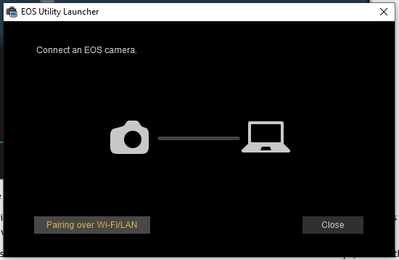
When I click “Pairing over Wi-Fi/LAN, I get:
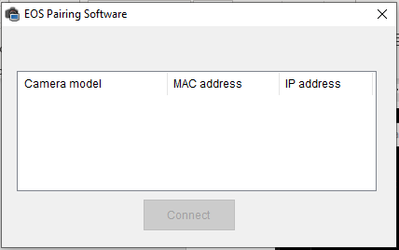
From there, all I can do is close out. I thought maybe it would pair over LAN since I had the HDMI cable hooked up to the camera and the camera turned on. No such luck.
Can someone please resolve my dilemma? I’d like to use the EOS Utility on my laptop. Thank you.
Solved! Go to Solution.
3 ACCEPTED SOLUTIONS
Accepted Solutions


Options
- Mark as New
- Bookmark
- Subscribe
- Mute
- Subscribe to RSS Feed
- Permalink
- Report Inappropriate Content
08-15-2022 12:24 PM
Disconnect the HDMI cable. You only want to be connected with a USB data cable. Not a charging cable like they sell at a gas station.
--------------------------------------------------------
"Enjoying photography since 1972."
"Enjoying photography since 1972."


Options
- Mark as New
- Bookmark
- Subscribe
- Mute
- Subscribe to RSS Feed
- Permalink
- Report Inappropriate Content
08-15-2022 07:58 PM
Greetings twgibson014,
Let's first check to see if the issue may be related to the type of connection you're using. The EOS Utility 2 software application will communicate with the camera through a USB cable. An HDMI cable cannot be used. Please also test different USB ports of the laptop along with testing a different USB cable if you have already tried using one USB cable.
For downloading the EOS Utility 2 software application, Canon develops the same software which is compatible across many of our EOS cameras. You may click on the following link to visit the product download page for the EOS Rebel T7i.
https://www.usa.canon.com/internet/portal/us/home/support/details/cameras/eos-dslr-and-mirrorless-ca...
When downloading and installing the software, it will show that it is for EOS Utility 3 but a full version of EOS Utility 2 is included to use with your EOS 60D camera. The camera will not function with EOS Utility 3. On the list of available software to download, please download EOS Utility 3.13.20. Please do not download version 3.14.10 or newer since these do not include EOS Utility 2.
Please note that EOS Utility 2 is software that Canon has stopped updating and no longer supports on newer operating systems. We’re unable to guarantee if it will install and run on your computer.
Options
- Mark as New
- Bookmark
- Subscribe
- Mute
- Subscribe to RSS Feed
- Permalink
- Report Inappropriate Content
08-16-2022 12:58 AM
Waddizzle,
Ok, I'll use the USB cable. I sure thought I saw on YouTube several people using HDMI with the adapter to HCMI Mini. Anyway, lesson learned. Thx.
3 REPLIES 3
Options
- Mark as New
- Bookmark
- Subscribe
- Mute
- Subscribe to RSS Feed
- Permalink
- Report Inappropriate Content
08-15-2022 12:24 PM
Disconnect the HDMI cable. You only want to be connected with a USB data cable. Not a charging cable like they sell at a gas station.
--------------------------------------------------------
"Enjoying photography since 1972."
"Enjoying photography since 1972."
Options
- Mark as New
- Bookmark
- Subscribe
- Mute
- Subscribe to RSS Feed
- Permalink
- Report Inappropriate Content
08-15-2022 07:58 PM
Greetings twgibson014,
Let's first check to see if the issue may be related to the type of connection you're using. The EOS Utility 2 software application will communicate with the camera through a USB cable. An HDMI cable cannot be used. Please also test different USB ports of the laptop along with testing a different USB cable if you have already tried using one USB cable.
For downloading the EOS Utility 2 software application, Canon develops the same software which is compatible across many of our EOS cameras. You may click on the following link to visit the product download page for the EOS Rebel T7i.
https://www.usa.canon.com/internet/portal/us/home/support/details/cameras/eos-dslr-and-mirrorless-ca...
When downloading and installing the software, it will show that it is for EOS Utility 3 but a full version of EOS Utility 2 is included to use with your EOS 60D camera. The camera will not function with EOS Utility 3. On the list of available software to download, please download EOS Utility 3.13.20. Please do not download version 3.14.10 or newer since these do not include EOS Utility 2.
Please note that EOS Utility 2 is software that Canon has stopped updating and no longer supports on newer operating systems. We’re unable to guarantee if it will install and run on your computer.
Options
- Mark as New
- Bookmark
- Subscribe
- Mute
- Subscribe to RSS Feed
- Permalink
- Report Inappropriate Content
08-16-2022 12:58 AM
Waddizzle,
Ok, I'll use the USB cable. I sure thought I saw on YouTube several people using HDMI with the adapter to HCMI Mini. Anyway, lesson learned. Thx.


Announcements
07/22/2026: New firmware updates are available.
EOS R6 Mark III - Version 1.1.0
05/13/2026: New firmware updates are available.
EOS R5 Mark II - Version 1.3.0
EOS R6 Mark II - Version 1.7.0
04/28/2026: Service Notice: Caution Concerning use of Lithium Batteries
03/17/2026: New firmware updates are available.
SELPHY CP1500 - Version 1.0.7.0
02/23/2026: New firmware update is available for EOS C50- Version 1.0.3.1
01/23/2026: New firmware update is available for RF 24-105mm F4 IS USM- Version 2.0.7
01/20/2026: New firmware updates are available.
10/21/2025: Service Notice: To Users of the Compact Digital Camera PowerShot V1
10/15/2025: New firmware updates are available.
Speedlite EL-5 - Version 1.2.0
Speedlite EL-1 - Version 1.1.0
Speedlite Transmitter ST-E10 - Version 1.2.0
07/28/2025: Notice of Free Repair Service for the Mirrorless Camera EOS R50 (Black)
05/21/2025: New firmware update available for EOS C500 Mark II - Version 1.1.5.1
Related Content
- How to synch Canon DPP with photo files on Windows 11, without using Onedrive in Camera Software
- Can't update firmware on EOS R50 in EOS DSLR & Mirrorless Cameras
- HDR PQ greyed out on the EOS R50 in EOS DSLR & Mirrorless Cameras
- EOS R5 Mark II firmware 1.30 notes in Camera Software
- EOS R8 - Connecting to EOS Utility in Windows via USB in EOS DSLR & Mirrorless Cameras

Ⓒ 2026
Canon U.S.A Inc. All Rights Reserved. Reproduction in whole or part without permission is prohibited.
