Turn on suggestions
Auto-suggest helps you quickly narrow down your search results by suggesting possible matches as you type.
- Canon Community
- Discussions & Help
- Camera
- Camera Software
- Re: DPP 4 won't start if Winidows 10 display size ...
Options
- Subscribe to RSS Feed
- Mark Topic as New
- Mark Topic as Read
- Float this Topic for Current User
- Bookmark
- Subscribe
- Mute
- Printer Friendly Page
DPP 4 won't start if Winidows 10 display size is 150%

Options
- Mark as New
- Bookmark
- Subscribe
- Mute
- Subscribe to RSS Feed
- Permalink
- Report Inappropriate Content
06-12-2019 12:17 AM
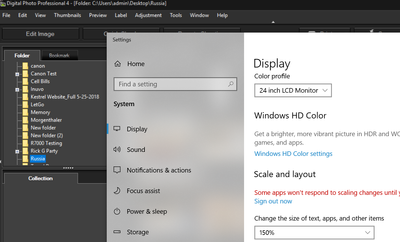
I set Advanced scaling settings to 150% (under Dispaly) and Digital Photo Professional 4 displays an error message
"Not all screen elements can be shown under the computer's current display size settings. Before use, reduce the display size."
If I click "OK" the error msg disappears but the program won't launch. If I set it back to 100% the program launches again but the text is way too small for me to comfortably work with the program.
I have version 4.6.10.0.
(If I press F5 to check for updates nothing happens, but that's a different problem.)
2 REPLIES 2


Options
- Mark as New
- Bookmark
- Subscribe
- Mute
- Subscribe to RSS Feed
- Permalink
- Report Inappropriate Content
06-12-2019 10:06 AM
Start by downloading 4.10.21.0
Then uninstall 4.6.10.0
Now perform a fresh install of the file your downloaded. Open it at 100% scaling. Close, change scaling to 150% and open it again.
FYI, working fine here.
~Rick
Bay Area - CA
~R5 C (1.1.2.1), ~RF Trinity, ~RF 100 Macro, ~RF 100~400, ~RF 100~500, ~RF 200-800, ~RF 1.4x TC, BG-R10, 430EX III-RT ~DxO PhotoLab Elite ~DaVinci Resolve Studio ~ImageClass MF644Cdw MF656Cdw ~Pixel 10 ~CarePaks Are Worth It
Options
- Mark as New
- Bookmark
- Subscribe
- Mute
- Subscribe to RSS Feed
- Permalink
- Report Inappropriate Content
06-12-2019 11:17 PM
Thank you for your gracious answer. I did install the lastest version of DPP as you suggested but I still got the failure to launch at display size of 150%. The problem turned out to be that the no. 1 monitor in my multi-monitor display is configured to display in potrait mode. One I reconfigured it to display in landscape DPP would launch with resolution at 150%. (I moved about a year ago and forgot that I changed to portrait and so was puzzled why I had this problem when nothing had changed from prior house to the new one. Duhh. Also under "Dispaly" on Windows there was an earlier message about my using custom settings so I cleared those so the "Change the size of text . . ." was there all by its lonesome and no message about custom settings. I think it was the orientation change that made DPP work IMO .)
Thank you again for your help.
Thank you again for your help.


Announcements
05/13/2026: New firmware updates are available.
EOS R5 Mark II - Version 1.3.0
EOS R6 Mark II - Version 1.7.0
04/28/2026: Service Notice: Caution Concerning use of Lithium Batteries
03/17/2026: New firmware updates are available.
SELPHY CP1500 - Version 1.0.7.0
02/23/2026: New firmware update is available for EOS C50- Version 1.0.3.1
01/23/2026: New firmware update is available for RF 24-105mm F4 IS USM- Version 2.0.7
01/20/2026: New firmware updates are available.
12/22/2025: New firmware update is available for EOS R6 Mark III- Version 1.0.2
10/21/2025: Service Notice: To Users of the Compact Digital Camera PowerShot V1
10/15/2025: New firmware updates are available.
Speedlite EL-5 - Version 1.2.0
Speedlite EL-1 - Version 1.1.0
Speedlite Transmitter ST-E10 - Version 1.2.0
07/28/2025: Notice of Free Repair Service for the Mirrorless Camera EOS R50 (Black)
05/21/2025: New firmware update available for EOS C500 Mark II - Version 1.1.5.1
Related Content
- EOS R5 Mark II firmware 1.30 notes in Camera Software
- EOS R5 Mark II "Optical Viewfinder simulation assist" won't work if EVF brightness not set to "Auto" in EOS DSLR & Mirrorless Cameras
- EOS Utility 3 Can't Communicate With Camera. in Camera Software
- 6-week-old EOS R5 Mark II has autofocus issues and freezes in EOS DSLR & Mirrorless Cameras
- Updated my R5 Mark II with latest firmware V.1.1.1 in EOS DSLR & Mirrorless Cameras

Ⓒ 2026
Canon U.S.A Inc. All Rights Reserved. Reproduction in whole or part without permission is prohibited.
